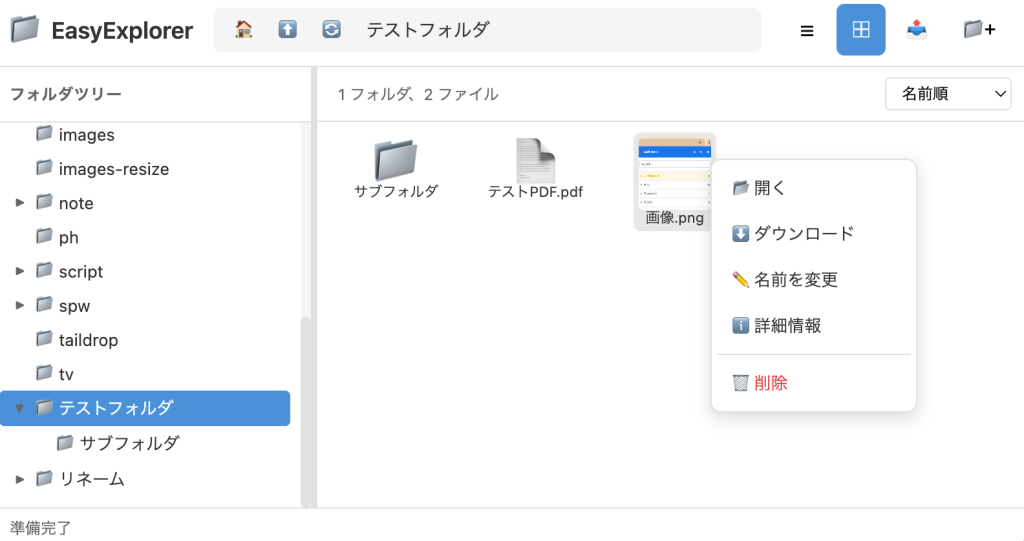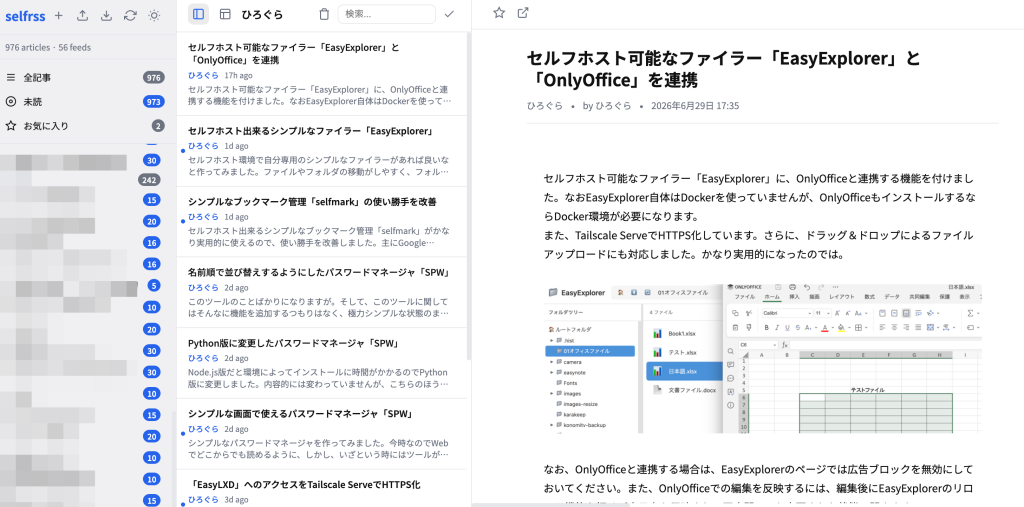
セルフホスト可能なファイラー「EasyExplorer」に、OnlyOfficeと連携する機能を付けました。なおEasyExplorer自体はDockerを使っていませんが、OnlyOfficeもインストールするならDocker環境が必要になります。
また、Tailscale ServeでHTTPS化しています。さらに、ドラッグ&ドロップによるファイルアップロードにも対応しました。かなり実用的になったのでは。
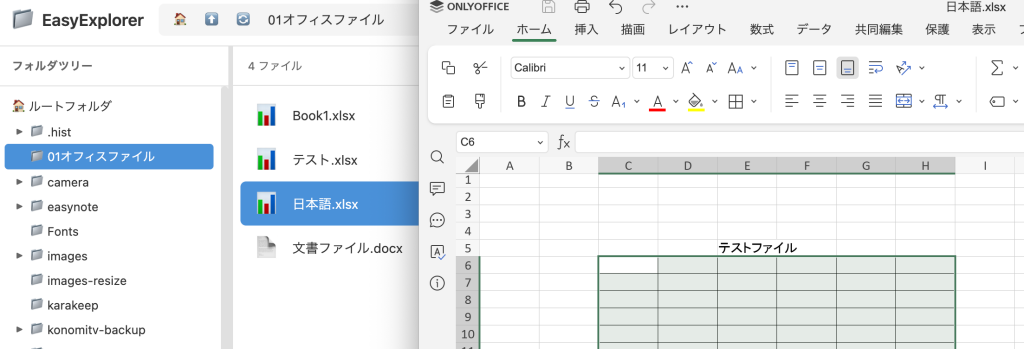
なお、OnlyOfficeと連携する場合は、EasyExplorerのページでは広告ブロックを無効にしておいてください。また、OnlyOfficeでの編集を反映するには、編集後にEasyExplorerのリロード機能を押せば表示上も反映され、再度開いても変更された状態で開きます。
LXDコンテナにインストール
#!/usr/bin/env bash
# =============================================================================
#  EasyExplorer セットアップスクリプト v8
#  - /opt/easyexplorer に EasyExplorer を配置
#  - /opt/lxd-data をブラウズ対象として利用
#  - ポート 3346 で公開
#  - systemd サービスとして登録・自動起動
#  - Node.js が無ければ自動インストール
#  - Tailscale 情報を表示 (Tailscale Serve の設定に合わせたURL表示)
#  - OnlyOffice 連携オプション(既存環境を検出した場合は再利用を確認)
#  - 新規ファイル作成機能 (Excel/Word/PowerPoint/テキスト等)
#  - D&Dアップロード(日本語フォルダ対応)・中止ボタン対応
# =============================================================================
set -euo pipefail

# ── 固定設定 ──────────────────────────────────────────────────────────────────
INSTALL_DIR="/opt/easyexplorer"
BROWSE_ROOT="/opt/lxd-data"
PORT=3346
OO_PORT=3322
SERVICE_NAME="easyexplorer"
NODE_MIN_VERSION=18
NODE_VERSION_TO_INSTALL="22"

# ── 色付きログ ─────────────────────────────────────────────────────────────────
info()  { echo -e "\033[1;34m[INFO]\033[0m  $*"; }
ok()    { echo -e "\033[1;32m[ OK ]\033[0m  $*"; }
warn()  { echo -e "\033[1;33m[WARN]\033[0m  $*"; }
die()   { echo -e "\033[1;31m[ERR ]\033[0m  $*" >&2; exit 1; }

# ── Node.js 自動インストール ──────────────────────────────────────────────────
install_nodejs() {
  info "Node.js をインストール中..."

  if [ -f /etc/debian_version ]; then
    info "Debian/Ubuntu を検出。NodeSource からインストールします..."
    apt-get update -qq
    apt-get install -y -qq ca-certificates curl gnupg
    mkdir -p /etc/apt/keyrings
    curl -fsSL https://deb.nodesource.com/gpgkey/nodesource-repo.gpg.key | gpg --dearmor -o /etc/apt/keyrings/nodesource.gpg 2>/dev/null || true
    echo "deb [signed-by=/etc/apt/keyrings/nodesource.gpg] https://deb.nodesource.com/node_${NODE_VERSION_TO_INSTALL}.x nodistro main" | tee /etc/apt/sources.list.d/nodesource.list >/dev/null
    apt-get update -qq
    apt-get install -y -qq nodejs

  elif [ -f /etc/redhat-release ]; then
    info "RHEL/CentOS を検出。NodeSource からインストールします..."
    curl -fsSL https://rpm.nodesource.com/setup_${NODE_VERSION_TO_INSTALL}.x | bash -
    yum install -y nodejs

  elif command -v apk >/dev/null 2>&1; then
    info "Alpine Linux を検出。apk からインストールします..."
    apk add --no-cache nodejs npm

  elif command -v pacman >/dev/null 2>&1; then
    info "Arch Linux を検出。pacman からインストールします..."
    pacman -S --noconfirm nodejs npm

  elif command -v zypper >/dev/null 2>&1; then
    info "openSUSE を検出。zypper からインストールします..."
    zypper install -y nodejs npm

  else
    info "nvm でインストールします..."
    export NVM_DIR="/tmp/nvm_install"
    mkdir -p "$NVM_DIR"
    curl -fsSL https://raw.githubusercontent.com/nvm-sh/nvm/v0.40.1/install.sh | bash
    . "${NVM_DIR}/nvm.sh"
    nvm install "${NODE_VERSION_TO_INSTALL}"
    nvm use "${NODE_VERSION_TO_INSTALL}"
    NODE_BIN=$(which node)
    NPM_BIN=$(which npm)
    ln -sf "$NODE_BIN" /usr/local/bin/node
    ln -sf "$NPM_BIN" /usr/local/bin/npm
    rm -rf "$NVM_DIR"
  fi

  if ! command -v node >/dev/null 2>&1; then
    die "Node.js のインストールに失敗しました"
  fi
  ok "Node.js v$(node -v) のインストール完了"
}

# ── 前提チェック ───────────────────────────────────────────────────────────────
info "前提確認..."

if ! command -v node >/dev/null 2>&1; then
  warn "Node.js が見つかりません"
  install_nodejs
fi

NODE_VERSION=$(node -v | sed 's/v//' | cut -d. -f1)
if [ "$NODE_VERSION" -lt "$NODE_MIN_VERSION" ]; then
  warn "Node.js v${NODE_VERSION} は古いです (必要: v${NODE_MIN_VERSION}以上)"
  install_nodejs
fi

command -v npm >/dev/null 2>&1 || die "npm が見つかりません"
ok "前提 OK (Node.js v$(node -v))"

# ── OnlyOffice インストール確認(既存環境の再利用確認を含む) ──────────────────
echo ""
echo "━━━━━━━━━━━━━━━━━━━━━━━━━━━━━━━━━━━━━━━━━━━━━━━━━━━━━━━━━━━━━"

REUSE_EXISTING_OO="n"
if [ -f /opt/onlyoffice/docker-compose.yml ]; then
  warn "既存の OnlyOffice 環境 (/opt/onlyoffice) を検出しました"
  read -rp "  既存の OnlyOffice 環境を再利用しますか? [Y/n]: " reuse_oo
  reuse_oo="${reuse_oo:-Y}"
  if [[ "${reuse_oo}" =~ ^[Yy] ]]; then
    REUSE_EXISTING_OO="y"
    install_oo="Y"
  fi
fi

if [ "${REUSE_EXISTING_OO}" != "y" ]; then
  read -rp "  OnlyOffice Document Server をインストールしますか? [Y/n]: " install_oo
  install_oo="${install_oo:-Y}"
fi
echo "━━━━━━━━━━━━━━━━━━━━━━━━━━━━━━━━━━━━━━━━━━━━━━━━━━━━━━━━━━━━━"

# ── ディレクトリ作成 ──────────────────────────────────────────────────────────
info "ディレクトリ作成..."
mkdir -p "${INSTALL_DIR}"
mkdir -p "${INSTALL_DIR}/server"
mkdir -p "${INSTALL_DIR}/public/css"
mkdir -p "${INSTALL_DIR}/public/js"
mkdir -p "${BROWSE_ROOT}"
ok "ディレクトリ作成完了"

# ── OnlyOffice シークレット生成(既存環境を再利用する場合は既存値を抽出) ──────
if [ "${REUSE_EXISTING_OO}" = "y" ]; then
  OO_SECRET=$(grep 'JWT_SECRET:' /opt/onlyoffice/docker-compose.yml | head -1 | sed 's/.*JWT_SECRET: *"\(.*\)"/\1/' 2>/dev/null || true)
  if [ -z "${OO_SECRET}" ]; then
    warn "既存のシークレットキーを取得できなかったため、新規に生成します"
    OO_SECRET=$(python3 -c "import secrets; print(secrets.token_hex(32))")
    REUSE_EXISTING_OO="n"
  else
    ok "既存の OnlyOffice シークレットキーを再利用します"
  fi
else
  OO_SECRET=$(python3 -c "import secrets; print(secrets.token_hex(32))")
fi

# ── OnlyOffice セットアップ ──────────────────────────────────────────────────
if [[ "${install_oo}" =~ ^[Yy] ]]; then
  if [ "${REUSE_EXISTING_OO}" = "y" ]; then
    info "既存の OnlyOffice 環境を再利用します(docker-compose.yml の再作成・pull はスキップ)..."
    cd /opt/onlyoffice
    docker compose up -d
    ok "OnlyOffice コンテナの起動を確認しました"
  else
    info "OnlyOffice のディレクトリを作成..."
    mkdir -p /opt/onlyoffice/{logs,data,lib}

    cat > /opt/onlyoffice/docker-compose.yml << OOCHEOF
# OnlyOffice Document Server for EasyExplorer
# Generated: $(date '+%Y-%m-%d %H:%M:%S')

services:
  onlyoffice:
    image: onlyoffice/documentserver:latest
    container_name: onlyoffice
    restart: unless-stopped
    ports:
      - "127.0.0.1:${OO_PORT}:80"
    environment:
      JWT_ENABLED: "true"
      JWT_SECRET: "${OO_SECRET}"
    volumes:
      - /opt/onlyoffice/logs:/var/log/onlyoffice
      - /opt/onlyoffice/data:/var/www/onlyoffice/Data
      - /opt/onlyoffice/lib:/var/lib/onlyoffice
OOCHEOF
    ok "OnlyOffice docker-compose.yml 生成完了"

    info "OnlyOffice コンテナを起動..."
    cd /opt/onlyoffice
    docker compose pull
    docker compose up -d
    ok "OnlyOffice コンテナ起動完了(初回起動は2〜3分かかります)"
  fi

  # Tailscale Serve に OnlyOffice を追加
  if command -v tailscale >/dev/null 2>&1; then
    EXISTING_SERVE=$(tailscale serve status 2>/dev/null || true)
    if echo "${EXISTING_SERVE}" | grep -q ":${OO_PORT}"; then
      warn "ポート ${OO_PORT} はすでに Tailscale Serve に登録されています。スキップします。"
    else
      info "Tailscale Serve にポート ${OO_PORT} を追加..."
      tailscale serve --bg --https="${OO_PORT}" "http://127.0.0.1:${OO_PORT}"
      ok "OnlyOffice の Tailscale Serve 設定追加完了"
    fi
  fi
else
  info "OnlyOffice のインストールをスキップします"
  OO_SECRET=""
fi

# ── サーバーコード生成 ────────────────────────────────────────────────────────
info "サーバーコードを生成..."

OO_SECRET_LINE="const ONLYOFFICE_SECRET = process.env.ONLYOFFICE_SECRET || '${OO_SECRET}';"
if [ -z "${OO_SECRET}" ]; then
  OO_SECRET_LINE="const ONLYOFFICE_SECRET = process.env.ONLYOFFICE_SECRET || '';"
fi

cat > "${INSTALL_DIR}/server/package.json" << 'PKGJSON'
{
  "name": "easyexplorer",
  "version": "8.0.0",
  "description": "Simple file explorer with OnlyOffice integration",
  "main": "server.js",
  "scripts": {
    "start": "node server.js"
  },
  "dependencies": {
    "express": "^4.18.2",
    "multer": "^1.4.5-lts.1",
    "mime-types": "^2.1.35",
    "archiver": "^7.0.1"
  }
}
PKGJSON
ok "package.json 生成完了"

cat > "${INSTALL_DIR}/server/server.js" << SERVERJS
const express = require('express');
const multer = require('multer');
const path = require('path');
const fs = require('fs').promises;
const fsSync = require('fs');
const mime = require('mime-types');
const archiver = require('archiver');
const crypto = require('crypto');

const app = express();
const PORT = ${PORT};
const ROOT_DIR = '${BROWSE_ROOT}';

// OnlyOffice configuration
const ONLYOFFICE_INTERNAL_URL = process.env.ONLYOFFICE_URL || 'http://127.0.0.1:${OO_PORT}';
${OO_SECRET_LINE}
const PUBLIC_URL = process.env.PUBLIC_URL || \`http://127.0.0.1:\${PORT}\`;

// Resolve Tailscale hostname for public URLs
function getTailscaleHostname() {
  try {
    const { execSync } = require('child_process');
    const hostname = execSync("tailscale status --json 2>/dev/null | python3 -c \\"import sys,json; print(json.load(sys.stdin)['Self']['DNSName'].rstrip('.'))\\"").toString().trim();
    if (hostname) return hostname;
  } catch (e) {}
  return null;
}

function getPublicBaseUrl() {
  const hostname = getTailscaleHostname();
  if (hostname) return \`http://\${hostname}:\${PORT}\`;
  return \`http://127.0.0.1:\${PORT}\`;
}

function getOnlyOfficePublicUrl() {
  const hostname = getTailscaleHostname();
  if (hostname) return \`https://\${hostname}:${OO_PORT}\`;
  return ONLYOFFICE_INTERNAL_URL;
}

// Middleware
app.use(express.json());
app.use(express.static(path.join(__dirname, '..', 'public')));

app.use((req, res, next) => {
  if (req.headers['content-type'] && req.headers['content-type'].includes('multipart/form-data')) {
    req.headers['content-type'] = req.headers['content-type'].replace(/charset=[^;]+/, 'charset=utf-8');
  }
  next();
});

const storage = multer.diskStorage({
  destination: (req, file, cb) => {
    const relativePath = req.query.path || '';
    const targetDir = path.join(ROOT_DIR, relativePath);
    fs.mkdir(targetDir, { recursive: true }).then(() => cb(null, targetDir)).catch(cb);
  },
  filename: (req, file, cb) => {
    let name = file.originalname;
    try {
      const decoded = Buffer.from(name, 'latin1').toString('utf8');
      if (decoded && !decoded.includes('\ufffd')) name = decoded;
    } catch(e) {}
    cb(null, name);
  }
});

const upload = multer({ storage, limits: { fileSize: 100 * 1024 * 1024 } });

function safePath(relativePath) {
  const normalized = path.normalize(relativePath).replace(/^(\.\.[\/\\\\])+/, '');
  const fullPath = path.join(ROOT_DIR, normalized);
  if (!fullPath.startsWith(ROOT_DIR)) throw new Error('Invalid path');
  return fullPath;
}

async function getFileStats(filePath, relativePath) {
  try {
    const stats = await fs.stat(filePath);
    const isDir = stats.isDirectory();
    const ext = isDir ? '' : path.extname(filePath).toLowerCase();
    return {
      name: path.basename(filePath), path: relativePath, isDirectory: isDir,
      size: stats.size, modified: stats.mtime, created: stats.birthtime,
      extension: ext,
      mimeType: isDir ? 'inode/directory' : (mime.lookup(filePath) || 'application/octet-stream')
    };
  } catch (err) { return null; }
}

app.get('/api/browse', async (req, res) => {
  try {
    const relativePath = req.query.path || '';
    const fullPath = safePath(relativePath);
    const entries = await fs.readdir(fullPath);
    const items = [];
    for (const entry of entries) {
      const entryPath = path.join(fullPath, entry);
      const entryRelative = path.join(relativePath, entry).replace(/\\\\/g, '/');
      const stats = await getFileStats(entryPath, entryRelative);
      if (stats) items.push(stats);
    }
    items.sort((a, b) => {
      if (a.isDirectory !== b.isDirectory) return a.isDirectory ? -1 : 1;
      return a.name.localeCompare(b.name);
    });
    res.json({ success: true, path: relativePath, items });
  } catch (err) { res.status(500).json({ success: false, error: err.message }); }
});

app.get('/api/tree', async (req, res) => {
  try {
    const relativePath = req.query.path || '';
    const fullPath = safePath(relativePath);
    const entries = await fs.readdir(fullPath);
    const items = [];
    for (const entry of entries) {
      const entryPath = path.join(fullPath, entry);
      const entryRelative = path.join(relativePath, entry).replace(/\\\\/g, '/');
      try {
        const stats = await fs.stat(entryPath);
        if (stats.isDirectory()) {
          const subEntries = await fs.readdir(entryPath);
          let hasChildren = false;
          for (const sub of subEntries) {
            const subStats = await fs.stat(path.join(entryPath, sub));
            if (subStats.isDirectory()) { hasChildren = true; break; }
          }
          items.push({ name: entry, path: entryRelative, hasChildren });
        }
      } catch (err) {}
    }
    items.sort((a, b) => a.name.localeCompare(b.name));
    res.json({ success: true, path: relativePath, items });
  } catch (err) { res.status(500).json({ success: false, error: err.message }); }
});

app.get('/api/thumbnail', async (req, res) => {
  try {
    const relativePath = req.query.path || '';
    const fullPath = safePath(relativePath);
    const ext = path.extname(fullPath).toLowerCase();
    const imageExts = ['.jpg', '.jpeg', '.png', '.gif', '.webp', '.bmp', '.svg'];
    if (!imageExts.includes(ext)) return res.status(400).json({ success: false, error: 'Not an image' });
    const fileBuffer = await fs.readFile(fullPath);
    res.set('Content-Type', mime.lookup(fullPath) || 'application/octet-stream');
    res.set('Cache-Control', 'public, max-age=3600');
    res.send(fileBuffer);
  } catch (err) { res.status(500).json({ success: false, error: err.message }); }
});

app.get('/api/view', async (req, res) => {
  try {
    const relativePath = req.query.path || '';
    const fullPath = safePath(relativePath);
    const stats = await fs.stat(fullPath);
    if (stats.isDirectory()) return res.status(400).json({ success: false, error: 'Cannot view directory' });
    const mimeType = mime.lookup(fullPath) || 'application/octet-stream';
    res.set('Content-Type', mimeType);
    res.set('Content-Disposition', 'inline');
    fsSync.createReadStream(fullPath).pipe(res);
  } catch (err) { res.status(500).json({ success: false, error: err.message }); }
});

app.get('/api/download', async (req, res) => {
  try {
    const relativePath = req.query.path || '';
    const fullPath = safePath(relativePath);
    const stats = await fs.stat(fullPath);
    if (stats.isDirectory()) {
      const dirName = path.basename(fullPath);
      const zipName = \`\${dirName}.zip\`;
      const encodedZipName = encodeURIComponent(zipName);
      res.set('Content-Type', 'application/zip');
      res.set('Content-Disposition', \`attachment; filename="download.zip"; filename*=UTF-8''\${encodedZipName}\`);
      const archive = archiver('zip', { zlib: { level: 6 }, statConcurrency: 4 });
      archive.on('error', (err) => { console.error('Archive error:', err); if (!res.headersSent) res.status(500).json({ success: false, error: err.message }); });
      archive.pipe(res);
      const addDir = (dirPath, basePath) => {
        return fs.readdir(dirPath, { withFileTypes: true }).then(entries => {
          return Promise.all(entries.map(entry => {
            const fp = path.join(dirPath, entry.name);
            const rp = basePath ? \`\${basePath}/\${entry.name}\` : entry.name;
            if (entry.isDirectory()) return addDir(fp, rp);
            archive.file(fp, { name: rp });
            return Promise.resolve();
          }));
        });
      };
      addDir(fullPath, dirName).then(() => archive.finalize()).catch(err => { console.error('addDir error:', err); archive.abort(); });
    } else {
      const fileName = path.basename(fullPath);
      const enc = encodeURIComponent(fileName);
      res.set('Content-Type', mime.lookup(fullPath) || 'application/octet-stream');
      res.set('Content-Disposition', \`attachment; filename="download"; filename*=UTF-8''\${enc}\`);
      fsSync.createReadStream(fullPath).pipe(res);
    }
  } catch (err) { res.status(500).json({ success: false, error: err.message }); }
});

app.post('/api/upload', upload.array('files', 50), async (req, res) => {
  try {
    const uploadedFiles = req.files.map(f => ({ name: f.filename, size: f.size, path: f.path }));
    res.json({ success: true, message: \`\${uploadedFiles.length} file(s) uploaded\`, files: uploadedFiles });
  } catch (err) { res.status(500).json({ success: false, error: err.message }); }
});

app.post('/api/mkdir', async (req, res) => {
  try {
    const { path: relativePath, name } = req.body;
    if (!name) return res.status(400).json({ success: false, error: 'Folder name required' });
    await fs.mkdir(path.join(safePath(relativePath || ''), name), { recursive: true });
    res.json({ success: true, message: 'Folder created' });
  } catch (err) { res.status(500).json({ success: false, error: err.message }); }
});

app.post('/api/createfile', async (req, res) => {
  try {
    const { path: relativePath, name, type } = req.body;
    if (!name) return res.status(400).json({ success: false, error: 'File name required' });
    const typeMap = {
      '.xlsx': 'xlsx', '.xls': 'xls', '.ods': 'ods', '.csv': 'csv',
      '.docx': 'docx', '.doc': 'doc', '.odt': 'odt', '.rtf': 'rtf', '.txt': 'txt',
      '.pptx': 'pptx', '.ppt': 'ppt', '.odp': 'odp'
    };
    const originalExt = path.extname(name).toLowerCase();
    const ext = originalExt || type;
    if (!typeMap[ext]) return res.status(400).json({ success: false, error: 'Unsupported file type' });
    const fileName = originalExt ? name : name + type;
    const fullPath = path.join(safePath(relativePath || ''), fileName);
    try { await fs.access(fullPath); return res.status(400).json({ success: false, error: 'File already exists' }); } catch(e) {}
    await fs.writeFile(fullPath, '');
    res.json({ success: true, message: 'File created', path: path.join(relativePath || '', fileName).replace(/\\\\/g, '/') });
  } catch (err) { res.status(500).json({ success: false, error: err.message }); }
});

app.post('/api/rename', async (req, res) => {
  try {
    const { oldPath, newName } = req.body;
    if (!oldPath || !newName) return res.status(400).json({ success: false, error: 'Path and new name required' });
    const fullOldPath = safePath(oldPath);
    const fullNewPath = path.join(path.dirname(fullOldPath), newName);
    if (!fullNewPath.startsWith(ROOT_DIR)) return res.status(400).json({ success: false, error: 'Invalid new name' });
    await fs.rename(fullOldPath, fullNewPath);
    res.json({ success: true, message: 'Renamed successfully' });
  } catch (err) { res.status(500).json({ success: false, error: err.message }); }
});

app.post('/api/delete', async (req, res) => {
  try {
    const { path: relativePath } = req.body;
    if (!relativePath) return res.status(400).json({ success: false, error: 'Path required' });
    const fullPath = safePath(relativePath);
    const stats = await fs.stat(fullPath);
    if (stats.isDirectory()) await fs.rm(fullPath, { recursive: true });
    else await fs.unlink(fullPath);
    res.json({ success: true, message: 'Deleted successfully' });
  } catch (err) { res.status(500).json({ success: false, error: err.message }); }
});

app.get('/api/info', async (req, res) => {
  try {
    const relativePath = req.query.path || '';
    const fullPath = safePath(relativePath);
    const stats = await fs.stat(fullPath);
    res.json({ success: true, info: {
      name: path.basename(fullPath), path: relativePath, isDirectory: stats.isDirectory(),
      size: stats.size, modified: stats.mtime, created: stats.birthtime,
      permissions: stats.mode.toString(8).slice(-3)
    }});
  } catch (err) { res.status(500).json({ success: false, error: err.message }); }
});

app.post('/api/move', async (req, res) => {
  try {
    const { sourcePath, destPath } = req.body;
    if (!sourcePath || destPath === undefined) return res.status(400).json({ success: false, error: 'Source and destination paths required' });
    const fullSourcePath = safePath(sourcePath);
    const destDir = safePath(destPath);
    const destFullPath = path.join(destDir, path.basename(fullSourcePath));
    await fs.access(fullSourcePath);
    const destStats = await fs.stat(destDir);
    if (!destStats.isDirectory()) return res.status(400).json({ success: false, error: 'Destination is not a directory' });
    try { await fs.access(destFullPath); return res.status(400).json({ success: false, error: 'Already exists' }); } catch(e) {}
    await fs.rename(fullSourcePath, destFullPath);
    res.json({ success: true, message: 'Moved successfully' });
  } catch (err) { res.status(500).json({ success: false, error: err.message }); }
});

// OnlyOffice: Generate JWT token (URL-safe Base64)
function base64url(str) {
  return Buffer.from(str).toString('base64').replace(/\\+/g, '-').replace(/\\//g, '_').replace(/=/g, '');
}

function generateToken(payload) {
  const header = base64url(JSON.stringify({ alg: 'HS256', typ: 'JWT' }));
  const body = base64url(JSON.stringify(payload));
  const signature = crypto.createHmac('sha256', ONLYOFFICE_SECRET)
    .update(\`\${header}.\${body}\`).digest('base64')
    .replace(/\\+/g, '-').replace(/\\//g, '_').replace(/=/g, '');
  return \`\${header}.\${body}.\${signature}\`;
}

app.get('/api/onlyoffice/config', async (req, res) => {
  try {
    const filePath = req.query.path || '';
    if (!filePath) return res.status(400).json({ success: false, error: 'Path required' });
    const fullPath = safePath(filePath);
    const stats = await fs.stat(fullPath);
    if (stats.isDirectory()) return res.status(400).json({ success: false, error: 'Cannot open directory' });
    const fileName = path.basename(fullPath);
    const ext = path.extname(fileName).toLowerCase();
    const docTypes = { '.docx':'word','.doc':'word','.odt':'word','.rtf':'word','.txt':'word','.xlsx':'cell','.xls':'cell','.ods':'cell','.csv':'cell','.pptx':'slide','.ppt':'slide','.odp':'slide' };
    const docType = docTypes[ext];
    if (!docType) return res.status(400).json({ success: false, error: 'Unsupported file type' });
    const baseUrl = getPublicBaseUrl();
    const fileUrl = \`\${baseUrl}/api/onlyoffice/file?path=\${encodeURIComponent(filePath)}\`;
    const callbackUrl = \`\${baseUrl}/api/onlyoffice/callback?path=\${encodeURIComponent(filePath)}\`;
    const config = {
      documentType: docType,
      document: {
        fileType: ext.replace('.', ''),
        key: \`doc-\${Buffer.from(filePath).toString('base64').replace(/[\\/+=]/g, '-')}-\${Date.now()}\`,
        title: fileName,
        url: fileUrl,
        permissions: { comment: true, download: true, edit: true, fillForms: true, print: true, review: true }
      },
      editorConfig: {
        callbackUrl, lang: 'ja', mode: 'edit',
        user: { id: 'easyexplorer-user', name: 'User' },
        customization: { autosave: true, chat: true, comments: true }
      }
    };
    if (ONLYOFFICE_SECRET) config.token = generateToken(config);
    const editorUrl = getOnlyOfficePublicUrl();
    res.json({ success: true, config, editorUrl });
  } catch (err) { res.status(500).json({ success: false, error: err.message }); }
});

app.get('/api/onlyoffice/file', async (req, res) => {
  try {
    const filePath = req.query.path || '';
    const fullPath = safePath(filePath);
    const stats = await fs.stat(fullPath);
    if (stats.isDirectory()) return res.status(400).json({ success: false, error: 'Cannot serve directory' });
    const fileName = path.basename(fullPath);
    const enc = encodeURIComponent(fileName);
    res.set('Content-Type', mime.lookup(fullPath) || 'application/octet-stream');
    res.set('Content-Disposition', \`attachment; filename="download"; filename*=UTF-8''\${enc}\`);
    fsSync.createReadStream(fullPath).pipe(res);
  } catch (err) { res.status(500).json({ success: false, error: err.message }); }
});

app.post('/api/onlyoffice/callback', express.raw({ type: '*/*' }), async (req, res) => {
  try {
    const filePath = req.query.path || '';
    const fullPath = safePath(filePath);
    let body = req.body;
    if (Buffer.isBuffer(body)) body = JSON.parse(body.toString());
    const status = Number(body.status);
    if ((status === 2 || status === 6) && body.url) {
      const response = await fetch(body.url);
      if (!response.ok) throw new Error('Failed to download updated file');
      const buffer = Buffer.from(await response.arrayBuffer());
      await fs.writeFile(fullPath, buffer);
      console.log(\`File saved: \${filePath}\`);
    }
    res.json({ error: 0 });
  } catch (err) {
    console.error('Callback error:', err);
    res.status(200).json({ error: 1 });
  }
});

app.get('/api/onlyoffice/status', async (req, res) => {
  try {
    const response = await fetch(\`\${ONLYOFFICE_INTERNAL_URL}/healthcheck\`);
    const healthy = response.ok;
    res.json({ success: true, healthy, url: getOnlyOfficePublicUrl() });
  } catch (err) {
    res.json({ success: true, healthy: false, url: getOnlyOfficePublicUrl() });
  }
});

app.get('*', (req, res) => { res.sendFile(path.join(__dirname, '..', 'public', 'index.html')); });

app.listen(PORT, '0.0.0.0', () => {
  console.log(\`EasyExplorer server running on port \${PORT}\`);
  console.log(\`Root directory: \${ROOT_DIR}\`);
});
SERVERJS
ok "server.js 生成完了"

# ── フロントエンド生成 ────────────────────────────────────────────────────────
info "フロントエンドを生成..."

cat > "${INSTALL_DIR}/public/favicon.svg" << 'FAVICON'
<svg xmlns="http://www.w3.org/2000/svg" viewBox="0 0 24 24" fill="#4a90d9">
  <path d="M19.5 21a3 3 0 0 0 3-3v-4.5a3 3 0 0 0-3-3h-15a3 3 0 0 0-3 3V18a3 3 0 0 0 3 3h15ZM1.5 10.146V6a3 3 0 0 1 3-3h5.379a2.25 2.25 0 0 1 1.59.659l2.122 2.121c.14.141.331.22.53.22H19.5a3 3 0 0 1 3 3v1.146A4.483 4.483 0 0 0 19.5 9h-15a4.483 4.483 0 0 0-3 1.146Z"/>
</svg>
FAVICON

cat > "${INSTALL_DIR}/public/editor.html" << 'EDITORHTML'
<!DOCTYPE html>
<html lang="ja">
<head>
  <meta charset="UTF-8">
  <meta name="viewport" content="width=device-width, initial-scale=1.0">
  <title>EasyExplorer - OnlyOffice Editor</title>
  <style>
    * { margin: 0; padding: 0; box-sizing: border-box; }
    html, body { width: 100%; height: 100%; overflow: hidden; }
    #placeholder { width: 100%; height: 100%; }
    .loading { display: flex; align-items: center; justify-content: center; width: 100%; height: 100%; font-family: sans-serif; color: #666; }
  </style>
</head>
<body>
  <div id="placeholder"><div class="loading">エディタを読み込み中...</div></div>
  <script>
    const params = new URLSearchParams(window.location.search);
    const filePath = params.get('path');
    if (!filePath) {
      document.getElementById('placeholder').innerHTML = '<div class="loading">ファイルが指定されていません</div>';
    } else {
      fetch(`/api/onlyoffice/config?path=${encodeURIComponent(filePath)}`)
        .then(r => r.json())
        .then(data => {
          if (!data.success) { document.getElementById('placeholder').innerHTML = `<div class="loading">エラー: ${data.error}</div>`; return; }
          const script = document.createElement('script');
          script.src = `${data.editorUrl}/web-apps/apps/api/documents/api.js`;
          script.onload = () => { try { new DocsAPI.DocEditor('placeholder', data.config); } catch (e) { document.getElementById('placeholder').innerHTML = `<div class="loading">エディタの初期化に失敗しました: ${e.message}</div>`; } };
          script.onerror = () => { document.getElementById('placeholder').innerHTML = '<div class="loading">OnlyOffice スクリプトの読み込みに失敗しました</div>'; };
          document.head.appendChild(script);
        })
        .catch(e => { document.getElementById('placeholder').innerHTML = `<div class="loading">エラー: ${e.message}</div>`; });
    }
  </script>
</body>
</html>
EDITORHTML

cat > "${INSTALL_DIR}/public/index.html" << 'HTML'
<!DOCTYPE html>
<html lang="ja">
<head>
  <meta charset="UTF-8">
  <meta name="viewport" content="width=device-width, initial-scale=1.0">
  <title>EasyExplorer</title>
  <link rel="icon" type="image/svg+xml" href="/favicon.svg">
  <link rel="stylesheet" href="css/style.css">
</head>
<body>
  <div class="app">
    <header class="header">
      <div class="header-left"><span class="logo">📁</span><h1>EasyExplorer</h1></div>
      <div class="header-center">
        <div class="path-bar">
          <button class="path-btn" id="btn-home" title="ホーム">🏠</button>
          <button class="path-btn" id="btn-up" title="親フォルダ">⬆️</button>
          <button class="path-btn" id="btn-refresh" title="更新">🔄</button>
          <input type="text" id="current-path" class="path-input" readonly>
        </div>
      </div>
      <div class="header-right">
        <button class="view-btn active" id="btn-list" title="リスト表示">☰</button>
        <button class="view-btn" id="btn-thumb" title="サムネイル表示">⊞</button>
        <button class="action-btn" id="btn-upload" title="アップロード">📤</button>
        <button class="action-btn" id="btn-mkdir" title="フォルダ作成">📁+</button>
        <button class="action-btn" id="btn-createfile" title="新規ファイル作成">📄+</button>
      </div>
    </header>
    <div class="main-container">
      <aside class="sidebar" id="sidebar">
        <div class="sidebar-header"><h3>フォルダツリー</h3></div>
        <div class="tree-container" id="tree-container"></div>
      </aside>
      <div class="resize-handle" id="resize-handle"></div>
      <main class="content" id="content">
        <div class="toolbar">
          <span class="item-count" id="item-count">0 件</span>
          <div class="sort-controls"><select id="sort-select"><option value="name">名前順</option><option value="size">サイズ順</option><option value="modified">更新日時順</option></select></div>
        </div>
        <div class="file-list" id="file-list"></div>
      </main>
    </div>
    <footer class="status-bar"><span id="status-text">準備完了</span></footer>
  </div>
  <div class="context-menu" id="context-menu">
    <div class="menu-item" data-action="open">📂 開く</div>
    <div class="menu-item" data-action="edit">📝 OnlyOfficeで編集</div>
    <div class="menu-item" data-action="download">⬇️ ダウンロード</div>
    <div class="menu-item" data-action="rename">✏️ 名前を変更</div>
    <div class="menu-item" data-action="info">ℹ️ 詳細情報</div>
    <div class="menu-divider"></div>
    <div class="menu-item danger" data-action="delete">🗑️ 削除</div>
  </div>
  <div class="dialog-overlay" id="upload-dialog">
    <div class="dialog">
      <div class="dialog-header"><h3>ファイルアップロード</h3><button class="dialog-close" id="upload-cancel">✕</button></div>
      <div class="dialog-body">
        <div class="upload-zone" id="upload-zone"><p>ファイルをここにドラッグ&ドロップ</p><p>または</p><button class="btn" id="select-files">ファイルを選択</button><input type="file" id="file-input" multiple hidden></div>
        <div class="upload-list" id="upload-list"></div>
      </div>
      <div class="dialog-footer"><button class="btn" id="upload-cancel-btn">キャンセル</button><button class="btn primary" id="upload-start" disabled>アップロード開始</button></div>
    </div>
  </div>
  <div class="dialog-overlay" id="rename-dialog">
    <div class="dialog small">
      <div class="dialog-header"><h3>名前を変更</h3><button class="dialog-close" id="rename-cancel">✕</button></div>
      <div class="dialog-body"><input type="text" id="rename-input" class="dialog-input" placeholder="新しい名前"></div>
      <div class="dialog-footer"><button class="btn" id="rename-cancel-btn">キャンセル</button><button class="btn primary" id="rename-confirm">変更</button></div>
    </div>
  </div>
  <div class="dialog-overlay" id="mkdir-dialog">
    <div class="dialog small">
      <div class="dialog-header"><h3>フォルダを作成</h3><button class="dialog-close" id="mkdir-cancel">✕</button></div>
      <div class="dialog-body"><input type="text" id="mkdir-input" class="dialog-input" placeholder="フォルダ名"></div>
      <div class="dialog-footer"><button class="btn" id="mkdir-cancel-btn">キャンセル</button><button class="btn primary" id="mkdir-confirm">作成</button></div>
    </div>
  </div>
  <div class="dialog-overlay" id="createfile-dialog">
    <div class="dialog small">
      <div class="dialog-header"><h3>新規ファイルを作成</h3><button class="dialog-close" id="createfile-cancel">✕</button></div>
      <div class="dialog-body">
        <div style="margin-bottom:12px">
          <label style="display:block;font-size:12px;color:var(--text-secondary);margin-bottom:4px">ファイルタイプ</label>
          <select id="createfile-type" class="dialog-input">
            <option value=".xlsx">Excel (.xlsx)</option>
            <option value=".docx">Word (.docx)</option>
            <option value=".pptx">PowerPoint (.pptx)</option>
            <option value=".txt">テキスト (.txt)</option>
            <option value=".csv">CSV (.csv)</option>
            <option value=".ods">LibreOffice Calc (.ods)</option>
            <option value=".odt">LibreOffice Writer (.odt)</option>
            <option value=".odp">LibreOffice Impress (.odp)</option>
          </select>
        </div>
        <div>
          <label style="display:block;font-size:12px;color:var(--text-secondary);margin-bottom:4px">ファイル名</label>
          <input type="text" id="createfile-input" class="dialog-input" placeholder="例: ドキュメント">
        </div>
        <div id="createfile-preview" style="margin-top:8px;font-size:12px;color:var(--text-secondary)"></div>
      </div>
      <div class="dialog-footer"><button class="btn" id="createfile-cancel-btn">キャンセル</button><button class="btn primary" id="createfile-confirm">作成</button></div>
    </div>
  </div>
  <div class="dialog-overlay" id="info-dialog">
    <div class="dialog">
      <div class="dialog-header"><h3>詳細情報</h3><button class="dialog-close" id="info-close">✕</button></div>
      <div class="dialog-body"><div class="info-grid" id="info-content"></div></div>
      <div class="dialog-footer"><button class="btn" id="info-close-btn">閉じる</button></div>
    </div>
  </div>
  <script src="js/app.js"></script>
</body>
</html>
HTML

# CSS
cat > "${INSTALL_DIR}/public/css/style.css" << 'CSS'
*{margin:0;padding:0;box-sizing:border-box}
:root{--bg-primary:#fff;--bg-secondary:#f5f5f5;--bg-hover:#e8e8e8;--text-primary:#333;--text-secondary:#666;--border-color:#e0e0e0;--accent-color:#4a90d9;--danger-color:#d94a4a}
body{font-family:-apple-system,BlinkMacSystemFont,"Segoe UI",Roboto,"Helvetica Neue",Arial,sans-serif;background:var(--bg-secondary);color:var(--text-primary);height:100vh;overflow:hidden}
.app{display:flex;flex-direction:column;height:100vh}
.header{display:flex;align-items:center;padding:8px 16px;background:var(--bg-primary);border-bottom:1px solid var(--border-color);gap:16px;z-index:100}
.header-left{display:flex;align-items:center;gap:8px}
.logo{font-size:24px}
.header h1{font-size:18px;font-weight:600}
.header-center{flex:1}
.path-bar{display:flex;align-items:center;gap:4px;background:var(--bg-secondary);padding:4px 8px;border-radius:6px}
.path-btn{background:none;border:none;padding:4px 8px;cursor:pointer;border-radius:4px;font-size:14px}
.path-btn:hover{background:var(--bg-hover)}
.path-input{flex:1;border:none;background:none;padding:4px 8px;font-size:14px;color:var(--text-primary)}
.header-right{display:flex;align-items:center;gap:4px}
.view-btn,.action-btn{background:none;border:none;padding:8px 12px;cursor:pointer;border-radius:6px;font-size:16px}
.view-btn:hover,.action-btn:hover{background:var(--bg-hover)}
.view-btn.active{background:var(--accent-color);color:white}
.main-container{display:flex;flex:1;overflow:hidden}
.sidebar{width:250px;background:var(--bg-primary);border-right:1px solid var(--border-color);display:flex;flex-direction:column;overflow:hidden}
.sidebar-header{padding:12px 16px;border-bottom:1px solid var(--border-color)}
.sidebar-header h3{font-size:12px;text-transform:uppercase;color:var(--text-secondary);letter-spacing:.5px}
.tree-container{flex:1;overflow-y:auto;padding:8px}
.tree-item{user-select:none}
.tree-item-content{display:flex;align-items:center;gap:4px;padding:4px 8px;border-radius:4px;cursor:pointer;font-size:13px}
.tree-item-content:hover{background:var(--bg-hover)}
.tree-item-content.active{background:var(--accent-color);color:white}
.tree-chevron{width:16px;height:16px;display:flex;align-items:center;justify-content:center;font-size:10px;color:var(--text-secondary);transition:transform .15s}
.tree-chevron.expanded{transform:rotate(90deg)}
.tree-icon{font-size:14px}
.tree-children{margin-left:16px}
.resize-handle{width:4px;background:var(--border-color);cursor:col-resize;transition:background .15s}
.resize-handle:hover{background:var(--accent-color)}
.content{flex:1;display:flex;flex-direction:column;overflow:hidden;background:var(--bg-primary);position:relative}
.toolbar{display:flex;align-items:center;justify-content:space-between;padding:8px 16px;border-bottom:1px solid var(--border-color)}
.item-count{font-size:12px;color:var(--text-secondary)}
.sort-controls select{padding:4px 8px;border:1px solid var(--border-color);border-radius:4px;font-size:12px;background:var(--bg-primary)}
.file-list{flex:1;overflow-y:auto;padding:8px}
.file-item{display:flex;align-items:center;padding:8px 12px;border-radius:6px;cursor:pointer;gap:12px}
.file-item:hover{background:var(--bg-hover)}
.file-item.selected{background:var(--accent-color);color:white;height:fit-content}
.file-item.selected .file-meta{color:rgba(255,255,255,.8)}
.file-icon{font-size:24px;width:32px;text-align:center}
.file-info{flex:1;min-width:0}
.file-name{font-size:14px;white-space:nowrap;overflow:hidden;text-overflow:ellipsis}
.file-meta{font-size:11px;color:var(--text-secondary);margin-top:2px}
.file-size{font-size:12px;color:var(--text-secondary);width:80px;text-align:right}
.file-date{font-size:12px;color:var(--text-secondary);width:140px;text-align:right}
.file-list.thumbnail-view{display:grid;grid-template-columns:repeat(auto-fill,minmax(100px,1fr));grid-auto-rows:auto;gap:2px;padding:8px;align-items:start;align-content:start;height:fit-content;min-height:0}
.file-list.thumbnail-view .file-item{flex-direction:column;padding:4px;text-align:center;min-height:0;height:fit-content;gap:0;align-self:start;justify-self:center}
.file-list.thumbnail-view .file-icon{font-size:36px;width:auto;line-height:1}
.file-list.thumbnail-view .file-info{width:100%;overflow:hidden}
.file-list.thumbnail-view .file-name{font-size:11px;word-break:break-all;white-space:normal;overflow:hidden;line-height:1.15;display:-webkit-box;-webkit-line-clamp:2;-webkit-box-orient:vertical;word-wrap:break-word}
.file-list.thumbnail-view .file-meta,.file-list.thumbnail-view .file-size,.file-list.thumbnail-view .file-date{display:none}
.file-list.thumbnail-view .file-thumb{width:56px;height:56px;object-fit:cover;border-radius:4px}
.status-bar{padding:6px 16px;background:var(--bg-primary);border-top:1px solid var(--border-color);font-size:12px;color:var(--text-secondary)}
.context-menu{position:fixed;background:var(--bg-primary);border:1px solid var(--border-color);border-radius:8px;box-shadow:0 4px 12px rgba(0,0,0,.15);padding:4px;min-width:160px;z-index:1000;display:none}
.context-menu.show{display:block}
.menu-item{padding:8px 12px;cursor:pointer;border-radius:4px;font-size:13px}
.menu-item:hover{background:var(--bg-hover)}
.menu-item.danger{color:var(--danger-color)}
.menu-divider{height:1px;background:var(--border-color);margin:4px 0}
.dialog-overlay{position:fixed;top:0;left:0;right:0;bottom:0;background:rgba(0,0,0,.5);display:none;align-items:center;justify-content:center;z-index:2000}
.dialog-overlay.show{display:flex}
.dialog{background:var(--bg-primary);border-radius:12px;width:480px;max-width:90vw;max-height:80vh;display:flex;flex-direction:column;box-shadow:0 8px 32px rgba(0,0,0,.2)}
.dialog.small{width:360px}
.dialog-header{display:flex;align-items:center;justify-content:space-between;padding:16px 20px;border-bottom:1px solid var(--border-color)}
.dialog-header h3{font-size:16px;font-weight:600}
.dialog-close{background:none;border:none;font-size:18px;cursor:pointer;padding:4px;color:var(--text-secondary)}
.dialog-close:hover{color:var(--text-primary)}
.dialog-body{padding:20px;flex:1;overflow-y:auto}
.dialog-footer{display:flex;justify-content:flex-end;gap:8px;padding:16px 20px;border-top:1px solid var(--border-color)}
.btn{padding:8px 16px;border:1px solid var(--border-color);border-radius:6px;background:var(--bg-primary);cursor:pointer;font-size:13px}
.btn:hover{background:var(--bg-hover)}
.btn.primary{background:var(--accent-color);color:white;border-color:var(--accent-color)}
.btn.primary:hover{background:#3a7bc8}
.btn:disabled{opacity:.5;cursor:not-allowed}
.dialog-input{width:100%;padding:10px 12px;border:1px solid var(--border-color);border-radius:6px;font-size:14px}
.dialog-input:focus{outline:none;border-color:var(--accent-color)}
.upload-zone{border:2px dashed var(--border-color);border-radius:8px;padding:40px 20px;text-align:center}
.upload-zone.dragover{border-color:var(--accent-color);background:rgba(74,144,217,.1)}
.upload-zone p{margin:8px 0;color:var(--text-secondary)}
.upload-list{margin-top:16px}
.upload-item{display:flex;align-items:center;justify-content:space-between;padding:8px 12px;border:1px solid var(--border-color);border-radius:6px;margin-bottom:8px}
.upload-item-name{flex:1;font-size:13px;white-space:nowrap;overflow:hidden;text-overflow:ellipsis}
.upload-item-size{font-size:12px;color:var(--text-secondary);margin-left:12px}
.upload-item-remove{background:none;border:none;cursor:pointer;color:var(--danger-color);margin-left:8px}
.info-grid{display:grid;grid-template-columns:120px 1fr;gap:8px}
.info-label{font-weight:500;color:var(--text-secondary)}
.info-value{word-break:break-all}
::-webkit-scrollbar{width:8px;height:8px}
::-webkit-scrollbar-track{background:var(--bg-secondary)}
::-webkit-scrollbar-thumb{background:var(--border-color);border-radius:4px}
::-webkit-scrollbar-thumb:hover{background:#ccc}
.loading{display:flex;align-items:center;justify-content:center;padding:40px;color:var(--text-secondary)}
.empty-state{display:flex;flex-direction:column;align-items:center;justify-content:center;padding:60px 20px;color:var(--text-secondary)}
.empty-state-icon{font-size:48px;margin-bottom:16px}
.file-item.dragging{opacity:.5}
.file-item.drag-over,.tree-item-content.drag-over{background:var(--accent-color)!important;color:white!important;outline:2px dashed var(--accent-color);outline-offset:-2px}
[data-draggable="true"]{cursor:grab}
[data-draggable="true"]:active{cursor:grabbing}
/* D&Dアップロード オーバーレイ */
.drop-overlay{position:absolute;inset:0;background:rgba(74,144,217,.15);border:3px dashed var(--accent-color);border-radius:8px;display:flex;align-items:center;justify-content:center;z-index:500;pointer-events:none;opacity:0;transition:opacity .2s}
.drop-overlay.visible{opacity:1}
.drop-overlay-content{text-align:center;color:var(--accent-color)}
.drop-overlay-icon{font-size:48px;margin-bottom:12px}
.drop-overlay-text{font-size:20px;font-weight:600;margin-bottom:4px}
.drop-overlay-hint{font-size:13px;opacity:.8}
/* アップロード進捗パネル */
.upload-progress-panel{position:fixed;bottom:48px;right:16px;width:320px;background:var(--bg-primary);border:1px solid var(--border-color);border-radius:10px;box-shadow:0 4px 16px rgba(0,0,0,.15);z-index:3000;overflow:hidden}
.upload-progress-header{display:flex;align-items:center;justify-content:space-between;padding:10px 14px;background:var(--accent-color);color:white}
.upload-progress-title{font-size:13px;font-weight:600}
.upload-progress-cancel{background:rgba(255,255,255,.25);border:1px solid rgba(255,255,255,.5);color:white;border-radius:4px;padding:2px 8px;font-size:12px;cursor:pointer}
.upload-progress-cancel:hover{background:rgba(255,255,255,.4)}
.upload-progress-cancel:disabled{opacity:.5;cursor:not-allowed}
.upload-progress-close{background:none;border:none;color:white;font-size:16px;cursor:pointer;padding:2px 4px;line-height:1}
.upload-progress-close:hover{opacity:.8}
.upload-progress-body{max-height:240px;overflow-y:auto;padding:8px}
.upload-progress-item{padding:6px 8px;margin-bottom:6px;border:1px solid var(--border-color);border-radius:6px}
.upload-progress-item-info{display:flex;justify-content:space-between;align-items:center;margin-bottom:4px}
.upload-progress-item-name{font-size:12px;white-space:nowrap;overflow:hidden;text-overflow:ellipsis;max-width:180px}
.upload-progress-item-size{font-size:11px;color:var(--text-secondary);flex-shrink:0}
.upload-progress-bar-wrap{height:4px;background:var(--bg-secondary);border-radius:2px;overflow:hidden;margin-bottom:2px}
.upload-progress-bar{height:100%;width:0;background:var(--accent-color);border-radius:2px;transition:width .2s}
.upload-progress-bar.success{background:#4caf50}
.upload-progress-bar.error{background:var(--danger-color)}
.upload-progress-item-status{font-size:11px;color:var(--text-secondary)}
CSS
ok "style.css 生成完了"

# JavaScript(パッチ適用済み統合版)
cat > "${INSTALL_DIR}/public/js/app.js" << 'APPJS'
(function(){'use strict';const state={currentPath:'',viewMode:'list',items:[],selectedItem:null,expandedPaths:new Set(),treeData:{},sortBy:'name',pendingUploads:[],draggedPath:null,uploading:false,uploadCancelled:false,uploadXhr:null};const elements={treeContainer:document.getElementById('tree-container'),fileList:document.getElementById('file-list'),currentPathInput:document.getElementById('current-path'),itemCount:document.getElementById('item-count'),statusText:document.getElementById('status-text'),contextMenu:document.getElementById('context-menu'),sortSelect:document.getElementById('sort-select')};async function api(endpoint,options={}){const r=await fetch(`/api${endpoint}`,options);const d=await r.json();if(!d.success)throw new Error(d.error||'API error');return d}function showStatus(m){elements.statusText.textContent=m}async function loadTree(path=''){try{const d=await api(`/tree?path=${encodeURIComponent(path)}`);state.treeData[path]=d.items;renderTree()}catch(e){console.error(e)}}function renderTree(){const items=state.treeData['']||[];const a=state.currentPath==='';elements.treeContainer.innerHTML=`<div class="tree-item"><div class="tree-item-content ${a?'active':''}" data-path="" data-drop-target="true" draggable="false"><span class="tree-icon">🏠</span><span>ルートフォルダ</span></div></div>`+renderTreeLevel(items,0);attachTreeListeners()}function renderTreeLevel(items,d){if(!items||!items.length)return'';return items.map(i=>{const ex=state.expandedPaths.has(i.path);const ac=i.path===state.currentPath;return`<div class="tree-item"><div class="tree-item-content ${ac?'active':''}" data-path="${i.path}" data-has-children="${i.hasChildren}" data-drop-target="true" draggable="false"><span class="tree-chevron ${ex?'expanded':''}">${i.hasChildren?'▶':''}</span><span class="tree-icon">📁</span><span>${i.name}</span></div>${ex&&state.treeData[i.path]?`<div class="tree-children">${renderTreeLevel(state.treeData[i.path],d+1)}</div>`:''}</div>`}).join('')}function attachTreeListeners(){document.querySelectorAll('.tree-item-content').forEach(el=>{el.addEventListener('click',handleTreeClick)});document.querySelectorAll('[data-drop-target="true"]').forEach(el=>{el.addEventListener('dragover',handleDragOver);el.addEventListener('dragenter',handleDragEnter);el.addEventListener('dragleave',handleDragLeave);el.addEventListener('drop',handleDrop)})}async function handleTreeClick(e){const el=e.currentTarget;const p=el.dataset.path;const hc=el.dataset.hasChildren==='true';if(hc){if(state.expandedPaths.has(p))state.expandedPaths.delete(p);else{state.expandedPaths.add(p);if(!state.treeData[p])await loadTree(p)}}navigateTo(p,true)}
/* D&D判定: 外部ファイルか内部ファイル移動か */
function isExternalFileDrag(e){return!state.draggedPath&&e.dataTransfer&&e.dataTransfer.types&&Array.from(e.dataTransfer.types).includes('Files')}
function handleDragStart(e){state.draggedPath=e.currentTarget.dataset.path;e.currentTarget.classList.add('dragging');e.dataTransfer.effectAllowed='move';e.dataTransfer.setData('text/plain',state.draggedPath)}function handleDragEnd(e){e.currentTarget.classList.remove('dragging');state.draggedPath=null;document.querySelectorAll('.drag-over').forEach(el=>el.classList.remove('drag-over'))}function handleDragOver(e){if(isExternalFileDrag(e)){e.preventDefault();e.dataTransfer.dropEffect='copy';return}e.preventDefault();e.stopPropagation();const s=state.draggedPath;const d=e.currentTarget.dataset.path||'';if(!s||s===d||d.startsWith(s+'/'))return;e.dataTransfer.dropEffect='move'}function handleDragEnter(e){if(isExternalFileDrag(e)){e.preventDefault();return}e.preventDefault();const s=state.draggedPath;const d=e.currentTarget.dataset.path||'';if(!s||s===d||d.startsWith(s+'/'))return;e.currentTarget.classList.add('drag-over')}function handleDragLeave(e){if(!isExternalFileDrag(e))e.currentTarget.classList.remove('drag-over')}async function handleDrop(e){if(isExternalFileDrag(e))return;e.preventDefault();e.stopPropagation();e.currentTarget.classList.remove('drag-over');const s=state.draggedPath;const d=e.currentTarget.dataset.path||'';state.draggedPath=null;if(!s||s===d||d.startsWith(s+'/'))return;await moveItem(s,d)}
async function navigateTo(path,skip){state.currentPath=path;elements.currentPathInput.value=path||'/';showStatus('読み込み中...');try{const d=await api(`/browse?path=${encodeURIComponent(path)}`);state.items=d.items;renderFileList();updateItemCount();showStatus('準備完了')}catch(e){showStatus(`エラー: ${e.message}`)}if(!skip)expandParentPaths(path);renderTree()}function expandParentPaths(p){if(!p)return;const ps=p.split('/');let c='';for(let i=0;i<ps.length;i++){c=c?`${c}/${ps[i]}`:ps[i];state.expandedPaths.add(c)}}function goUp(){if(!state.currentPath)return;const p=state.currentPath.split('/');p.pop();navigateTo(p.join('/'))}function goHome(){navigateTo('')}function renderFileList(){const s=sortItems(state.items);if(!s.length){elements.fileList.innerHTML=`<div class="empty-state"><div class="empty-state-icon">📂</div><p>フォルダは空です</p></div>`;return}elements.fileList.className=`file-list ${state.viewMode==='thumbnail'?'thumbnail-view':''}`;elements.fileList.innerHTML=s.map(i=>{const ic=getFileIcon(i);const sel=state.selectedItem&&state.selectedItem.path===i.path;if(state.viewMode==='thumbnail'){const st=isImageFile(i.extension)&&!i.isDirectory;return`<div class="file-item ${sel?'selected':''}" data-path="${i.path}" data-is-directory="${i.isDirectory}" data-drop-target="true" draggable="true">${st?`<img class="file-thumb" src="/api/thumbnail?path=${encodeURIComponent(i.path)}" onerror="this.style.display='none';this.nextElementSibling.style.display='block'"><span class="file-icon" style="display:none">${ic}</span>`:`<span class="file-icon">${ic}</span>`}<div class="file-info"><div class="file-name" title="${i.name}">${i.name}</div></div></div>`}return`<div class="file-item ${sel?'selected':''}" data-path="${i.path}" data-is-directory="${i.isDirectory}" data-drop-target="true" draggable="true"><span class="file-icon">${ic}</span><div class="file-info"><div class="file-name" title="${i.name}">${i.name}</div></div><span class="file-size">${i.isDirectory?'-':formatSize(i.size)}</span><span class="file-date">${formatDate(i.modified)}</span></div>`}).join('');attachFileListeners()}function getFileIcon(i){if(i.isDirectory)return'📁';const e=i.extension.toLowerCase();const m={'.jpg':'🖼️','.jpeg':'🖼️','.png':'🖼️','.gif':'🖼️','.webp':'🖼️','.mp4':'🎬','.avi':'🎬','.mkv':'🎬','.mov':'🎬','.mp3':'🎵','.wav':'🎵','.flac':'🎵','.pdf':'📄','.doc':'📄','.docx':'📄','.xls':'📊','.xlsx':'📊','.zip':'📦','.rar':'📦','.7z':'📦','.tar':'📦','.gz':'📦','.txt':'📝','.md':'📝','.log':'📝','.js':'📜','.ts':'📜','.py':'📜','.java':'📜','.html':'🌐','.css':'🎨','.json':'📋','.xml':'📋','.yaml':'📋','.yml':'📋'};return m[e]||'📄'}function isImageFile(e){return['.jpg','.jpeg','.png','.gif','.webp','.bmp'].includes(e.toLowerCase())}function formatSize(b){if(b===0)return'0 B';const k=1024,s=['B','KB','MB','GB','TB'],i=Math.floor(Math.log(b)/Math.log(k));return parseFloat((b/Math.pow(k,i)).toFixed(1))+' '+s[i]}function formatDate(d){return new Date(d).toLocaleString('ja-JP',{year:'numeric',month:'2-digit',day:'2-digit',hour:'2-digit',minute:'2-digit'})}function sortItems(items){const s=[...items];s.sort((a,b)=>{if(a.isDirectory!==b.isDirectory)return a.isDirectory?-1:1;switch(state.sortBy){case'size':return b.size-a.size;case'modified':return new Date(b.modified)-new Date(a.modified);default:return a.name.localeCompare(b.name,'ja')}});return s}function updateItemCount(){const d=state.items.filter(i=>i.isDirectory).length,f=state.items.filter(i=>!i.isDirectory).length;let t='';if(d>0)t+=`${d} フォルダ`;if(d>0&&f>0)t+='、';if(f>0)t+=`${f} ファイル`;if(!t)t='0 件';elements.itemCount.textContent=t}function attachFileListeners(){document.querySelectorAll('.file-item').forEach(el=>{el.addEventListener('click',()=>{document.querySelectorAll('.file-item').forEach(i=>i.classList.remove('selected'));el.classList.add('selected');state.selectedItem=state.items.find(i=>i.path===el.dataset.path)});el.addEventListener('dblclick',()=>{if(el.dataset.isDirectory==='true')navigateTo(el.dataset.path);else if(isEditableFile(el.dataset.path.split('.').pop()))openInEditor(el.dataset.path);else if(el.dataset.path.toLowerCase().endsWith('.pdf'))openPdfInNewWindow(el.dataset.path);else downloadFile(el.dataset.path)});el.addEventListener('contextmenu',e=>{e.preventDefault();state.selectedItem=state.items.find(i=>i.path===el.dataset.path);showContextMenu(e.clientX,e.clientY)});el.addEventListener('dragstart',handleDragStart);el.addEventListener('dragend',handleDragEnd);el.addEventListener('dragover',handleDragOver);el.addEventListener('dragenter',handleDragEnter);el.addEventListener('dragleave',handleDragLeave);el.addEventListener('drop',handleDrop)})}function showContextMenu(x,y){elements.contextMenu.style.left=`${x}px`;elements.contextMenu.style.top=`${y}px`;elements.contextMenu.classList.add('show')}function hideContextMenu(){elements.contextMenu.classList.remove('show')}const EDITABLE_EXTENSIONS=['.docx','.doc','.odt','.rtf','.txt','.xlsx','.xls','.ods','.csv','.pptx','.ppt','.odp'];function isEditableFile(ext){return EDITABLE_EXTENSIONS.includes('.'+ext.toLowerCase())}async function handleContextAction(action){const i=state.selectedItem;if(!i)return;switch(action){case'open':if(i.isDirectory)navigateTo(i.path);else if(isEditableFile(i.path.split('.').pop()))openInEditor(i.path);else if(i.path.toLowerCase().endsWith('.pdf'))openPdfInNewWindow(i.path);else downloadFile(i.path);break;case'edit':openInEditor(i.path);break;case'download':downloadFile(i.path);break;case'rename':showRenameDialog(i);break;case'info':showInfoDialog(i);break;case'delete':await deleteItem(i);break}hideContextMenu()}async function openInEditor(filePath){try{showStatus('エディタを起動中...');window.open(`/editor.html?path=${encodeURIComponent(filePath)}`,'onlyoffice-editor','width=1200,height=800');showStatus('エディタを起動しました')}catch(e){showStatus(`エディタエラー: ${e.message}`)}}async function moveItem(s,d){try{showStatus('移動中...');await api('/move',{method:'POST',headers:{'Content-Type':'application/json'},body:JSON.stringify({sourcePath:s,destPath:d})});showStatus('移動しました');await navigateTo(state.currentPath,true);await loadTree(state.currentPath)}catch(e){showStatus(`移動エラー: ${e.message}`)}}function downloadFile(p){const a=document.createElement('a');a.href=`/api/download?path=${encodeURIComponent(p)}`;a.download='';document.body.appendChild(a);a.click();document.body.removeChild(a);showStatus('ダウンロードを開始しました')}function openPdfInNewWindow(p){window.open(`/api/view?path=${encodeURIComponent(p)}`,'_blank')}async function deleteItem(i){if(!confirm(`「${i.name}」を削除しますか?`))return;try{await api('/delete',{method:'POST',headers:{'Content-Type':'application/json'},body:JSON.stringify({path:i.path})});showStatus('削除しました');navigateTo(state.currentPath);loadTree(state.currentPath)}catch(e){showStatus(`削除エラー: ${e.message}`)}}function showRenameDialog(i){const el=document.getElementById('rename-input');el.value=i.name;document.getElementById('rename-dialog').classList.add('show');el.focus();el.select()}async function confirmRename(){const i=state.selectedItem;const n=document.getElementById('rename-input').value.trim();if(!n||!i)return;try{await api('/rename',{method:'POST',headers:{'Content-Type':'application/json'},body:JSON.stringify({oldPath:i.path,newName:n})});hideDialog('rename-dialog');showStatus('名前を変更しました');navigateTo(state.currentPath);loadTree(state.currentPath)}catch(e){showStatus(`リネームエラー: ${e.message}`)}}function showMkdirDialog(){document.getElementById('mkdir-input').value='';document.getElementById('mkdir-dialog').classList.add('show');document.getElementById('mkdir-input').focus()}async function confirmMkdir(){const n=document.getElementById('mkdir-input').value.trim();if(!n)return;try{await api('/mkdir',{method:'POST',headers:{'Content-Type':'application/json'},body:JSON.stringify({path:state.currentPath,name:n})});hideDialog('mkdir-dialog');showStatus('フォルダを作成しました');navigateTo(state.currentPath);loadTree(state.currentPath)}catch(e){showStatus(`フォルダ作成エラー: ${e.message}`)}}function showCreatefileDialog(){document.getElementById('createfile-input').value='';document.getElementById('createfile-type').value='.xlsx';updateCreatefilePreview();document.getElementById('createfile-dialog').classList.add('show');document.getElementById('createfile-input').focus()}function updateCreatefilePreview(){const n=document.getElementById('createfile-input').value.trim();const t=document.getElementById('createfile-type').value;document.getElementById('createfile-preview').textContent=n?`保存名: ${n}${t}`:''}async function confirmCreatefile(){const n=document.getElementById('createfile-input').value.trim();const t=document.getElementById('createfile-type').value;if(!n)return;try{await api('/createfile',{method:'POST',headers:{'Content-Type':'application/json'},body:JSON.stringify({path:state.currentPath,name:n,type:t})});hideDialog('createfile-dialog');showStatus('ファイルを作成しました');navigateTo(state.currentPath);loadTree(state.currentPath)}catch(e){showStatus(`ファイル作成エラー: ${e.message}`)}}async function showInfoDialog(i){try{const d=await api(`/info?path=${encodeURIComponent(i.path)}`);const n=d.info;document.getElementById('info-content').innerHTML=`<span class="info-label">名前:</span><span class="info-value">${n.name}</span><span class="info-label">パス:</span><span class="info-value">${n.path}</span><span class="info-label">種類:</span><span class="info-value">${n.isDirectory?'フォルダ':'ファイル'}</span><span class="info-label">サイズ:</span><span class="info-value">${n.isDirectory?'-':formatSize(n.size)}</span><span class="info-label">更新日時:</span><span class="info-value">${formatDate(n.modified)}</span><span class="info-label">作成日時:</span><span class="info-value">${formatDate(n.created)}</span><span class="info-label">権限:</span><span class="info-value">${n.permissions}</span>`;document.getElementById('info-dialog').classList.add('show')}catch(e){showStatus(`情報取得エラー: ${e.message}`)}}function hideDialog(id){document.getElementById(id).classList.remove('show')}
/* ダイアログ経由アップロード(従来機能) */
function showUploadDialog(){state.pendingUploads=[];document.getElementById('upload-list').innerHTML='';document.getElementById('upload-start').disabled=true;document.getElementById('upload-dialog').classList.add('show')}function handleFileSelect(f){for(const i of f)state.pendingUploads.push(i);renderUploadList()}function renderUploadList(){const l=document.getElementById('upload-list');l.innerHTML=state.pendingUploads.map((f,i)=>`<div class="upload-item"><span class="upload-item-name">${f.name}</span><span class="upload-item-size">${formatSize(f.size)}</span><button class="upload-item-remove" data-index="${i}">✕</button></div>`).join('');document.getElementById('upload-start').disabled=!state.pendingUploads.length;l.querySelectorAll('.upload-item-remove').forEach(b=>{b.addEventListener('click',e=>{state.pendingUploads.splice(parseInt(e.target.dataset.index),1);renderUploadList()})})}async function startUpload(){if(!state.pendingUploads.length)return;const fd=new FormData();state.pendingUploads.forEach(f=>fd.append('files',f));try{showStatus('アップロード中...');await fetch(`/api/upload?path=${encodeURIComponent(state.currentPath)}`,{method:'POST',body:fd});hideDialog('upload-dialog');showStatus('アップロードが完了しました');navigateTo(state.currentPath)}catch(e){showStatus(`アップロードエラー: ${e.message}`)}}
/* D&Dアップロード(進捗パネル付き) */
let uploadOverlay=null;let uploadProgress=null;
function createUploadOverlay(){if(uploadOverlay)return;uploadOverlay=document.createElement('div');uploadOverlay.className='drop-overlay';uploadOverlay.innerHTML='<div class="drop-overlay-content"><div class="drop-overlay-icon">📤</div><div class="drop-overlay-text">ドロップしてアップロード</div><div class="drop-overlay-hint">ここにファイルをドロップ</div></div>';const content=document.getElementById('content');content.appendChild(uploadOverlay)}
function createUploadProgress(){if(uploadProgress)return;uploadProgress=document.createElement('div');uploadProgress.className='upload-progress-panel';uploadProgress.innerHTML='<div class="upload-progress-header"><span class="upload-progress-title">アップロード中...</span><div style="display:flex;align-items:center;gap:4px"><button class="upload-progress-cancel" id="upload-progress-cancel">中止</button><button class="upload-progress-close" id="upload-progress-close">✕</button></div></div><div class="upload-progress-body" id="upload-progress-body"></div>';document.body.appendChild(uploadProgress);document.getElementById('upload-progress-close').addEventListener('click',()=>{if(!state.uploading)hideUploadProgress()});document.getElementById('upload-progress-cancel').addEventListener('click',()=>{state.uploadCancelled=true;if(state.uploadXhr){state.uploadXhr.abort();state.uploadXhr=null;}const btn=document.getElementById('upload-progress-cancel');if(btn){btn.disabled=true;btn.textContent='中止中...'}})}
function hideUploadProgress(){if(uploadProgress){uploadProgress.remove();uploadProgress=null}}
function setUploadProgressTitle(t){const el=uploadProgress&&uploadProgress.querySelector('.upload-progress-title');if(el)el.textContent=t}
function addUploadProgressItem(name,size){createUploadProgress();const body=document.getElementById('upload-progress-body');const item=document.createElement('div');item.className='upload-progress-item';item.innerHTML=`<div class="upload-progress-item-info"><span class="upload-progress-item-name">${name}</span><span class="upload-progress-item-size">${formatSize(size)}</span></div><div class="upload-progress-bar-wrap"><div class="upload-progress-bar"></div></div><span class="upload-progress-item-status">待機中</span>`;body.appendChild(item);return item}
function updateUploadProgressItem(item,percent,status){const bar=item.querySelector('.upload-progress-bar');const statusEl=item.querySelector('.upload-progress-item-status');if(bar)bar.style.width=`${percent}%`;if(statusEl)statusEl.textContent=status}
function completeUploadProgressItem(item,success,message){const bar=item.querySelector('.upload-progress-bar');const statusEl=item.querySelector('.upload-progress-item-status');if(bar){bar.style.width='100%';bar.classList.add(success?'success':'error')}if(statusEl)statusEl.textContent=message}
function uploadSingleFile(file,item){return new Promise((resolve)=>{if(state.uploadCancelled){completeUploadProgressItem(item,false,'スキップ');resolve();return}const fd=new FormData();fd.append('files',file);const xhr=new XMLHttpRequest();state.uploadXhr=xhr;xhr.open('POST',`/api/upload?path=${encodeURIComponent(state.currentPath)}`);xhr.upload.onprogress=e=>{if(e.lengthComputable){const pct=Math.round(e.loaded/e.total*100);updateUploadProgressItem(item,pct,`${pct}%`)}};xhr.onload=()=>{state.uploadXhr=null;if(xhr.status>=200&&xhr.status<300){completeUploadProgressItem(item,true,'完了')}else{let msg='失敗';try{const r=JSON.parse(xhr.responseText);if(r.error)msg=r.error}catch(e){}completeUploadProgressItem(item,false,msg)}resolve()};xhr.onerror=()=>{state.uploadXhr=null;completeUploadProgressItem(item,false,'通信エラー');resolve()};xhr.onabort=()=>{state.uploadXhr=null;completeUploadProgressItem(item,false,'中止');resolve()};xhr.send(fd)})}
async function uploadFiles(files){if(!files.length||state.uploading)return;state.uploading=true;state.uploadCancelled=false;createUploadOverlay();const fileArr=Array.from(files);let totalSize=0;for(const f of fileArr)totalSize+=f.size;showStatus(`${fileArr.length} ファイルをアップロード中... (${formatSize(totalSize)})`);const progressItems=fileArr.map(f=>({file:f,el:addUploadProgressItem(f.name,f.size)}));let completed=0;for(const pi of progressItems){if(state.uploadCancelled){completeUploadProgressItem(pi.el,false,'スキップ');continue}await uploadSingleFile(pi.file,pi.el);completed++; setUploadProgressTitle(`アップロード中... ${completed}/${fileArr.length}`)}state.uploading=false;state.uploadXhr=null;setUploadProgressTitle(state.uploadCancelled?'アップロード中止':'アップロード完了');const cancelBtn=document.getElementById('upload-progress-cancel');if(cancelBtn)cancelBtn.style.display='none';if(uploadOverlay)uploadOverlay.classList.remove('visible');showStatus(state.uploadCancelled?`アップロード中止 (${completed}/${fileArr.length} 完了)`:'アップロードが完了しました');navigateTo(state.currentPath);loadTree(state.currentPath);setTimeout(()=>hideUploadProgress(),3000);if(uploadOverlay){uploadOverlay.remove();uploadOverlay=null}}
/* コンテンツエリアへの外部ファイルD&D */
let contentDragCounter=0;
function initContentDragDrop(){const content=document.getElementById('content');content.addEventListener('dragenter',e=>{if(state.draggedPath)return;if(!isExternalFileDrag(e))return;e.preventDefault();contentDragCounter++;createUploadOverlay();if(uploadOverlay)uploadOverlay.classList.add('visible')});content.addEventListener('dragover',e=>{if(state.draggedPath)return;if(!isExternalFileDrag(e))return;e.preventDefault();e.dataTransfer.dropEffect='copy'});content.addEventListener('dragleave',e=>{if(state.draggedPath)return;if(!isExternalFileDrag(e))return;contentDragCounter--;if(contentDragCounter<=0){contentDragCounter=0;if(uploadOverlay)uploadOverlay.classList.remove('visible')}});content.addEventListener('drop',e=>{if(state.draggedPath)return;if(!isExternalFileDrag(e))return;e.preventDefault();contentDragCounter=0;if(uploadOverlay)uploadOverlay.classList.remove('visible');if(e.dataTransfer.files.length)uploadFiles(e.dataTransfer.files)});document.addEventListener('dragover',e=>{if(state.draggedPath)return;if(isExternalFileDrag(e))e.preventDefault()});document.addEventListener('drop',e=>{if(state.draggedPath)return;if(!isExternalFileDrag(e))return;e.preventDefault();contentDragCounter=0;if(uploadOverlay)uploadOverlay.classList.remove('visible');if(e.dataTransfer.files.length)uploadFiles(e.dataTransfer.files)})}
function setViewMode(m){state.viewMode=m;document.getElementById('btn-list').classList.toggle('active',m==='list');document.getElementById('btn-thumb').classList.toggle('active',m==='thumbnail');renderFileList()}function initResize(){const h=document.getElementById('resize-handle'),s=document.getElementById('sidebar');let r=false;h.addEventListener('mousedown',()=>{r=true;document.body.style.cursor='col-resize';document.body.style.userSelect='none'});document.addEventListener('mousemove',e=>{if(!r)return;s.style.width=`${Math.max(150,Math.min(500,e.clientX))}px`});document.addEventListener('mouseup',()=>{if(r){r=false;document.body.style.cursor='';document.body.style.userSelect=''}})}function initEventListeners(){document.getElementById('btn-home').addEventListener('click',goHome);document.getElementById('btn-up').addEventListener('click',goUp);document.getElementById('btn-refresh').addEventListener('click',()=>navigateTo(state.currentPath));document.getElementById('btn-list').addEventListener('click',()=>setViewMode('list'));document.getElementById('btn-thumb').addEventListener('click',()=>setViewMode('thumbnail'));document.getElementById('btn-upload').addEventListener('click',showUploadDialog);document.getElementById('btn-mkdir').addEventListener('click',showMkdirDialog);document.getElementById('btn-createfile').addEventListener('click',showCreatefileDialog);elements.sortSelect.addEventListener('change',e=>{state.sortBy=e.target.value;renderFileList()});document.querySelectorAll('.menu-item').forEach(i=>{i.addEventListener('click',()=>handleContextAction(i.dataset.action))});document.addEventListener('click',hideContextMenu);document.getElementById('upload-cancel').addEventListener('click',()=>hideDialog('upload-dialog'));document.getElementById('upload-cancel-btn').addEventListener('click',()=>hideDialog('upload-dialog'));document.getElementById('upload-start').addEventListener('click',startUpload);document.getElementById('select-files').addEventListener('click',()=>document.getElementById('file-input').click());document.getElementById('file-input').addEventListener('change',e=>handleFileSelect(e.target.files));const uz=document.getElementById('upload-zone');uz.addEventListener('dragover',e=>{e.preventDefault();uz.classList.add('dragover')});uz.addEventListener('dragleave',()=>uz.classList.remove('dragover'));uz.addEventListener('drop',e=>{e.preventDefault();uz.classList.remove('dragover');handleFileSelect(e.dataTransfer.files)});document.getElementById('rename-cancel').addEventListener('click',()=>hideDialog('rename-dialog'));document.getElementById('rename-cancel-btn').addEventListener('click',()=>hideDialog('rename-dialog'));document.getElementById('rename-confirm').addEventListener('click',confirmRename);document.getElementById('rename-input').addEventListener('keydown',e=>{if(e.key==='Enter'&&!e.isComposing){e.preventDefault();confirmRename()}});document.getElementById('mkdir-cancel').addEventListener('click',()=>hideDialog('mkdir-dialog'));document.getElementById('mkdir-cancel-btn').addEventListener('click',()=>hideDialog('mkdir-dialog'));document.getElementById('mkdir-confirm').addEventListener('click',confirmMkdir);document.getElementById('mkdir-input').addEventListener('keydown',e=>{if(e.key==='Enter'&&!e.isComposing){e.preventDefault();confirmMkdir()}});document.getElementById('createfile-cancel').addEventListener('click',()=>hideDialog('createfile-dialog'));document.getElementById('createfile-cancel-btn').addEventListener('click',()=>hideDialog('createfile-dialog'));document.getElementById('createfile-confirm').addEventListener('click',confirmCreatefile);document.getElementById('createfile-input').addEventListener('input',updateCreatefilePreview);document.getElementById('createfile-type').addEventListener('change',updateCreatefilePreview);document.getElementById('createfile-input').addEventListener('keydown',e=>{if(e.key==='Enter'&&!e.isComposing){e.preventDefault();confirmCreatefile()}});document.getElementById('info-close').addEventListener('click',()=>hideDialog('info-dialog'));document.getElementById('info-close-btn').addEventListener('click',()=>hideDialog('info-dialog'));document.querySelectorAll('.dialog-overlay').forEach(o=>{o.addEventListener('click',e=>{if(e.target===o)o.classList.remove('show')})});document.addEventListener('keydown',e=>{if(e.key==='Escape'){document.querySelectorAll('.dialog-overlay').forEach(o=>o.classList.remove('show'));hideContextMenu()}if(e.key==='Delete'&&state.selectedItem)deleteItem(state.selectedItem);if(e.key==='F2'&&state.selectedItem)showRenameDialog(state.selectedItem);if(e.key==='Backspace'&&!e.target.matches('input')){e.preventDefault();goUp()}})}async function init(){initEventListeners();initResize();initContentDragDrop();await loadTree();await navigateTo('')}init()})();
APPJS
ok "app.js 生成完了"

# ── npm install ───────────────────────────────────────────────────────────────
info "npm install 実行中..."
cd "${INSTALL_DIR}/server"
npm install --production 2>&1 | tail -3
ok "npm install 完了"

# ── systemd サービス作成 ─────────────────────────────────────────────────────
info "systemd サービスを作成..."
cat > "/etc/systemd/system/${SERVICE_NAME}.service" << SVCEOF
[Unit]
Description=EasyExplorer File Manager
After=network.target

[Service]
Type=simple
WorkingDirectory=${INSTALL_DIR}/server
ExecStart=/usr/bin/node server.js
Restart=always
RestartSec=5
Environment=NODE_ENV=production

[Install]
WantedBy=multi-user.target
SVCEOF
ok "サービスファイル作成完了"

# ── サービス起動 ─────────────────────────────────────────────────────────────
info "サービスを有効化・起動..."
systemctl daemon-reload
systemctl enable "${SERVICE_NAME}" 2>/dev/null || true
systemctl restart "${SERVICE_NAME}"
sleep 2

if systemctl is-active --quiet "${SERVICE_NAME}"; then
  ok "サービス起動完了"
else
  die "サービスの起動に失敗しました"
fi

# ── Tailscale Serve 設定 ──────────────────────────────────────────────────────
if command -v tailscale >/dev/null 2>&1; then
  EXISTING_SERVE=$(tailscale serve status 2>/dev/null || true)
  if echo "${EXISTING_SERVE}" | grep -q ":${PORT}"; then
    warn "ポート ${PORT} はすでに Tailscale Serve に登録されています。スキップします。"
  else
    info "Tailscale Serve にポート ${PORT} を追加..."
    tailscale serve --bg --https="${PORT}" "http://127.0.0.1:${PORT}"
    ok "EasyExplorer の Tailscale Serve 設定追加完了"
  fi
fi

# ── Tailscale 情報取得 ────────────────────────────────────────────────────────
TS_HOSTNAME=""
if command -v tailscale >/dev/null 2>&1 && tailscale status >/dev/null 2>&1; then
  TS_HOSTNAME=$(tailscale status --json 2>/dev/null | python3 -c "import sys,json; print(json.load(sys.stdin)['Self']['DNSName'].rstrip('.'))" 2>/dev/null || true)
fi

# ── 完了サマリー ──────────────────────────────────────────────────────────────
echo ""
echo "━━━━━━━━━━━━━━━━━━━━━━━━━━━━━━━━━━━━━━━━━━━━━━━━━━━━━━━━━━━━━"
ok "EasyExplorer v8 セットアップ完了!"
echo ""
if [ -n "${TS_HOSTNAME}" ]; then
  echo "  EasyExplorer : https://${TS_HOSTNAME}:${PORT}"
  if [[ "${install_oo}" =~ ^[Yy] ]]; then
    if [ "${REUSE_EXISTING_OO}" = "y" ]; then
      echo "  OnlyOffice   : https://${TS_HOSTNAME}:${OO_PORT}  (既存環境を再利用)"
    else
      echo "  OnlyOffice   : https://${TS_HOSTNAME}:${OO_PORT}"
    fi
  fi
else
  warn "Tailscale Serve の設定情報を取得できませんでした(tailscale未起動の可能性があります)"
  echo "  EasyExplorer : http://$(hostname -I 2>/dev/null | awk '{print $1}' || echo 'localhost'):${PORT}  (ローカルアクセスのみ)"
fi
echo ""
echo "  インストール先: ${INSTALL_DIR}"
echo "  ブラウズ対象  : ${BROWSE_ROOT}"
echo "  ポート        : ${PORT}"
echo "  サービス      : systemctl status ${SERVICE_NAME}"
echo ""
echo "  機能:"
echo "    - サイドバー: フォルダツリー"
echo "    - リスト表示 / サムネイル表示"
echo "    - ファイルアップロード・ダウンロード"
echo "    - フォルダ作成・新規ファイル作成 (Excel/Word/PowerPoint/テキスト等)"
echo "    - リネーム・削除・ドラッグ&ドロップ移動"
echo "    - フォルダはzip圧縮ダウンロード (日本語対応)"
echo "    - D&Dアップロード: ファイルをウィンドウにドロップで直接アップロード"
echo "    - アップロード進捗パネル(ファイル別進捗バー・中止ボタン)"
echo "    - PDF: ダブルクリックでブラウザ内プレビュー"
if [[ "${install_oo}" =~ ^[Yy] ]]; then
  echo "    - OnlyOffice 連携 (Word/Excel/PowerPoint 編集)"
fi
echo "━━━━━━━━━━━━━━━━━━━━━━━━━━━━━━━━━━━━━━━━━━━━━━━━━━━━━━━━━━━━━"
フォント追加
OnlyOfficeにフォントを追加します。/opt/lxd-data/Fonts にフォントファイルを置いておいてください。
EasyExploreでルートに「Fonts」フォルダを作成して、その中にフォントファイルをアップロードすればよいでしょう。
その後スクリプトを実行すればセットアップ済みのOnlyOfficeコンテナの/usr/share/fonts/customにマウントして、コンテナを再作成しフォントを再生成します。
#!/usr/bin/env bash
# =============================================================================
#  OnlyOffice フォント追加スクリプト
#  - /opt/lxd-data/Fonts/ を /usr/share/fonts/custom にマウント追加
#  - docker-compose.yml を更新してコンテナ再作成
#  - OnlyOffice 内のフォントキャッシュを再生成
# =============================================================================
set -euo pipefail

OO_INSTALL_DIR="/opt/onlyoffice"
FONT_SRC="/opt/lxd-data/Fonts"
FONT_DST="/usr/share/fonts/custom"
COMPOSE_FILE="${OO_INSTALL_DIR}/docker-compose.yml"

# ── 色付きログ ─────────────────────────────────────────────────────────────────
info()  { echo -e "\033[1;34m[INFO]\033[0m  $*"; }
ok()    { echo -e "\033[1;32m[ OK ]\033[0m  $*"; }
warn()  { echo -e "\033[1;33m[WARN]\033[0m  $*"; }
die()   { echo -e "\033[1;31m[ERR ]\033[0m  $*" >&2; exit 1; }

# ── 前提チェック ───────────────────────────────────────────────────────────────
info "前提確認..."
[[ -f "${COMPOSE_FILE}" ]]  || die "compose ファイルが見つかりません: ${COMPOSE_FILE}"
[[ -d "${FONT_SRC}" ]]      || die "フォントディレクトリが見つかりません: ${FONT_SRC}"

FONT_COUNT=$(find "${FONT_SRC}" -maxdepth 2 -type f \( \
  -iname "*.ttf" -o -iname "*.otf" -o -iname "*.woff" -o -iname "*.woff2" \
\) | wc -l)
[[ "${FONT_COUNT}" -gt 0 ]] || die "フォントファイル(ttf/otf/woff)が ${FONT_SRC} に見つかりません"
ok "フォントファイル ${FONT_COUNT} 件を確認"

docker compose version >/dev/null 2>&1 || die "docker compose (v2) が見つかりません"
docker ps --format '{{.Names}}' | grep -q "^onlyoffice$" \
  || die "onlyoffice コンテナが起動していません(docker ps で確認してください)"
ok "前提 OK"

# ── compose.yml にマウントが既に存在するか確認 ─────────────────────────────────
if grep -q "${FONT_DST}" "${COMPOSE_FILE}"; then
  warn "すでに ${FONT_DST} のマウントが登録されています。"
  warn "フォントキャッシュの再生成のみ行います。"
  SKIP_COMPOSE_EDIT=true
else
  SKIP_COMPOSE_EDIT=false
fi

# ── docker-compose.yml にマウント行を追加 ──────────────────────────────────────
if [[ "${SKIP_COMPOSE_EDIT}" == false ]]; then
  info "docker-compose.yml にフォントマウントを追加..."

  # volumes: ブロックの末尾に追記(既存の最後のボリューム行の直後に挿入)
  # sedで "volumes:" セクション内の最後のエントリの後に追加
  python3 - "${COMPOSE_FILE}" "${FONT_SRC}" "${FONT_DST}" <<'PYEOF'
import sys, re

compose_path = sys.argv[1]
font_src     = sys.argv[2]
font_dst     = sys.argv[3]
new_line     = f"      - {font_src}:{font_dst}:ro"

with open(compose_path) as f:
    content = f.read()

# volumes: ブロックを探して末尾に追記
# "    volumes:" の後に続く "      - ..." 行群の最後を特定
pattern = r'(    volumes:(?:\n      - [^\n]+)+)'

def append_volume(m):
    return m.group(0) + "\n" + new_line

new_content, n = re.subn(pattern, append_volume, content)
if n == 0:
    # volumes: セクションが無い場合は作って追加
    new_content = content.rstrip() + f"\n    volumes:\n{new_line}\n"

with open(compose_path, "w") as f:
    f.write(new_content)

print("OK")
PYEOF

  ok "docker-compose.yml を更新しました"
  info "追加内容: ${FONT_SRC} → ${FONT_DST} (read-only)"
fi

# ── バックアップ ───────────────────────────────────────────────────────────────
BACKUP="${COMPOSE_FILE}.bak.$(date +%Y%m%d_%H%M%S)"
cp "${COMPOSE_FILE}" "${BACKUP}"
info "compose ファイルのバックアップ: ${BACKUP}"

# ── コンテナ再作成 ─────────────────────────────────────────────────────────────
info "コンテナを再作成します(データは保持されます)..."
docker compose -f "${COMPOSE_FILE}" up -d --force-recreate
ok "コンテナ再作成完了"

# ── OnlyOffice 起動待ち ────────────────────────────────────────────────────────
info "OnlyOffice の起動を待機中..."
for i in $(seq 1 30); do
  if docker exec onlyoffice supervisorctl status ds:docservice 2>/dev/null \
      | grep -q "RUNNING"; then
    ok "OnlyOffice 起動確認(${i}秒)"
    break
  fi
  if [[ "${i}" -eq 30 ]]; then
    warn "30秒待機しましたが起動確認できませんでした。フォント生成を続行します。"
  fi
  sleep 1
done

# ── フォントキャッシュ再生成 ───────────────────────────────────────────────────
info "コンテナ内でフォントキャッシュを再生成します..."

docker exec onlyoffice bash -c "
  set -e
  echo '[1/4] fc-cache を実行...'
  fc-cache -f -v /usr/share/fonts/custom 2>&1 | tail -5

  echo '[2/4] AllFonts.js を生成...'
  cd /var/www/onlyoffice/documentserver
  node core/DocService/sources/AllFontsGen.js \
    --fonts-dir=/usr/share/fonts \
    --out=/var/www/onlyoffice/documentserver/core-fonts 2>&1 | tail -5 || \
  node tools/fontgen/allfonts.js 2>&1 | tail -5 || \
  /usr/bin/documentserver-generate-allfonts.sh 2>&1 | tail -5 || \
  true

  echo '[3/4] プレゼンテーションテーマを再生成...'
  /usr/bin/documentserver-generate-all-themes.sh 2>&1 | tail -3 || true

  echo '[4/4] JS キャッシュを再生成...'
  /usr/bin/documentserver-pluginsmanager.sh 2>&1 | tail -3 || true
"

# ── nginx リロード ─────────────────────────────────────────────────────────────
info "nginx をリロード..."
docker exec onlyoffice nginx -s reload 2>/dev/null || true

# ── フォント認識確認 ───────────────────────────────────────────────────────────
echo ""
info "認識されたカスタムフォント一覧:"
docker exec onlyoffice fc-list /usr/share/fonts/custom 2>/dev/null \
  | awk -F: '{print "   ", $2}' | sort -u \
  || warn "fc-list での確認に失敗しました(フォント自体は追加されています)"

# ── 完了 ───────────────────────────────────────────────────────────────────────
echo ""
echo "━━━━━━━━━━━━━━━━━━━━━━━━━━━━━━━━━━━━━━━━━━━━━━━━━━━━━━━━━━━━━"
ok "フォント追加完了!"
echo ""
echo "  フォントソース : ${FONT_SRC} (${FONT_COUNT} ファイル)"
echo "  コンテナ内パス : ${FONT_DST} (read-only マウント)"
echo "  compose ファイル: ${COMPOSE_FILE}"
echo "  バックアップ   : ${BACKUP}"
echo ""
echo "  ブラウザキャッシュをクリアしてから OnlyOffice でフォントを確認してください。"
echo "━━━━━━━━━━━━━━━━━━━━━━━━━━━━━━━━━━━━━━━━━━━━━━━━━━━━━━━━━━━━━"
OnlyOfficeのアップデート
docker compose -f /opt/onlyoffice/docker-compose.yml pull
docker compose -f /opt/onlyoffice/docker-compose.yml up -d
pull で最新イメージを取得し、up -d でコンテナを入れ替えます。データ・設定・シークレットはすべてボリューム側に残るので消えません。
アンインストール
下記スクリプトを実施することで、次の処理を行います。
- systemdサービス停止・無効化・ファイル削除
tailscale serve --https=3346 off/opt/easyexplorer削除/opt/lxd-data(ブラウズ対象データ)は削除しない/opt/onlyofficeが見つかった場合のみ「削除するか」確認(デフォルトN、他サービスとの共有を考慮)
#!/usr/bin/env bash
# =============================================================================
#  EasyExplorer アンインストールスクリプト
# =============================================================================
set -euo pipefail

INSTALL_DIR="/opt/easyexplorer"
PORT=3346
OO_PORT=3322
SERVICE_NAME="easyexplorer"

info()  { echo -e "\033[1;34m[INFO]\033[0m  $*"; }
ok()    { echo -e "\033[1;32m[ OK ]\033[0m  $*"; }
warn()  { echo -e "\033[1;33m[WARN]\033[0m  $*"; }

# ── サービス停止・削除 ────────────────────────────────────────────────────────
if systemctl list-unit-files | grep -q "^${SERVICE_NAME}.service"; then
  info "サービスを停止・無効化..."
  systemctl stop "${SERVICE_NAME}" 2>/dev/null || true
  systemctl disable "${SERVICE_NAME}" 2>/dev/null || true
  rm -f "/etc/systemd/system/${SERVICE_NAME}.service"
  systemctl daemon-reload
  ok "サービス削除完了"
else
  warn "サービスが見つかりません(スキップ)"
fi

# ── Tailscale Serve 設定削除 ───────────────────────────────────────────────────
if command -v tailscale >/dev/null 2>&1; then
  if tailscale serve status 2>/dev/null | grep -q ":${PORT}"; then
    info "Tailscale Serve のポート ${PORT} 設定を削除..."
    tailscale serve --https="${PORT}" off
    ok "Tailscale Serve 設定削除完了"
  fi
fi

# ── インストールディレクトリ削除 ───────────────────────────────────────────────
if [ -d "${INSTALL_DIR}" ]; then
  info "インストールディレクトリを削除..."
  rm -rf "${INSTALL_DIR}"
  ok "${INSTALL_DIR} 削除完了"
fi

# ── ブラウズ対象データについて ─────────────────────────────────────────────────
warn "/opt/lxd-data(ブラウズ対象データ)は削除していません。必要なら手動で対応してください。"

# ── OnlyOffice 削除確認 ────────────────────────────────────────────────────────
if [ -f /opt/onlyoffice/docker-compose.yml ]; then
  echo ""
  warn "OnlyOffice 環境 (/opt/onlyoffice) が見つかりました"
  warn "他のサービス(Nextcloud等)と共有している場合があります"
  read -rp "  OnlyOffice も削除しますか? [y/N]: " remove_oo
  remove_oo="${remove_oo:-N}"
  if [[ "${remove_oo}" =~ ^[Yy] ]]; then
    info "OnlyOffice コンテナを停止・削除..."
    cd /opt/onlyoffice
    docker compose down
    cd /
    if command -v tailscale >/dev/null 2>&1; then
      if tailscale serve status 2>/dev/null | grep -q ":${OO_PORT}"; then
        tailscale serve --https="${OO_PORT}" off
      fi
    fi
    rm -rf /opt/onlyoffice
    ok "OnlyOffice 削除完了"
  else
    info "OnlyOffice はそのまま残します"
  fi
fi

echo ""
ok "EasyExplorer アンインストール完了"