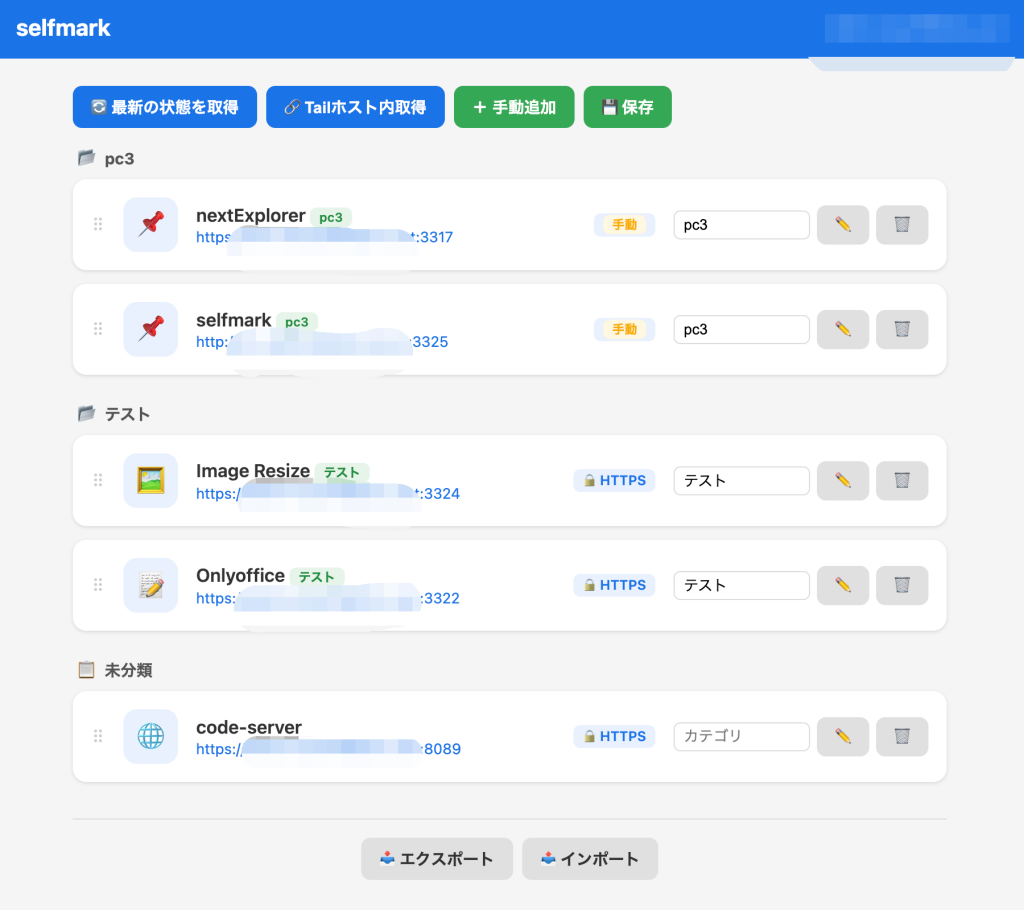
個人的にあると便利なので作ってみました。指定フォルダを監視して自動リサイズするだけのツールです。
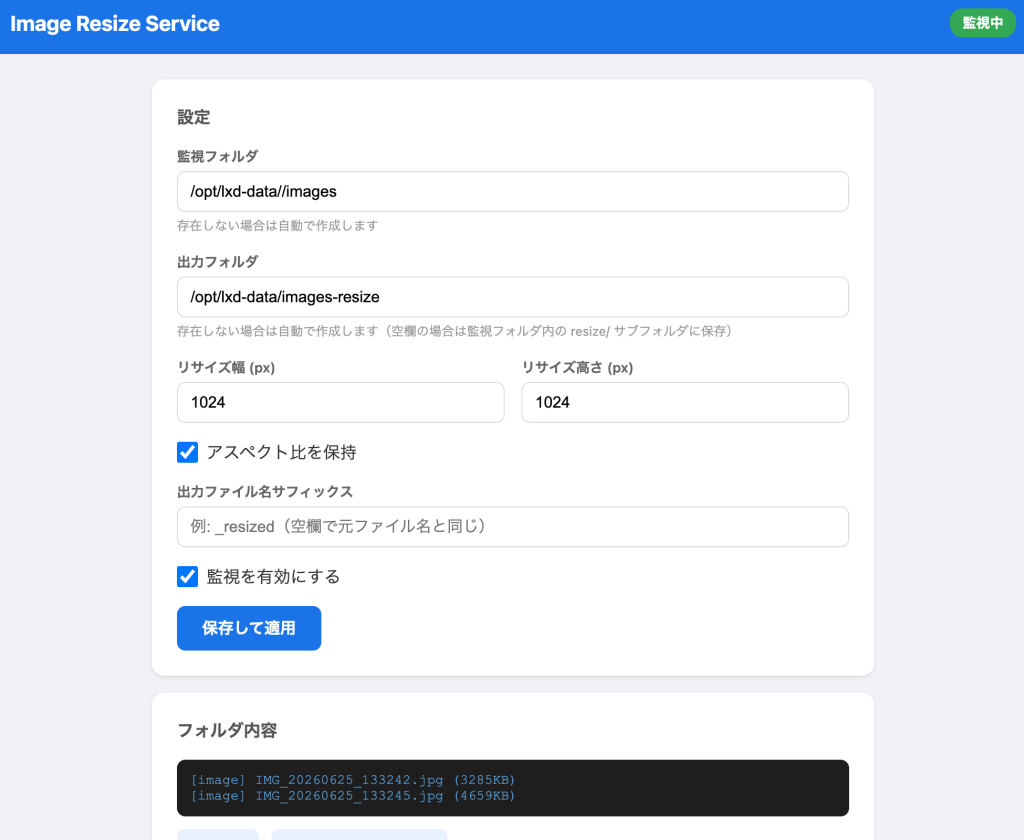
Web-UIで設定を変更出来ます。
LXDコンテナにインストール
LXDコンテナにインストールします。Tailscale ServeでHTTPS化しています。
インストール時に監視フォルダや画像サイズを指定しますが、これは起動後にWeb-UIで変更可能です。
ただLXDコンテナ内なのでHTTPでも十分だと思います。
#!/usr/bin/env bash
# =============================================================================
#  Image Resize Service — インストールスクリプト
#  - 特定フォルダを監視し、画像(jpg/jpeg/png)をリサイズして指定フォルダに保存
#  - Web-UIで全設定を行う(インストール時の対話入力なし)
#  - 「保存して適用」ボタンを押した時点で初めて監視開始
#  - 出力先フォルダは自由に指定可能(デフォルト: /opt/lxd-data/images-resize)
#  - 既にリサイズ済みのファイルはスキップ(重複生成防止)
# =============================================================================
set -euo pipefail

INSTALL_DIR="/opt/image-resize"
SERVICE_NAME="image-resize"
PORT=3324

info()  { echo -e "\033[1;34m[INFO]\033[0m  $*"; }
ok()    { echo -e "\033[1;32m[ OK ]\033[0m  $*"; }
warn()  { echo -e "\033[1;33m[WARN]\033[0m  $*"; }
die()   { echo -e "\033[1;31m[ERR ]\033[0m  $*" >&2; exit 1; }

# ── 前提チェック ───────────────────────────────────────────────────────────────
info "前提確認..."
command -v python3 >/dev/null 2>&1 || die "python3 が見つかりません"

TS_AVAILABLE=false
if command -v tailscale >/dev/null 2>&1 && tailscale status >/dev/null 2>&1; then
  TS_AVAILABLE=true
  TS_HOSTNAME=$(tailscale status --json \
    | python3 -c "import sys,json; d=json.load(sys.stdin); print(d['Self']['DNSName'].rstrip('.'))" \
    2>/dev/null) || TS_AVAILABLE=false
fi
ok "前提 OK"

# ── ディレクトリ作成 ──────────────────────────────────────────────────────────
info "ディレクトリ作成..."
mkdir -p "${INSTALL_DIR}"

# ── venv 作成 & 依存パッケージインストール ────────────────────────────────────
info "Python venv を作成..."

if [[ -d "${INSTALL_DIR}/venv" ]]; then
  if ! "${INSTALL_DIR}/venv/bin/python" -c "import sys; print(sys.version)" >/dev/null 2>&1; then
    warn "既存のvenvが壊れています。削除して再作成します..."
    rm -rf "${INSTALL_DIR}/venv"
  fi
fi

VENV_OK=false
if [[ ! -d "${INSTALL_DIR}/venv" ]]; then
  TMPDIR_VENV=$(mktemp -d)
  if python3 -m venv "${TMPDIR_VENV}/test" 2>/dev/null && "${TMPDIR_VENV}/test/bin/python" -c "import sys; print(sys.version)" >/dev/null 2>&1; then
    VENV_OK=true
    rm -rf "${TMPDIR_VENV}"
  else
    rm -rf "${TMPDIR_VENV}"
  fi
fi

if [[ ! -d "${INSTALL_DIR}/venv" ]]; then
  if [[ "${VENV_OK}" == "false" ]]; then
    warn "venv が利用できません。python3-venv をインストールします..."
    PYVER=$(python3 -c "import sys; print(f'{sys.version_info.major}.{sys.version_info.minor}')" 2>/dev/null)
    SUDO_CMD=""
    if [[ $EUID -ne 0 ]]; then
      SUDO_CMD="sudo"
    fi
    ${SUDO_CMD} apt-get update -qq 2>/dev/null
    ${SUDO_CMD} apt-get install -y -qq "python3.${PYVER}-venv" 2>/dev/null || \
    ${SUDO_CMD} apt-get install -y -qq python3-venv 2>/dev/null || \
    die "python3-venv のインストールに失敗しました。手動でインストールしてください: sudo apt install python3-venv"
    TMPDIR_VENV=$(mktemp -d)
    if python3 -m venv "${TMPDIR_VENV}/test" 2>/dev/null && "${TMPDIR_VENV}/test/bin/python" -c "import sys; print(sys.version)" >/dev/null 2>&1; then
      VENV_OK=true
    fi
    rm -rf "${TMPDIR_VENV}"
  fi

  if [[ "${VENV_OK}" == "true" ]]; then
    python3 -m venv "${INSTALL_DIR}/venv" || die "venv の作成に失敗しました"
  else
    die "venv の作成に失敗しました。手動でインストールしてください: sudo apt install python3-venv"
  fi
fi

if ! "${INSTALL_DIR}/venv/bin/python" -c "import sys; print(sys.version)" >/dev/null 2>&1; then
  die "venv の作成に失敗しました。手動でインストールしてください: sudo apt install python3-venv"
fi
ok "venv 作成完了 ($("${INSTALL_DIR}/venv/bin/python" -c "import sys; print(sys.version)"))"
info "依存パッケージをインストール..."
"${INSTALL_DIR}/venv/bin/pip" install --quiet --upgrade Pillow watchdog flask
ok "依存パッケージインストール完了"

# ── アプリケーションスクリプト生成 ────────────────────────────────────────────
info "アプリケーションを生成..."
cat > "${INSTALL_DIR}/app.py" << 'PYEOF'
#!/usr/bin/env python3
"""Image Resize Service — Watch a folder and resize images to an output folder."""

import json
import os
import sys
import time
import threading
from pathlib import Path

from flask import Flask, render_template_string, request, jsonify
from PIL import Image
from watchdog.observers import Observer
from watchdog.events import FileSystemEventHandler

CONFIG_FILE = os.path.join(os.path.dirname(os.path.abspath(__file__)), "config.json")

DEFAULT_CONFIG = {
    "watch_folder": "/opt/lxd-data/images",
    "output_folder": "/opt/lxd-data/images-resize",
    "resize_width": 1024,
    "resize_height": 1024,
    "keep_aspect_ratio": True,
    "output_suffix": "",
    "extensions": [".jpg", ".jpeg", ".png"],
    "enabled": False,
    "port": 3324,
}

app = Flask(__name__)
config = {}
observer = None


def load_config():
    global config
    if os.path.exists(CONFIG_FILE):
        with open(CONFIG_FILE, "r") as f:
            config = json.load(f)
    else:
        config = DEFAULT_CONFIG.copy()
        save_config()


def save_config():
    with open(CONFIG_FILE, "w") as f:
        json.dump(config, f, indent=2, ensure_ascii=False)


def resize_image(src_path, dst_path, width, height, keep_aspect):
    try:
        img = Image.open(src_path)
        if keep_aspect:
            img.thumbnail((width, height), Image.LANCZOS)
        else:
            img = img.resize((width, height), Image.LANCZOS)
        os.makedirs(os.path.dirname(dst_path), exist_ok=True)
        img.save(dst_path, quality=90)
        return True
    except Exception as e:
        print(f"[ERROR] Failed to resize {src_path}: {e}", file=sys.stderr)
        return False


def get_output_path(src_path):
    p = Path(src_path)
    output_dir = config.get("output_folder", "").strip()
    if output_dir:
        out_dir = Path(output_dir)
    else:
        out_dir = p.parent / "resize"
    suffix = config.get("output_suffix", "")
    stem = p.stem + suffix
    ext = p.suffix.lower()
    return str(out_dir / (stem + ext))


class ImageHandler(FileSystemEventHandler):
    def __init__(self):
        self._pending = {}   # path -> 最後にイベントを受けた時刻
        self._lock = threading.Lock()

    def on_created(self, event):
        if event.is_directory:
            return
        self._handle(event.src_path)

    def on_modified(self, event):
        if event.is_directory:
            return
        self._handle(event.src_path)

    def on_moved(self, event):
        if event.is_directory:
            return
        self._handle(event.dest_path)

    def _handle(self, path):
        ext = Path(path).suffix.lower()
        if ext not in config.get("extensions", [".jpg", ".jpeg", ".png"]):
            # .uploading 等の一時ファイルはここで弾かれる
            return
        # 出力フォルダ内のファイルは無視
        output_dir = config.get("output_folder", "").strip()
        if output_dir:
            try:
                Path(path).resolve().relative_to(Path(output_dir).resolve())
                return
            except ValueError:
                pass
        else:
            if "resize" in Path(path).parts:
                return

        with self._lock:
            already_pending = path in self._pending
            self._pending[path] = time.time()  # タイムスタンプを常に更新
            if already_pending:
                # スレッドは既に動いているのでタイムスタンプ更新だけして終わり
                return

        # 新規ペンディング → スレッド起動
        threading.Thread(target=self._delayed_process, args=(path,), daemon=True).start()

    def _delayed_process(self, path):
        # イベントが落ち着くまで待つ(最後のイベントから1秒間隔がなければ待ち続ける)
        while True:
            with self._lock:
                last = self._pending.get(path, 0)
            if time.time() - last >= 1.0:
                break
            time.sleep(0.2)

        with self._lock:
            self._pending.pop(path, None)

        if not os.path.exists(path):
            return
        dst = get_output_path(path)
        # 既にリサイズ済みの場合はスキップ
        if os.path.exists(dst):
            print(f"[SKIP] Already resized: {os.path.basename(path)} -> {dst}", flush=True)
            return
        ok = resize_image(
            path, dst,
            config.get("resize_width", 1024),
            config.get("resize_height", 1024),
            config.get("keep_aspect_ratio", True),
        )
        if ok:
            print(f"[OK] Resized: {os.path.basename(path)} -> {dst}", flush=True)


def start_watching():
    global observer
    if observer and observer.is_alive():
        observer.stop()
        observer.join(timeout=5)
        observer = None
    if not config.get("enabled", False):
        print("[INFO] Watching disabled", flush=True)
        return
    watch_dir = config.get("watch_folder", "")
    if not watch_dir or not os.path.isdir(watch_dir):
        print(f"[WARN] Watch folder not found: {watch_dir}", flush=True)
        return
    observer = Observer()
    observer.schedule(ImageHandler(), watch_dir, recursive=False)
    observer.start()
    print(f"[INFO] Watching: {watch_dir}", flush=True)


HTML_TEMPLATE = """<!DOCTYPE html>
<html lang="ja">
<head>
<meta charset="UTF-8">
<meta name="viewport" content="width=device-width, initial-scale=1.0">
<title>Image Resize Service</title>
<style>
  * { box-sizing: border-box; margin: 0; padding: 0; }
  body { font-family: -apple-system, BlinkMacSystemFont, 'Segoe UI', sans-serif; background: #f0f2f5; color: #333; }
  .header { background: #1a73e8; color: white; padding: 16px 24px; display: flex; align-items: center; gap: 12px; }
  .header h1 { font-size: 20px; }
  .status { margin-left: auto; padding: 4px 12px; border-radius: 12px; font-size: 13px; font-weight: 600; }
  .status.on  { background: #34a853; }
  .status.off { background: #ea4335; }
  .container { max-width: 720px; margin: 24px auto; padding: 0 16px; }
  .card { background: white; border-radius: 12px; box-shadow: 0 1px 3px rgba(0,0,0,0.12); padding: 24px; margin-bottom: 16px; }
  .card h2 { font-size: 16px; margin-bottom: 16px; color: #555; }
  .field { margin-bottom: 16px; }
  .field label { display: block; font-size: 13px; font-weight: 600; margin-bottom: 4px; color: #666; }
  .field input[type="text"], .field input[type="number"] {
    width: 100%; padding: 10px 12px; border: 1px solid #ddd; border-radius: 8px; font-size: 15px;
  }
  .field input:focus { outline: none; border-color: #1a73e8; }
  .field .hint { font-size: 12px; color: #999; margin-top: 4px; }
  .row { display: flex; gap: 16px; }
  .row .field { flex: 1; }
  .toggle { display: flex; align-items: center; gap: 8px; margin-bottom: 16px; }
  .toggle input[type="checkbox"] { width: 20px; height: 20px; }
  .btn { display: inline-block; padding: 10px 24px; border: none; border-radius: 8px; font-size: 15px; font-weight: 600; cursor: pointer; margin-right: 8px; }
  .btn-primary { background: #1a73e8; color: white; }
  .btn-primary:hover { background: #1557b0; }
  .btn-secondary { background: #e8f0fe; color: #1a73e8; }
  .btn-secondary:hover { background: #d2e3fc; }
  .log { background: #1e1e1e; color: #d4d4d4; border-radius: 8px; padding: 12px; font-family: 'Courier New', monospace; font-size: 13px; max-height: 300px; overflow-y: auto; white-space: pre-wrap; }
  .log .ok   { color: #4ec9b0; }
  .log .err  { color: #f44747; }
  .log .info { color: #569cd6; }
  .notice { background: #fff8e1; border-left: 4px solid #f9a825; padding: 12px 16px; border-radius: 0 8px 8px 0; margin-bottom: 16px; font-size: 14px; color: #555; }
</style>
</head>
<body>
<div class="header">
  <h1>Image Resize Service</h1>
  <span class="status {{ 'on' if config.enabled else 'off' }}" id="statusBadge">
    {{ '監視中' if config.enabled else '停止中' }}
  </span>
</div>
<div class="container">

  {% if not config.enabled %}
  <div class="notice">
    ⚙️ まだ監視は開始されていません。設定を確認して「保存して適用」を押してください。
  </div>
  {% endif %}

  <div class="card">
    <h2>設定</h2>
    <div class="field">
      <label>監視フォルダ</label>
      <input type="text" id="watchFolder" value="{{ config.watch_folder }}">
      <div class="hint">存在しない場合は自動で作成します</div>
    </div>
    <div class="field">
      <label>出力フォルダ</label>
      <input type="text" id="outputFolder" value="{{ config.output_folder }}">
      <div class="hint">存在しない場合は自動で作成します(空欄の場合は監視フォルダ内の resize/ サブフォルダに保存)</div>
    </div>
    <div class="row">
      <div class="field">
        <label>リサイズ幅 (px)</label>
        <input type="number" id="resizeWidth" value="{{ config.resize_width }}" min="1">
      </div>
      <div class="field">
        <label>リサイズ高さ (px)</label>
        <input type="number" id="resizeHeight" value="{{ config.resize_height }}" min="1">
      </div>
    </div>
    <div class="toggle">
      <input type="checkbox" id="keepAspect" {{ 'checked' if config.keep_aspect_ratio }}>
      <label for="keepAspect">アスペクト比を保持</label>
    </div>
    <div class="field">
      <label>出力ファイル名サフィックス</label>
      <input type="text" id="outputSuffix" value="{{ config.output_suffix }}" placeholder="例: _resized(空欄で元ファイル名と同じ)">
    </div>
    <div class="toggle">
      <input type="checkbox" id="enabled" {{ 'checked' if config.enabled }}>
      <label for="enabled">監視を有効にする</label>
    </div>
    <button class="btn btn-primary" onclick="saveConfig()">保存して適用</button>
  </div>

  <div class="card">
    <h2>フォルダ内容</h2>
    <div id="folderContents" class="log">読み込み中...</div>
    <div style="margin-top:12px">
      <button class="btn btn-secondary" onclick="refreshFolder()">更新</button>
      <button class="btn btn-secondary" onclick="addTestImage()">テスト画像を追加</button>
    </div>
  </div>
</div>

<script>
function refreshFolder() {
  fetch('/api/folder').then(r => r.json()).then(data => {
    const el = document.getElementById('folderContents');
    el.innerHTML = '';
    if (data.error) {
      const line = document.createElement('span');
      line.className = 'err';
      line.textContent = data.error + '\\n';
      el.appendChild(line);
      return;
    }
    if (data.items.length === 0) { el.textContent = '(空)'; return; }
    data.items.forEach(item => {
      const line = document.createElement('span');
      line.className = item.type === 'output' ? 'ok' : 'info';
      line.textContent = '[' + item.type + '] ' + item.name + ' (' + item.size + ')\\n';
      el.appendChild(line);
    });
  });
}

function saveConfig() {
  const watchFolder  = document.getElementById('watchFolder').value.trim();
  const outputFolder = document.getElementById('outputFolder').value.trim();
  const cfg = {
    watch_folder:    watchFolder,
    output_folder:   outputFolder,
    resize_width:    parseInt(document.getElementById('resizeWidth').value),
    resize_height:   parseInt(document.getElementById('resizeHeight').value),
    keep_aspect_ratio: document.getElementById('keepAspect').checked,
    output_suffix:   document.getElementById('outputSuffix').value,
    enabled:         document.getElementById('enabled').checked,
  };

  // 監視フォルダの存在確認
  fetch('/api/check-folder', {
    method: 'POST',
    headers: {'Content-Type': 'application/json'},
    body: JSON.stringify({path: watchFolder}),
  }).then(r => r.json()).then(data => {
    if (!data.exists) {
      if (!confirm('監視フォルダ「' + watchFolder + '」が存在しません。\\n作成しますか?')) return Promise.resolve(null);
      cfg.create_watch = true;
    }
    // 出力フォルダの存在確認(空欄でなければ)
    if (outputFolder) {
      return fetch('/api/check-folder', {
        method: 'POST',
        headers: {'Content-Type': 'application/json'},
        body: JSON.stringify({path: outputFolder}),
      }).then(r => r.json()).then(od => {
        if (!od.exists) {
          if (!confirm('出力フォルダ「' + outputFolder + '」が存在しません。\\n作成しますか?')) return null;
          cfg.create_output = true;
        }
        return cfg;
      });
    }
    return cfg;
  }).then(cfg => {
    if (!cfg) return;
    return fetch('/api/config', {
      method: 'POST',
      headers: {'Content-Type': 'application/json'},
      body: JSON.stringify(cfg),
    });
  }).then(r => r && r.json()).then(result => {
    if (!result) return;
    document.getElementById('statusBadge').className = 'status ' + (cfg.enabled ? 'on' : 'off');
    document.getElementById('statusBadge').textContent = cfg.enabled ? '監視中' : '停止中';
    // notice バナーを非表示に
    const notice = document.querySelector('.notice');
    if (notice) notice.style.display = 'none';
    refreshFolder();
  });
}

function addTestImage() {
  fetch('/api/test-image', {method: 'POST'}).then(r => r.json()).then(data => {
    if (data.error) { alert(data.error); return; }
    setTimeout(refreshFolder, 1000);
  });
}

refreshFolder();
</script>
</body>
</html>"""


@app.route("/")
def index():
    return render_template_string(HTML_TEMPLATE, config=config)


@app.route("/api/config", methods=["GET", "POST"])
def api_config():
    global config
    if request.method == "POST":
        data = request.json

        # 監視フォルダ作成
        if data.pop("create_watch", False):
            watch_dir = data.get("watch_folder", "")
            if watch_dir:
                os.makedirs(watch_dir, exist_ok=True)
                print(f"[INFO] Created watch folder: {watch_dir}", flush=True)

        # 出力フォルダ作成
        if data.pop("create_output", False):
            out_dir = data.get("output_folder", "")
            if out_dir:
                os.makedirs(out_dir, exist_ok=True)
                print(f"[INFO] Created output folder: {out_dir}", flush=True)

        config.update(data)
        save_config()
        start_watching()
        return jsonify({"ok": True})
    return jsonify(config)


@app.route("/api/check-folder", methods=["POST"])
def api_check_folder():
    path = request.json.get("path", "")
    exists = os.path.isdir(path) if path else False
    return jsonify({"exists": exists, "path": path})


@app.route("/api/folder")
def api_folder():
    items = []
    watch = config.get("watch_folder", "").strip()
    output = config.get("output_folder", "").strip()

    if not watch:
        return jsonify({"items": [], "error": "監視フォルダが未設定です"})
    if not os.path.isdir(watch):
        return jsonify({"items": [], "error": f"監視フォルダが見つかりません: {watch}"})

    exts = config.get("extensions", [".jpg", ".jpeg", ".png"])

    # 監視フォルダ内の画像
    for f in sorted(os.listdir(watch)):
        fp = os.path.join(watch, f)
        if os.path.isfile(fp) and Path(f).suffix.lower() in exts:
            sz = os.path.getsize(fp)
            items.append({"name": f, "size": f"{sz//1024}KB", "type": "image"})

    # 出力フォルダ内の画像
    if output and os.path.isdir(output):
        for f in sorted(os.listdir(output)):
            fp = os.path.join(output, f)
            if os.path.isfile(fp) and Path(f).suffix.lower() in exts:
                sz = os.path.getsize(fp)
                items.append({"name": f"[出力] {f}", "size": f"{sz//1024}KB", "type": "output"})
    elif not output:
        # サブフォルダ方式
        resize_dir = os.path.join(watch, "resize")
        if os.path.isdir(resize_dir):
            for f in sorted(os.listdir(resize_dir)):
                fp = os.path.join(resize_dir, f)
                if os.path.isfile(fp):
                    sz = os.path.getsize(fp)
                    items.append({"name": f"resize/{f}", "size": f"{sz//1024}KB", "type": "output"})

    return jsonify({"items": items})


@app.route("/api/test-image", methods=["POST"])
def api_test_image():
    import random
    watch = config.get("watch_folder", "").strip()
    if not watch:
        return jsonify({"ok": False, "error": "監視フォルダが未設定です"})
    os.makedirs(watch, exist_ok=True)
    w, h = random.randint(1600, 4000), random.randint(1200, 3000)
    img = Image.new("RGB", (w, h), (
        random.randint(0, 255), random.randint(0, 255), random.randint(0, 255)
    ))
    from PIL import ImageDraw
    draw = ImageDraw.Draw(img)
    for _ in range(20):
        x1, y1 = random.randint(0, w), random.randint(0, h)
        x2, y2 = x1 + random.randint(50, 300), y1 + random.randint(50, 300)
        draw.rectangle([x1, y1, x2, y2], fill=(
            random.randint(0, 255), random.randint(0, 255), random.randint(0, 255)
        ))
    ts = int(time.time() * 1000)
    path = os.path.join(watch, f"test_{ts}.jpg")
    img.save(path, quality=95)
    return jsonify({"ok": True, "path": path})


def main():
    load_config()
    # 起動時は enabled フラグに従う(デフォルト false なので監視しない)
    start_watching()
    port = config.get("port", 3324)
    print(f"[INFO] Web UI: http://127.0.0.1:{port}", flush=True)
    app.run(host="0.0.0.0", port=port, debug=False)


if __name__ == "__main__":
    main()
PYEOF
ok "アプリケーションスクリプト生成完了"

# ── config.json 生成(初期値・監視無効) ─────────────────────────────────────
cat > "${INSTALL_DIR}/config.json" << 'CFGEOF'
{
  "watch_folder": "/opt/lxd-data/images",
  "output_folder": "/opt/lxd-data/images-resize",
  "resize_width": 1024,
  "resize_height": 1024,
  "keep_aspect_ratio": true,
  "output_suffix": "",
  "extensions": [".jpg", ".jpeg", ".png"],
  "enabled": false,
  "port": 3324
}
CFGEOF
ok "config.json 生成完了"

# ── systemd ユニットファイル生成 ───────────────────────────────────────────────
info "systemd ユニットファイルを生成..."
cat > /etc/systemd/system/${SERVICE_NAME}.service << EOF
[Unit]
Description=Image Resize Service
After=network.target

[Service]
Type=simple
ExecStart=${INSTALL_DIR}/venv/bin/python ${INSTALL_DIR}/app.py
WorkingDirectory=${INSTALL_DIR}
Restart=on-failure
RestartSec=5

[Install]
WantedBy=multi-user.target
EOF
ok "systemd ユニットファイル生成完了"

# ── サービス起動 ──────────────────────────────────────────────────────────────
info "サービスを起動..."
systemctl daemon-reload
systemctl enable "${SERVICE_NAME}"
systemctl restart "${SERVICE_NAME}"
for i in $(seq 1 10); do
  if curl -s --max-time 1 "http://127.0.0.1:${PORT}/" >/dev/null 2>&1; then
    break
  fi
  sleep 1
done
if curl -s --max-time 1 "http://127.0.0.1:${PORT}/" >/dev/null 2>&1; then
  ok "サービス起動完了"
else
  die "サービスの起動に失敗しました。journalctl -u ${SERVICE_NAME} -n 20 で確認してください"
fi

# ── Tailscale Serve 設定 ──────────────────────────────────────────────────────
if [[ "${TS_AVAILABLE}" == "true" ]]; then
  info "Tailscale Serve にポート ${PORT} を追加..."
  tailscale serve --https="${PORT}" off 2>/dev/null || true
  tailscale serve --bg --https="${PORT}" "http://127.0.0.1:${PORT}"
  ok "Tailscale Serve 設定追加完了"
else
  warn "Tailscale が利用できないため、Tailscale Serve 設定をスキップします。"
  warn "Web-UI は http://127.0.0.1:${PORT} でアクセスできます。"
fi

# ── 完了サマリー ──────────────────────────────────────────────────────────────
echo ""
echo "━━━━━━━━━━━━━━━━━━━━━━━━━━━━━━━━━━━━━━━━━━━━━━━━━━━━━━━━━━━━━"
ok "セットアップ完了!"
echo ""
if [[ "${TS_AVAILABLE}" == "true" ]]; then
  echo "  Web UI    : https://${TS_HOSTNAME}:${PORT}"
else
  echo "  Web UI    : http://127.0.0.1:${PORT}"
fi
echo "  設定ファイル: ${INSTALL_DIR}/config.json"
echo ""
echo "  ▶ Web UI にアクセスして設定を確認し、「保存して適用」で監視を開始してください。"
echo ""
echo "  管理コマンド:"
echo "    systemctl status ${SERVICE_NAME}"
echo "    systemctl restart ${SERVICE_NAME}"
echo "    journalctl -u ${SERVICE_NAME} -f"
echo "━━━━━━━━━━━━━━━━━━━━━━━━━━━━━━━━━━━━━━━━━━━━━━━━━━━━━━━━━━━━━"
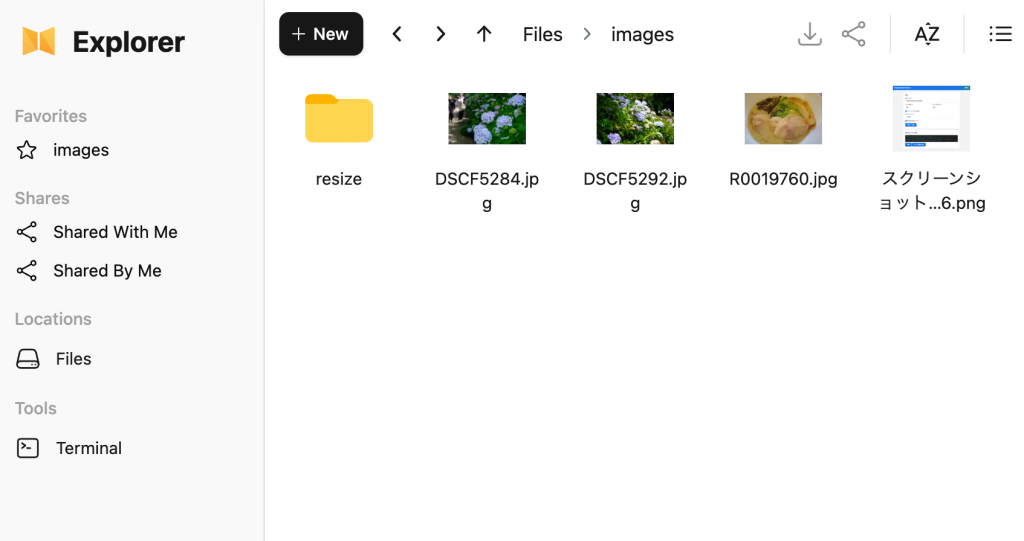
指定フォルダに保存した画像が自動リサイズ
監視フォルダに画像を入れれば設定したサイズに自動でリサイズされます。
これはnextExplorerで確認したところ。これでアップロードした画像もリサイズされます。
アンインストール
#!/usr/bin/env bash
# =============================================================================
#  Image Resize Service — アンインストールスクリプト
#  - systemdサービスの停止・無効化・ユニットファイル削除
#  - Tailscale Serveの設定解除(該当ポートのみ)
#  - インストールディレクトリ(/opt/image-resize)の削除
#  - 監視フォルダ・出力フォルダ(画像データ)はデフォルトでは削除しない
# =============================================================================
set -euo pipefail

INSTALL_DIR="/opt/image-resize"
SERVICE_NAME="image-resize"
CONFIG_FILE="${INSTALL_DIR}/config.json"
PORT=3324

info()  { echo -e "\033[1;34m[INFO]\033[0m  $*"; }
ok()    { echo -e "\033[1;32m[ OK ]\033[0m  $*"; }
warn()  { echo -e "\033[1;33m[WARN]\033[0m  $*"; }
die()   { echo -e "\033[1;31m[ERR ]\033[0m  $*" >&2; exit 1; }

SUDO_CMD=""
if [[ $EUID -ne 0 ]]; then
  SUDO_CMD="sudo"
fi

# ── 設定ファイルから実際のポート番号・フォルダを取得(存在すれば) ───────────
if [[ -f "${CONFIG_FILE}" ]] && command -v python3 >/dev/null 2>&1; then
  REAL_PORT=$(python3 -c "import json; print(json.load(open('${CONFIG_FILE}')).get('port', ${PORT}))" 2>/dev/null) || REAL_PORT="${PORT}"
  PORT="${REAL_PORT}"
  WATCH_FOLDER=$(python3 -c "import json; print(json.load(open('${CONFIG_FILE}')).get('watch_folder', ''))" 2>/dev/null) || WATCH_FOLDER=""
  OUTPUT_FOLDER=$(python3 -c "import json; print(json.load(open('${CONFIG_FILE}')).get('output_folder', ''))" 2>/dev/null) || OUTPUT_FOLDER=""
fi

# ── サービス停止・無効化 ──────────────────────────────────────────────────────
info "サービスを停止・無効化..."
if systemctl list-unit-files | grep -q "^${SERVICE_NAME}.service"; then
  ${SUDO_CMD} systemctl stop "${SERVICE_NAME}" 2>/dev/null || true
  ${SUDO_CMD} systemctl disable "${SERVICE_NAME}" 2>/dev/null || true
  ok "サービス停止・無効化完了"
else
  warn "サービスユニットが見つかりません(既に削除済みの可能性)"
fi

# ── systemd ユニットファイル削除 ──────────────────────────────────────────────
if [[ -f "/etc/systemd/system/${SERVICE_NAME}.service" ]]; then
  info "systemd ユニットファイルを削除..."
  ${SUDO_CMD} rm -f "/etc/systemd/system/${SERVICE_NAME}.service"
  ${SUDO_CMD} systemctl daemon-reload
  ok "systemd ユニットファイル削除完了"
fi

# ── Tailscale Serve 設定解除 ──────────────────────────────────────────────────
if command -v tailscale >/dev/null 2>&1 && tailscale status >/dev/null 2>&1; then
  info "Tailscale Serve のポート ${PORT} 設定を解除..."
  tailscale serve --https="${PORT}" off 2>/dev/null || true
  ok "Tailscale Serve 設定解除完了(または元々未設定)"
else
  warn "Tailscale が利用できないため、Serve 設定解除をスキップします"
fi

# ── インストールディレクトリ削除 ──────────────────────────────────────────────
if [[ -d "${INSTALL_DIR}" ]]; then
  info "インストールディレクトリを削除... (${INSTALL_DIR})"
  ${SUDO_CMD} rm -rf "${INSTALL_DIR}"
  ok "インストールディレクトリ削除完了"
else
  warn "インストールディレクトリが見つかりません(既に削除済みの可能性)"
fi

# ── 完了サマリー ──────────────────────────────────────────────────────────────
echo ""
echo "━━━━━━━━━━━━━━━━━━━━━━━━━━━━━━━━━━━━━━━━━━━━━━━━━━━━━━━━━━━━━"
ok "アンインストール完了!"
echo ""
echo "  以下のデータは削除されていません(必要であれば手動で削除してください):"
if [[ -n "${WATCH_FOLDER:-}" ]]; then
  echo "    監視フォルダ: ${WATCH_FOLDER}"
fi
if [[ -n "${OUTPUT_FOLDER:-}" ]]; then
  echo "    出力フォルダ: ${OUTPUT_FOLDER}"
fi
echo ""
echo "  上記フォルダも削除する場合は次を実行してください:"
if [[ -n "${WATCH_FOLDER:-}" ]]; then
  echo "    rm -rf '${WATCH_FOLDER}'"
fi
if [[ -n "${OUTPUT_FOLDER:-}" ]]; then
  echo "    rm -rf '${OUTPUT_FOLDER}'"
fi
echo "━━━━━━━━━━━━━━━━━━━━━━━━━━━━━━━━━━━━━━━━━━━━━━━━━━━━━━━━━━━━━"
Tailscale Serveを使わずシンプルにHTTPで利用
#!/usr/bin/env bash
# =============================================================================
#  Image Resize Service — インストールスクリプト
#  - 特定フォルダを監視し、画像(jpg/jpeg/png)をリサイズして指定フォルダに保存
#  - Web-UIで全設定を行う(インストール時の対話入力なし)
#  - 「保存して適用」ボタンを押した時点で初めて監視開始
#  - 出力先フォルダは自由に指定可能(デフォルト: /opt/lxd-data/images-resize)
#  - 既にリサイズ済みのファイルはスキップ(重複生成防止)
# =============================================================================
set -euo pipefail

INSTALL_DIR="/opt/image-resize"
SERVICE_NAME="image-resize"
PORT=3324

info()  { echo -e "\033[1;34m[INFO]\033[0m  $*"; }
ok()    { echo -e "\033[1;32m[ OK ]\033[0m  $*"; }
warn()  { echo -e "\033[1;33m[WARN]\033[0m  $*"; }
die()   { echo -e "\033[1;31m[ERR ]\033[0m  $*" >&2; exit 1; }

# ── 前提チェック ───────────────────────────────────────────────────────────────
info "前提確認..."
command -v python3 >/dev/null 2>&1 || die "python3 が見つかりません"

TS_AVAILABLE=false
if command -v tailscale >/dev/null 2>&1 && tailscale status >/dev/null 2>&1; then
  TS_AVAILABLE=true
  TS_HOSTNAME=$(tailscale status --json \
    | python3 -c "import sys,json; d=json.load(sys.stdin); print(d['Self']['DNSName'].rstrip('.'))" \
    2>/dev/null) || TS_AVAILABLE=false
  TS_IP=$(tailscale ip -4 2>/dev/null | head -1) || true
fi
ok "前提 OK"

# ── ディレクトリ作成 ──────────────────────────────────────────────────────────
info "ディレクトリ作成..."
mkdir -p "${INSTALL_DIR}"

# ── venv 作成 & 依存パッケージインストール ────────────────────────────────────
info "Python venv を作成..."

if [[ -d "${INSTALL_DIR}/venv" ]]; then
  if ! "${INSTALL_DIR}/venv/bin/python" -c "import sys; print(sys.version)" >/dev/null 2>&1; then
    warn "既存のvenvが壊れています。削除して再作成します..."
    rm -rf "${INSTALL_DIR}/venv"
  fi
fi

VENV_OK=false
if [[ ! -d "${INSTALL_DIR}/venv" ]]; then
  TMPDIR_VENV=$(mktemp -d)
  if python3 -m venv "${TMPDIR_VENV}/test" 2>/dev/null && "${TMPDIR_VENV}/test/bin/python" -c "import sys; print(sys.version)" >/dev/null 2>&1; then
    VENV_OK=true
    rm -rf "${TMPDIR_VENV}"
  else
    rm -rf "${TMPDIR_VENV}"
  fi
fi

if [[ ! -d "${INSTALL_DIR}/venv" ]]; then
  if [[ "${VENV_OK}" == "false" ]]; then
    warn "venv が利用できません。python3-venv をインストールします..."
    PYVER=$(python3 -c "import sys; print(f'{sys.version_info.major}.{sys.version_info.minor}')" 2>/dev/null)
    SUDO_CMD=""
    if [[ $EUID -ne 0 ]]; then
      SUDO_CMD="sudo"
    fi
    ${SUDO_CMD} apt-get update -qq 2>/dev/null
    ${SUDO_CMD} apt-get install -y -qq "python3.${PYVER}-venv" 2>/dev/null || \
    ${SUDO_CMD} apt-get install -y -qq python3-venv 2>/dev/null || \
    die "python3-venv のインストールに失敗しました。手動でインストールしてください: sudo apt install python3-venv"
    TMPDIR_VENV=$(mktemp -d)
    if python3 -m venv "${TMPDIR_VENV}/test" 2>/dev/null && "${TMPDIR_VENV}/test/bin/python" -c "import sys; print(sys.version)" >/dev/null 2>&1; then
      VENV_OK=true
    fi
    rm -rf "${TMPDIR_VENV}"
  fi

  if [[ "${VENV_OK}" == "true" ]]; then
    python3 -m venv "${INSTALL_DIR}/venv" || die "venv の作成に失敗しました"
  else
    die "venv の作成に失敗しました。手動でインストールしてください: sudo apt install python3-venv"
  fi
fi

if ! "${INSTALL_DIR}/venv/bin/python" -c "import sys; print(sys.version)" >/dev/null 2>&1; then
  die "venv の作成に失敗しました。手動でインストールしてください: sudo apt install python3-venv"
fi
ok "venv 作成完了 ($("${INSTALL_DIR}/venv/bin/python" -c "import sys; print(sys.version)"))"
info "依存パッケージを確認..."
PIP="${INSTALL_DIR}/venv/bin/pip"
PYTHON="${INSTALL_DIR}/venv/bin/python"
for pkg in Pillow watchdog flask; do
  if "${PYTHON}" -c "import importlib.metadata; importlib.metadata.version('${pkg}')" >/dev/null 2>&1; then
    ok "${pkg} は既にインストール済みです(スキップ)"
  else
    info "${pkg} をインストール..."
    "${PIP}" install --quiet "${pkg}" || die "${pkg} のインストールに失敗しました"
    ok "${pkg} インストール完了"
  fi
done

# ── アプリケーションスクリプト生成 ────────────────────────────────────────────
info "アプリケーションを生成..."
cat > "${INSTALL_DIR}/app.py" << 'PYEOF'
#!/usr/bin/env python3
"""Image Resize Service — Watch a folder and resize images to an output folder."""

import json
import os
import sys
import time
import threading
from pathlib import Path

from flask import Flask, render_template_string, request, jsonify
from PIL import Image
from watchdog.observers import Observer
from watchdog.events import FileSystemEventHandler

CONFIG_FILE = os.path.join(os.path.dirname(os.path.abspath(__file__)), "config.json")

DEFAULT_CONFIG = {
    "watch_folder": "/opt/lxd-data/images",
    "output_folder": "/opt/lxd-data/images-resize",
    "resize_width": 1024,
    "resize_height": 1024,
    "keep_aspect_ratio": True,
    "output_suffix": "",
    "extensions": [".jpg", ".jpeg", ".png"],
    "enabled": False,
    "port": 3324,
}

app = Flask(__name__)
config = {}
observer = None


def load_config():
    global config
    if os.path.exists(CONFIG_FILE):
        with open(CONFIG_FILE, "r") as f:
            config = json.load(f)
    else:
        config = DEFAULT_CONFIG.copy()
        save_config()


def save_config():
    with open(CONFIG_FILE, "w") as f:
        json.dump(config, f, indent=2, ensure_ascii=False)


def resize_image(src_path, dst_path, width, height, keep_aspect):
    try:
        img = Image.open(src_path)
        if keep_aspect:
            img.thumbnail((width, height), Image.LANCZOS)
        else:
            img = img.resize((width, height), Image.LANCZOS)
        os.makedirs(os.path.dirname(dst_path), exist_ok=True)
        img.save(dst_path, quality=90)
        return True
    except Exception as e:
        print(f"[ERROR] Failed to resize {src_path}: {e}", file=sys.stderr)
        return False


def get_output_path(src_path):
    p = Path(src_path)
    output_dir = config.get("output_folder", "").strip()
    if output_dir:
        out_dir = Path(output_dir)
    else:
        out_dir = p.parent / "resize"
    suffix = config.get("output_suffix", "")
    stem = p.stem + suffix
    ext = p.suffix.lower()
    return str(out_dir / (stem + ext))


class ImageHandler(FileSystemEventHandler):
    def __init__(self):
        self._pending = {}   # path -> 最後にイベントを受けた時刻
        self._lock = threading.Lock()

    def on_created(self, event):
        if event.is_directory:
            return
        self._handle(event.src_path)

    def on_modified(self, event):
        if event.is_directory:
            return
        self._handle(event.src_path)

    def on_moved(self, event):
        if event.is_directory:
            return
        self._handle(event.dest_path)

    def _handle(self, path):
        ext = Path(path).suffix.lower()
        if ext not in config.get("extensions", [".jpg", ".jpeg", ".png"]):
            # .uploading 等の一時ファイルはここで弾かれる
            return
        # 出力フォルダ内のファイルは無視
        output_dir = config.get("output_folder", "").strip()
        if output_dir:
            try:
                Path(path).resolve().relative_to(Path(output_dir).resolve())
                return
            except ValueError:
                pass
        else:
            if "resize" in Path(path).parts:
                return

        with self._lock:
            already_pending = path in self._pending
            self._pending[path] = time.time()  # タイムスタンプを常に更新
            if already_pending:
                # スレッドは既に動いているのでタイムスタンプ更新だけして終わり
                return

        # 新規ペンディング → スレッド起動
        threading.Thread(target=self._delayed_process, args=(path,), daemon=True).start()

    def _delayed_process(self, path):
        # イベントが落ち着くまで待つ(最後のイベントから1秒間隔がなければ待ち続ける)
        while True:
            with self._lock:
                last = self._pending.get(path, 0)
            if time.time() - last >= 1.0:
                break
            time.sleep(0.2)

        with self._lock:
            self._pending.pop(path, None)

        if not os.path.exists(path):
            return
        dst = get_output_path(path)
        # 既にリサイズ済みの場合はスキップ
        if os.path.exists(dst):
            print(f"[SKIP] Already resized: {os.path.basename(path)} -> {dst}", flush=True)
            return
        ok = resize_image(
            path, dst,
            config.get("resize_width", 1024),
            config.get("resize_height", 1024),
            config.get("keep_aspect_ratio", True),
        )
        if ok:
            print(f"[OK] Resized: {os.path.basename(path)} -> {dst}", flush=True)


def start_watching():
    global observer
    if observer and observer.is_alive():
        observer.stop()
        observer.join(timeout=5)
        observer = None
    if not config.get("enabled", False):
        print("[INFO] Watching disabled", flush=True)
        return
    watch_dir = config.get("watch_folder", "")
    if not watch_dir or not os.path.isdir(watch_dir):
        print(f"[WARN] Watch folder not found: {watch_dir}", flush=True)
        return
    observer = Observer()
    observer.schedule(ImageHandler(), watch_dir, recursive=False)
    observer.start()
    print(f"[INFO] Watching: {watch_dir}", flush=True)


HTML_TEMPLATE = """<!DOCTYPE html>
<html lang="ja">
<head>
<meta charset="UTF-8">
<meta name="viewport" content="width=device-width, initial-scale=1.0">
<title>Image Resize Service</title>
<style>
  * { box-sizing: border-box; margin: 0; padding: 0; }
  body { font-family: -apple-system, BlinkMacSystemFont, 'Segoe UI', sans-serif; background: #f0f2f5; color: #333; }
  .header { background: #1a73e8; color: white; padding: 16px 24px; display: flex; align-items: center; gap: 12px; }
  .header h1 { font-size: 20px; }
  .status { margin-left: auto; padding: 4px 12px; border-radius: 12px; font-size: 13px; font-weight: 600; }
  .status.on  { background: #34a853; }
  .status.off { background: #ea4335; }
  .container { max-width: 720px; margin: 24px auto; padding: 0 16px; }
  .card { background: white; border-radius: 12px; box-shadow: 0 1px 3px rgba(0,0,0,0.12); padding: 24px; margin-bottom: 16px; }
  .card h2 { font-size: 16px; margin-bottom: 16px; color: #555; }
  .field { margin-bottom: 16px; }
  .field label { display: block; font-size: 13px; font-weight: 600; margin-bottom: 4px; color: #666; }
  .field input[type="text"], .field input[type="number"] {
    width: 100%; padding: 10px 12px; border: 1px solid #ddd; border-radius: 8px; font-size: 15px;
  }
  .field input:focus { outline: none; border-color: #1a73e8; }
  .field .hint { font-size: 12px; color: #999; margin-top: 4px; }
  .row { display: flex; gap: 16px; }
  .row .field { flex: 1; }
  .toggle { display: flex; align-items: center; gap: 8px; margin-bottom: 16px; }
  .toggle input[type="checkbox"] { width: 20px; height: 20px; }
  .btn { display: inline-block; padding: 10px 24px; border: none; border-radius: 8px; font-size: 15px; font-weight: 600; cursor: pointer; margin-right: 8px; }
  .btn-primary { background: #1a73e8; color: white; }
  .btn-primary:hover { background: #1557b0; }
  .btn-secondary { background: #e8f0fe; color: #1a73e8; }
  .btn-secondary:hover { background: #d2e3fc; }
  .log { background: #1e1e1e; color: #d4d4d4; border-radius: 8px; padding: 12px; font-family: 'Courier New', monospace; font-size: 13px; max-height: 300px; overflow-y: auto; white-space: pre-wrap; }
  .log .ok   { color: #4ec9b0; }
  .log .err  { color: #f44747; }
  .log .info { color: #569cd6; }
  .notice { background: #fff8e1; border-left: 4px solid #f9a825; padding: 12px 16px; border-radius: 0 8px 8px 0; margin-bottom: 16px; font-size: 14px; color: #555; }
</style>
</head>
<body>
<div class="header">
  <h1>Image Resize Service</h1>
  <span class="status {{ 'on' if config.enabled else 'off' }}" id="statusBadge">
    {{ '監視中' if config.enabled else '停止中' }}
  </span>
</div>
<div class="container">

  {% if not config.enabled %}
  <div class="notice">
    ⚙️ まだ監視は開始されていません。設定を確認して「保存して適用」を押してください。
  </div>
  {% endif %}

  <div class="card">
    <h2>設定</h2>
    <div class="field">
      <label>監視フォルダ</label>
      <input type="text" id="watchFolder" value="{{ config.watch_folder }}">
      <div class="hint">存在しない場合は自動で作成します</div>
    </div>
    <div class="field">
      <label>出力フォルダ</label>
      <input type="text" id="outputFolder" value="{{ config.output_folder }}">
      <div class="hint">存在しない場合は自動で作成します(空欄の場合は監視フォルダ内の resize/ サブフォルダに保存)</div>
    </div>
    <div class="row">
      <div class="field">
        <label>リサイズ幅 (px)</label>
        <input type="number" id="resizeWidth" value="{{ config.resize_width }}" min="1">
      </div>
      <div class="field">
        <label>リサイズ高さ (px)</label>
        <input type="number" id="resizeHeight" value="{{ config.resize_height }}" min="1">
      </div>
    </div>
    <div class="toggle">
      <input type="checkbox" id="keepAspect" {{ 'checked' if config.keep_aspect_ratio }}>
      <label for="keepAspect">アスペクト比を保持</label>
    </div>
    <div class="field">
      <label>出力ファイル名サフィックス</label>
      <input type="text" id="outputSuffix" value="{{ config.output_suffix }}" placeholder="例: _resized(空欄で元ファイル名と同じ)">
    </div>
    <div class="toggle">
      <input type="checkbox" id="enabled" {{ 'checked' if config.enabled }}>
      <label for="enabled">監視を有効にする</label>
    </div>
    <button class="btn btn-primary" onclick="saveConfig()">保存して適用</button>
  </div>

  <div class="card">
    <h2>フォルダ内容</h2>
    <div id="folderContents" class="log">読み込み中...</div>
    <div style="margin-top:12px">
      <button class="btn btn-secondary" onclick="refreshFolder()">更新</button>
      <button class="btn btn-secondary" onclick="addTestImage()">テスト画像を追加</button>
    </div>
  </div>
</div>

<script>
function refreshFolder() {
  fetch('/api/folder').then(r => r.json()).then(data => {
    const el = document.getElementById('folderContents');
    el.innerHTML = '';
    if (data.error) {
      const line = document.createElement('span');
      line.className = 'err';
      line.textContent = data.error + '\\n';
      el.appendChild(line);
      return;
    }
    if (data.items.length === 0) { el.textContent = '(空)'; return; }
    data.items.forEach(item => {
      const line = document.createElement('span');
      line.className = item.type === 'output' ? 'ok' : 'info';
      line.textContent = '[' + item.type + '] ' + item.name + ' (' + item.size + ')\\n';
      el.appendChild(line);
    });
  });
}

function saveConfig() {
  const watchFolder  = document.getElementById('watchFolder').value.trim();
  const outputFolder = document.getElementById('outputFolder').value.trim();
  const cfg = {
    watch_folder:    watchFolder,
    output_folder:   outputFolder,
    resize_width:    parseInt(document.getElementById('resizeWidth').value),
    resize_height:   parseInt(document.getElementById('resizeHeight').value),
    keep_aspect_ratio: document.getElementById('keepAspect').checked,
    output_suffix:   document.getElementById('outputSuffix').value,
    enabled:         document.getElementById('enabled').checked,
  };

  // 監視フォルダの存在確認
  fetch('/api/check-folder', {
    method: 'POST',
    headers: {'Content-Type': 'application/json'},
    body: JSON.stringify({path: watchFolder}),
  }).then(r => r.json()).then(data => {
    if (!data.exists) {
      if (!confirm('監視フォルダ「' + watchFolder + '」が存在しません。\\n作成しますか?')) return Promise.resolve(null);
      cfg.create_watch = true;
    }
    // 出力フォルダの存在確認(空欄でなければ)
    if (outputFolder) {
      return fetch('/api/check-folder', {
        method: 'POST',
        headers: {'Content-Type': 'application/json'},
        body: JSON.stringify({path: outputFolder}),
      }).then(r => r.json()).then(od => {
        if (!od.exists) {
          if (!confirm('出力フォルダ「' + outputFolder + '」が存在しません。\\n作成しますか?')) return null;
          cfg.create_output = true;
        }
        return cfg;
      });
    }
    return cfg;
  }).then(cfg => {
    if (!cfg) return;
    return fetch('/api/config', {
      method: 'POST',
      headers: {'Content-Type': 'application/json'},
      body: JSON.stringify(cfg),
    });
  }).then(r => r && r.json()).then(result => {
    if (!result) return;
    document.getElementById('statusBadge').className = 'status ' + (cfg.enabled ? 'on' : 'off');
    document.getElementById('statusBadge').textContent = cfg.enabled ? '監視中' : '停止中';
    // notice バナーを非表示に
    const notice = document.querySelector('.notice');
    if (notice) notice.style.display = 'none';
    refreshFolder();
  });
}

function addTestImage() {
  fetch('/api/test-image', {method: 'POST'}).then(r => r.json()).then(data => {
    if (data.error) { alert(data.error); return; }
    setTimeout(refreshFolder, 1000);
  });
}

refreshFolder();
</script>
</body>
</html>"""


@app.route("/")
def index():
    return render_template_string(HTML_TEMPLATE, config=config)


@app.route("/api/config", methods=["GET", "POST"])
def api_config():
    global config
    if request.method == "POST":
        data = request.json

        # 監視フォルダ作成
        if data.pop("create_watch", False):
            watch_dir = data.get("watch_folder", "")
            if watch_dir:
                os.makedirs(watch_dir, exist_ok=True)
                print(f"[INFO] Created watch folder: {watch_dir}", flush=True)

        # 出力フォルダ作成
        if data.pop("create_output", False):
            out_dir = data.get("output_folder", "")
            if out_dir:
                os.makedirs(out_dir, exist_ok=True)
                print(f"[INFO] Created output folder: {out_dir}", flush=True)

        config.update(data)
        save_config()
        start_watching()
        return jsonify({"ok": True})
    return jsonify(config)


@app.route("/api/check-folder", methods=["POST"])
def api_check_folder():
    path = request.json.get("path", "")
    exists = os.path.isdir(path) if path else False
    return jsonify({"exists": exists, "path": path})


@app.route("/api/folder")
def api_folder():
    items = []
    watch = config.get("watch_folder", "").strip()
    output = config.get("output_folder", "").strip()

    if not watch:
        return jsonify({"items": [], "error": "監視フォルダが未設定です"})
    if not os.path.isdir(watch):
        return jsonify({"items": [], "error": f"監視フォルダが見つかりません: {watch}"})

    exts = config.get("extensions", [".jpg", ".jpeg", ".png"])

    # 監視フォルダ内の画像
    for f in sorted(os.listdir(watch)):
        fp = os.path.join(watch, f)
        if os.path.isfile(fp) and Path(f).suffix.lower() in exts:
            sz = os.path.getsize(fp)
            items.append({"name": f, "size": f"{sz//1024}KB", "type": "image"})

    # 出力フォルダ内の画像
    if output and os.path.isdir(output):
        for f in sorted(os.listdir(output)):
            fp = os.path.join(output, f)
            if os.path.isfile(fp) and Path(f).suffix.lower() in exts:
                sz = os.path.getsize(fp)
                items.append({"name": f"[出力] {f}", "size": f"{sz//1024}KB", "type": "output"})
    elif not output:
        # サブフォルダ方式
        resize_dir = os.path.join(watch, "resize")
        if os.path.isdir(resize_dir):
            for f in sorted(os.listdir(resize_dir)):
                fp = os.path.join(resize_dir, f)
                if os.path.isfile(fp):
                    sz = os.path.getsize(fp)
                    items.append({"name": f"resize/{f}", "size": f"{sz//1024}KB", "type": "output"})

    return jsonify({"items": items})


@app.route("/api/test-image", methods=["POST"])
def api_test_image():
    import random
    watch = config.get("watch_folder", "").strip()
    if not watch:
        return jsonify({"ok": False, "error": "監視フォルダが未設定です"})
    os.makedirs(watch, exist_ok=True)
    w, h = random.randint(1600, 4000), random.randint(1200, 3000)
    img = Image.new("RGB", (w, h), (
        random.randint(0, 255), random.randint(0, 255), random.randint(0, 255)
    ))
    from PIL import ImageDraw
    draw = ImageDraw.Draw(img)
    for _ in range(20):
        x1, y1 = random.randint(0, w), random.randint(0, h)
        x2, y2 = x1 + random.randint(50, 300), y1 + random.randint(50, 300)
        draw.rectangle([x1, y1, x2, y2], fill=(
            random.randint(0, 255), random.randint(0, 255), random.randint(0, 255)
        ))
    ts = int(time.time() * 1000)
    path = os.path.join(watch, f"test_{ts}.jpg")
    img.save(path, quality=95)
    return jsonify({"ok": True, "path": path})


def main():
    load_config()
    # 起動時は enabled フラグに従う(デフォルト false なので監視しない)
    start_watching()
    port = config.get("port", 3324)
    print(f"[INFO] Web UI: http://127.0.0.1:{port}", flush=True)
    app.run(host="0.0.0.0", port=port, debug=False)


if __name__ == "__main__":
    main()
PYEOF
ok "アプリケーションスクリプト生成完了"

# ── config.json 生成(初期値・監視無効) ─────────────────────────────────────
cat > "${INSTALL_DIR}/config.json" << 'CFGEOF'
{
  "watch_folder": "/opt/lxd-data/images",
  "output_folder": "/opt/lxd-data/images-resize",
  "resize_width": 1024,
  "resize_height": 1024,
  "keep_aspect_ratio": true,
  "output_suffix": "",
  "extensions": [".jpg", ".jpeg", ".png"],
  "enabled": false,
  "port": 3324
}
CFGEOF
ok "config.json 生成完了"

# ── systemd ユニットファイル生成 ───────────────────────────────────────────────
info "systemd ユニットファイルを生成..."
cat > /etc/systemd/system/${SERVICE_NAME}.service << EOF
[Unit]
Description=Image Resize Service
After=network.target

[Service]
Type=simple
ExecStart=${INSTALL_DIR}/venv/bin/python ${INSTALL_DIR}/app.py
WorkingDirectory=${INSTALL_DIR}
Restart=on-failure
RestartSec=5

[Install]
WantedBy=multi-user.target
EOF
ok "systemd ユニットファイル生成完了"

# ── サービス起動 ──────────────────────────────────────────────────────────────
info "サービスを起動..."
systemctl daemon-reload
systemctl enable "${SERVICE_NAME}"
systemctl restart "${SERVICE_NAME}"
for i in $(seq 1 10); do
  if curl -s --max-time 1 "http://127.0.0.1:${PORT}/" >/dev/null 2>&1; then
    break
  fi
  sleep 1
done
if curl -s --max-time 1 "http://127.0.0.1:${PORT}/" >/dev/null 2>&1; then
  ok "サービス起動完了"
else
  die "サービスの起動に失敗しました。journalctl -u ${SERVICE_NAME} -n 20 で確認してください"
fi

# ── 完了サマリー ──────────────────────────────────────────────────────────────
echo ""
echo "━━━━━━━━━━━━━━━━━━━━━━━━━━━━━━━━━━━━━━━━━━━━━━━━━━━━━━━━━━━━━"
ok "セットアップ完了!"
echo ""
if [[ "${TS_AVAILABLE}" == "true" ]]; then
  echo "  Web UI : http://${TS_IP}:${PORT}"
  echo "  Web UI : http://${TS_HOSTNAME%%.*}:${PORT}  (MagicDNS)"
else
  echo "  Web UI : http://127.0.0.1:${PORT}"
fi
echo "  設定ファイル: ${INSTALL_DIR}/config.json"
echo ""
echo "  ▶ Web UI にアクセスして設定を確認し、「保存して適用」で監視を開始してください。"
echo ""
echo "  管理コマンド:"
echo "    systemctl status ${SERVICE_NAME}"
echo "    systemctl restart ${SERVICE_NAME}"
echo "    journalctl -u ${SERVICE_NAME} -f"
echo "━━━━━━━━━━━━━━━━━━━━━━━━━━━━━━━━━━━━━━━━━━━━━━━━━━━━━━━━━━━━━"