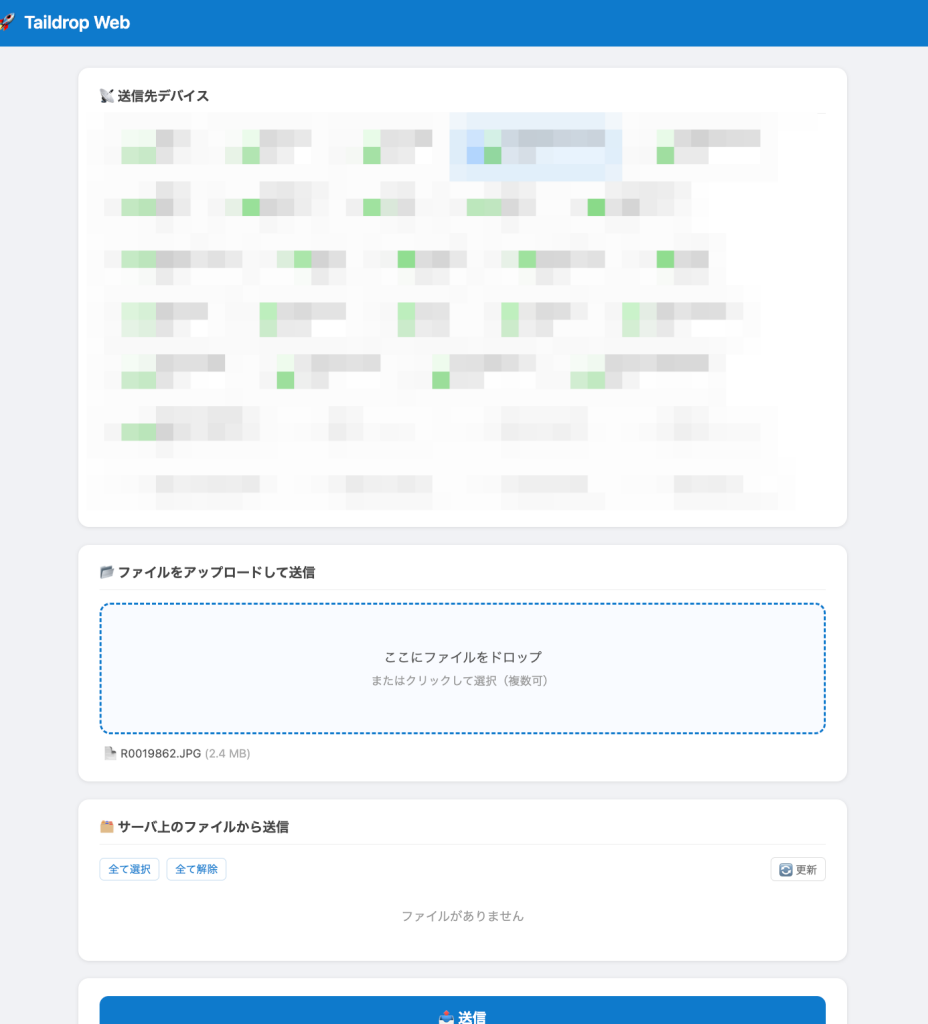
以前、TaildropをWeb-UIにするスクリプトを作りましたが、それを少し改良し、監視フォルダにファイルが追加されたら自動送信するサービスを用意してみました。何かと組み合わせれば便利になるのでは。
たとえばフォルダを監視し画像を自動でリサイズすると組み合わせて、リサイズされた画像だけを自動送信とかも出来そうです。Tailscale経由で送りつける形になるので、受信側に別途アプリを入れなくても済むのが良いですね。
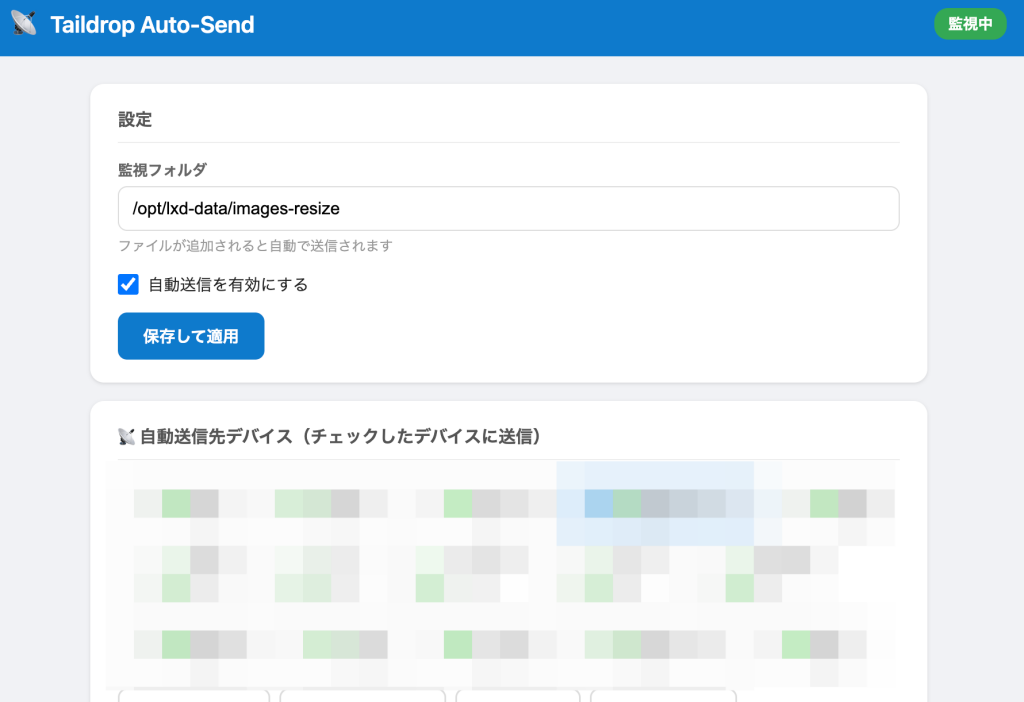
LXDコンテナにインストール
デフォルトの監視フォルダを/opt/lxd-data/images-resizeにしていますが、変更可能です。
#!/usr/bin/env bash
# =============================================================================
#  Taildrop Auto-Send Service — インストールスクリプト
#  - 指定フォルダを監視し、ファイルが追加されたら選択デバイスに自動Taildrop送信
#  - Web UIで送信先デバイスを選択・管理(チェックを入れたデバイスに自動送信)
#  - ポート 3343 で公開
#  - 既導入の Python モジュールはスキップ
# =============================================================================
set -euo pipefail

INSTALL_DIR="/opt/taildrop-auto"
SERVICE_NAME="taildrop-auto"
PORT=3343

info()  { echo -e "\033[1;34m[INFO]\033[0m  $*"; }
ok()    { echo -e "\033[1;32m[ OK ]\033[0m  $*"; }
warn()  { echo -e "\033[1;33m[WARN]\033[0m  $*"; }
die()   { echo -e "\033[1;31m[ERR ]\033[0m  $*" >&2; exit 1; }

# ── 前提チェック ───────────────────────────────────────────────────────────────
info "前提確認..."
command -v python3 >/dev/null 2>&1 || die "python3 が見つかりません"
command -v tailscale >/dev/null 2>&1 || die "tailscale が見つかりません"
tailscale status >/dev/null 2>&1    || die "tailscale が接続されていません"

TS_IP=$(tailscale ip -4 2>/dev/null | head -1) || die "Tailscale IP が取得できません"
TS_HOSTNAME=$(tailscale status --json \
  | python3 -c "import sys,json; d=json.load(sys.stdin); print(d['Self']['DNSName'].rstrip('.'))" \
  2>/dev/null) || TS_HOSTNAME="${TS_IP}"
ok "Tailscale IP: ${TS_IP} / hostname: ${TS_HOSTNAME}"

# ── ディレクトリ作成 ──────────────────────────────────────────────────────────
info "ディレクトリ作成..."
mkdir -p "${INSTALL_DIR}"
mkdir -p /opt/lxd-data/images-resize   # 監視フォルダのデフォルト(なければ作成)

# ── venv 作成 & 依存パッケージインストール ────────────────────────────────────
info "Python venv を確認..."

if [[ -d "${INSTALL_DIR}/venv" ]]; then
  if ! "${INSTALL_DIR}/venv/bin/python" -c "import sys" >/dev/null 2>&1; then
    warn "既存のvenvが壊れています。削除して再作成します..."
    rm -rf "${INSTALL_DIR}/venv"
  fi
fi

if [[ ! -d "${INSTALL_DIR}/venv" ]]; then
  TMPV=$(mktemp -d)
  if ! python3 -m venv "${TMPV}/test" 2>/dev/null; then
    rm -rf "${TMPV}"
    warn "python3-venv をインストールします..."
    PYVER=$(python3 -c "import sys; print(f'{sys.version_info.major}.{sys.version_info.minor}')")
    SUDO_CMD=""; [[ $EUID -ne 0 ]] && SUDO_CMD="sudo"
    ${SUDO_CMD} apt-get update -qq
    ${SUDO_CMD} apt-get install -y -qq "python3.${PYVER}-venv" 2>/dev/null || \
    ${SUDO_CMD} apt-get install -y -qq python3-venv || \
    die "python3-venv のインストールに失敗しました"
  else
    rm -rf "${TMPV}"
  fi
  python3 -m venv "${INSTALL_DIR}/venv" || die "venv の作成に失敗しました"
  ok "venv 作成完了"
else
  ok "venv は既に存在します(スキップ)"
fi

PIP="${INSTALL_DIR}/venv/bin/pip"
PYTHON="${INSTALL_DIR}/venv/bin/python"

info "依存パッケージを確認..."
"${PIP}" install --quiet flask watchdog
ok "依存パッケージ確認完了"

# ── テンプレート(HTML)を別ファイルとして生成 ─────────────────────────────────
info "テンプレートファイルを生成..."
cat > "${INSTALL_DIR}/template.html" << 'HTMLEOF'
<!DOCTYPE html>
<html lang="ja">
<head>
<meta charset="UTF-8">
<meta name="viewport" content="width=device-width, initial-scale=1.0">
<title>Taildrop Auto-Send</title>
<style>
  *, *::before, *::after { box-sizing: border-box; margin: 0; padding: 0; }
  body { font-family: -apple-system, BlinkMacSystemFont, 'Segoe UI', sans-serif; background: #f0f2f5; color: #222; }
  header { background: #0f7acc; color: #fff; padding: 14px 24px; display: flex; align-items: center; gap: 12px; }
  header h1 { font-size: 20px; font-weight: 600; }
  .badge { margin-left: auto; padding: 4px 12px; border-radius: 12px; font-size: 13px; font-weight: 600; }
  .badge.on  { background: #34a853; }
  .badge.off { background: #ea4335; }
  .container { max-width: 760px; margin: 24px auto; padding: 0 16px; display: flex; flex-direction: column; gap: 16px; }
  .card { background: #fff; border-radius: 12px; box-shadow: 0 1px 3px rgba(0,0,0,.12); padding: 20px 24px; }
  .card h2 { font-size: 15px; font-weight: 600; color: #555; margin-bottom: 14px; padding-bottom: 8px; border-bottom: 1px solid #eee; }
  .field { margin-bottom: 14px; }
  .field label { display: block; font-size: 13px; font-weight: 600; color: #666; margin-bottom: 4px; }
  .field input[type="text"] { width: 100%; padding: 10px 12px; border: 1px solid #ddd; border-radius: 8px; font-size: 15px; }
  .field input:focus { outline: none; border-color: #0f7acc; }
  .field .hint { font-size: 12px; color: #999; margin-top: 4px; }
  .toggle { display: flex; align-items: center; gap: 8px; margin-bottom: 14px; font-size: 14px; }
  .toggle input[type="checkbox"] { width: 18px; height: 18px; cursor: pointer; }
  .notice { background: #fff8e1; border-left: 4px solid #f9a825; padding: 10px 14px; border-radius: 0 8px 8px 0; font-size: 13px; color: #555; margin-bottom: 14px; }

  .device-grid { display: flex; flex-wrap: wrap; gap: 8px; }
  .device-item label {
    display: flex; align-items: center; gap: 8px; padding: 8px 14px;
    border: 1.5px solid #ddd; border-radius: 8px; cursor: pointer;
    font-size: 14px; transition: border-color .15s, background .15s; user-select: none;
  }
  .device-item label:has(input:checked) { border-color: #0f7acc; background: #e8f3fd; }
  .device-item label:has(input:disabled) { opacity: .45; cursor: not-allowed; }

  .btn { display: inline-block; padding: 10px 22px; border: none; border-radius: 8px; font-size: 14px; font-weight: 600; cursor: pointer; }
  .btn-primary   { background: #0f7acc; color: #fff; }
  .btn-primary:hover { background: #0960a5; }
  .btn-secondary { background: #e8f0fe; color: #0f7acc; }
  .btn-secondary:hover { background: #d2e3fc; }

  .log { background: #1e1e1e; color: #d4d4d4; border-radius: 8px; padding: 12px; font-family: 'Courier New', monospace; font-size: 13px; height: 280px; overflow-y: auto; white-space: pre-wrap; word-break: break-all; }
  .log-ok   { color: #4ec9b0; }
  .log-err  { color: #f44747; }
  .log-warn { color: #dcdcaa; }
  .log-info { color: #9cdcfe; }
  .toolbar { display: flex; gap: 8px; margin-bottom: 8px; align-items: center; }

  .error-toast {
    position: fixed; bottom: 20px; right: 20px; background: #ea4335; color: #fff;
    padding: 12px 18px; border-radius: 8px; font-size: 13px; max-width: 360px;
    box-shadow: 0 4px 12px rgba(0,0,0,.2); display: none; z-index: 999;
  }
</style>
</head>
<body>
<header>
  <span style="font-size:22px">📡</span>
  <h1>Taildrop Auto-Send</h1>
  <span class="badge {{ 'on' if config.enabled else 'off' }}" id="statusBadge">
    {{ '監視中' if config.enabled else '停止中' }}
  </span>
</header>

<div class="container">

  {% if not config.enabled %}
  <div class="notice">⚙️ まだ監視は開始されていません。送信先デバイスを選択し「保存して適用」を押してください。</div>
  {% endif %}

  <div class="card">
    <h2>設定</h2>
    <div class="field">
      <label>監視フォルダ</label>
      <input type="text" id="watchFolder" value="{{ config.watch_folder }}">
      <div class="hint">ファイルが追加されると自動で送信されます</div>
    </div>
    <div class="toggle">
      <input type="checkbox" id="enabled" {{ 'checked' if config.enabled }}>
      <label for="enabled">自動送信を有効にする</label>
    </div>
    <button class="btn btn-primary" id="saveBtn" onclick="saveConfig()">保存して適用</button>
  </div>

  <div class="card">
    <h2>📡 自動送信先デバイス(チェックしたデバイスに送信)</h2>
    <div class="device-grid" id="device-list">
      {% if peers %}
        {% for d in peers %}
        <div class="device-item">
          <label>
            <input type="checkbox" value="{{ d.dns_name }}"
              {{ 'checked' if d.dns_name in config.target_devices }}
              {{ 'disabled' if not d.online }}>
            <span>{{ '🟢' if d.online else '⚪' }}</span>
            <span>{{ d.name }}<br><small style="color:#999;font-weight:400">{{ d.lastseen }}</small></span>
          </label>
        </div>
        {% endfor %}
      {% else %}
        <span style="color:#999;font-size:14px;">デバイスが見つかりません</span>
      {% endif %}
    </div>
    <div style="margin-top:10px;">
      <button class="btn btn-secondary" onclick="location.reload()" style="padding:5px 14px;font-size:13px;">🔄 デバイス一覧を更新</button>
    </div>
  </div>

  <div class="card">
    <h2>📋 ログ</h2>
    <div class="toolbar">
      <button class="btn btn-secondary" onclick="refreshLog()" style="padding:4px 12px;font-size:12px;">🔄 更新</button>
      <button class="btn btn-secondary" onclick="clearLog()"   style="padding:4px 12px;font-size:12px;">🗑 クリア</button>
      <label style="margin-left:auto;font-size:12px;color:#888;display:flex;align-items:center;gap:4px;">
        <input type="checkbox" id="autoRefresh" checked> 自動更新 (3秒)
      </label>
    </div>
    <div class="log" id="log-area"></div>
  </div>

</div>

<div class="error-toast" id="errorToast"></div>

<script>
let autoRefreshTimer = null;

function showError(msg) {
  const toast = document.getElementById('errorToast');
  toast.textContent = '⚠️ ' + msg;
  toast.style.display = 'block';
  clearTimeout(toast._hideTimer);
  toast._hideTimer = setTimeout(() => { toast.style.display = 'none'; }, 6000);
}

// ─── 設定保存 ─────────────────────────────────────────────────────────────
function saveConfig() {
  const btn = document.getElementById('saveBtn');
  const watchFolder = document.getElementById('watchFolder').value.trim();
  const enabled     = document.getElementById('enabled').checked;
  const devices     = [...document.querySelectorAll('#device-list input:checked')].map(i => i.value);

  btn.disabled = true;
  btn.textContent = '保存中...';

  fetch('/api/config', {
    method:  'POST',
    headers: {'Content-Type': 'application/json'},
    body:    JSON.stringify({ watch_folder: watchFolder, enabled, target_devices: devices }),
  })
  .then(async (r) => {
    if (!r.ok) {
      const text = await r.text().catch(() => '');
      throw new Error(`サーバーエラー (HTTP ${r.status}): ${text.slice(0, 200)}`);
    }
    return r.json();
  })
  .then((data) => {
    if (!data || data.ok !== true) {
      throw new Error('サーバーが予期しない応答を返しました: ' + JSON.stringify(data));
    }
    document.getElementById('statusBadge').className = 'badge ' + (enabled ? 'on' : 'off');
    document.getElementById('statusBadge').textContent = enabled ? '監視中' : '停止中';
    const notice = document.querySelector('.notice');
    if (notice) notice.style.display = 'none';
    refreshLog();
  })
  .catch((err) => {
    console.error('saveConfig failed:', err);
    showError('保存に失敗しました: ' + err.message);
  })
  .finally(() => {
    btn.disabled = false;
    btn.textContent = '保存して適用';
  });
}

// ─── ログ表示 ─────────────────────────────────────────────────────────────
function refreshLog() {
  fetch('/api/log')
    .then((r) => {
      if (!r.ok) throw new Error(`HTTP ${r.status}`);
      return r.json();
    })
    .then((data) => {
      const el = document.getElementById('log-area');
      const atBottom = el.scrollHeight - el.scrollTop <= el.clientHeight + 40;
      el.innerHTML = '';
      (data.lines || []).forEach((entry) => {
        const span = document.createElement('span');
        const cls = entry.level === 'OK'   ? 'log-ok'
                  : entry.level === 'ERR'  ? 'log-err'
                  : entry.level === 'WARN' ? 'log-warn'
                  : 'log-info';
        span.className = cls;
        span.textContent = entry.msg + '\n';
        el.appendChild(span);
      });
      if (atBottom) el.scrollTop = el.scrollHeight;
    })
    .catch((err) => {
      console.error('refreshLog failed:', err);
    });
}

function clearLog() {
  fetch('/api/log/clear', { method: 'POST' })
    .then((r) => {
      if (!r.ok) throw new Error(`HTTP ${r.status}`);
      return refreshLog();
    })
    .catch((err) => {
      console.error('clearLog failed:', err);
      showError('ログのクリアに失敗しました: ' + err.message);
    });
}

function setupAutoRefresh() {
  if (autoRefreshTimer) clearInterval(autoRefreshTimer);
  if (document.getElementById('autoRefresh').checked) {
    autoRefreshTimer = setInterval(refreshLog, 3000);
  }
}
document.getElementById('autoRefresh').onchange = setupAutoRefresh;
refreshLog();
setupAutoRefresh();
</script>
</body>
</html>
HTMLEOF
ok "テンプレートファイル生成完了"

# ── アプリケーションスクリプト生成 ────────────────────────────────────────────
info "アプリケーションを生成..."
cat > "${INSTALL_DIR}/app.py" << 'PYEOF'
#!/usr/bin/env python3
"""
Taildrop Auto-Send Service
- 指定フォルダを監視し、ファイルが追加されたら選択中のデバイスに自動送信
- Web UI でデバイスの選択・監視フォルダの設定・ログ確認が可能
"""

import json
import os
import subprocess
import sys
import threading
import time
import traceback
import collections
from pathlib import Path

from flask import Flask, jsonify, render_template, request
from watchdog.observers import Observer
from watchdog.events import FileSystemEventHandler

BASE_DIR    = os.path.dirname(os.path.abspath(__file__))
CONFIG_FILE = os.path.join(BASE_DIR, "config.json")
TEMPLATE_FILE = os.path.join(BASE_DIR, "template.html")
LOG_MAXLEN  = 200   # ログ最大行数

DEFAULT_CONFIG = {
    "watch_folder":   "/opt/lxd-data/images-resize",
    "target_devices": [],   # 自動送信するデバイス名リスト
    "enabled":        False,
    "port":           3343,
}

# Flask に template.html を読み込ませる(templates フォルダ不要で同一ディレクトリを指定)
app = Flask(__name__, template_folder=BASE_DIR)

config   = {}
observer = None
log_buf  = collections.deque(maxlen=LOG_MAXLEN)
log_lock = threading.Lock()

# ─── ログ ───────────────────────────────────────────────────────────────────

def log(level: str, msg: str):
    ts   = time.strftime("%H:%M:%S")
    line = f"[{ts}][{level}] {msg}"
    with log_lock:
        log_buf.append({"level": level, "msg": line})
    print(line, flush=True)

# ─── 設定 ───────────────────────────────────────────────────────────────────

def load_config():
    global config
    if os.path.exists(CONFIG_FILE):
        try:
            with open(CONFIG_FILE, "r") as f:
                config = json.load(f)
        except (json.JSONDecodeError, OSError) as e:
            log("ERR", f"config.json の読み込みに失敗しました(既定値で起動): {e}")
            config = DEFAULT_CONFIG.copy()
    else:
        config = DEFAULT_CONFIG.copy()
        save_config()

def save_config():
    with open(CONFIG_FILE, "w") as f:
        json.dump(config, f, indent=2, ensure_ascii=False)

# ─── Taildrop 送信 ─────────────────────────────────────────────────────────

def tailscale_cp(src: str, device: str):
    try:
        subprocess.check_call(
            ["tailscale", "file", "cp", src, f"{device}:"],
            timeout=300,
            stdout=subprocess.DEVNULL,
            stderr=subprocess.PIPE,
        )
        return True, None
    except subprocess.TimeoutExpired:
        return False, "タイムアウト"
    except subprocess.CalledProcessError as e:
        stderr = e.stderr.decode(errors="replace").strip() if e.stderr else ""
        return False, stderr or f"終了コード {e.returncode}"
    except Exception as e:
        return False, str(e)

# ─── ファイル監視ハンドラ ──────────────────────────────────────────────────

class AutoSendHandler(FileSystemEventHandler):
    def __init__(self):
        self._pending = {}
        self._lock    = threading.Lock()

    def _handle(self, path: str):
        # 隠しファイル・一時ファイルは無視
        name = os.path.basename(path)
        if name.startswith(".") or name.endswith((".tmp", ".part", ".crdownload")):
            return
        with self._lock:
            already = path in self._pending
            self._pending[path] = time.time()
            if already:
                return
        threading.Thread(target=self._delayed_send, args=(path,), daemon=True).start()

    def on_created(self, event):
        if not event.is_directory:
            self._handle(event.src_path)

    def on_moved(self, event):
        if not event.is_directory:
            self._handle(event.dest_path)

    def on_modified(self, event):
        if not event.is_directory:
            self._handle(event.src_path)

    def _delayed_send(self, path: str):
        # 書き込みが落ち着くまで待つ(最後のイベントから1.5秒)
        while True:
            with self._lock:
                last = self._pending.get(path, 0)
            if time.time() - last >= 1.5:
                break
            time.sleep(0.3)

        with self._lock:
            self._pending.pop(path, None)

        if not os.path.isfile(path):
            return

        devices = config.get("target_devices", [])
        if not devices:
            log("WARN", f"送信先が未設定のためスキップ: {os.path.basename(path)}")
            return

        fname = os.path.basename(path)
        log("INFO", f"検知: {fname} → {', '.join(devices)} に送信開始")

        for dev in devices:
            ok_, err = tailscale_cp(path, dev)
            if ok_:
                log("OK",  f"✅ {fname} → {dev}")
            else:
                log("ERR", f"❌ {fname} → {dev} : {err}")

# ─── 監視起動/停止 ──────────────────────────────────────────────────────────

def start_watching():
    global observer
    try:
        if observer and observer.is_alive():
            observer.stop()
            observer.join(timeout=5)
        observer = None

        if not config.get("enabled", False):
            log("INFO", "監視停止中")
            return

        watch_dir = config.get("watch_folder", "").strip()
        if not watch_dir:
            log("WARN", "監視フォルダが未設定です")
            return
        if not os.path.isdir(watch_dir):
            log("WARN", f"監視フォルダが見つかりません: {watch_dir}")
            return

        observer = Observer()
        observer.schedule(AutoSendHandler(), watch_dir, recursive=False)
        observer.start()
        log("INFO", f"監視開始: {watch_dir}")
    except Exception as e:
        # ここで例外を握っておくことで /api/config のPOSTがエラーにならず
        # フロント側にも「保存自体」は成功として返せるようにする
        log("ERR", f"監視の開始に失敗しました: {e}")

# ─── Tailscale デバイス一覧 ────────────────────────────────────────────────

def get_peers():
    try:
        result = subprocess.check_output(["tailscale", "status", "--json"], timeout=10)
        data   = json.loads(result)
        peers  = []
        for peer in data.get("Peer", {}).values():
            # dns_name: tailscale file cp の宛先解決に使う実際の名前(DNSNameの先頭ラベル)
            # name:     UI表示用のわかりやすい名前(HostNameがあれば優先、スペース等含んでもOK)
            dns_name = peer.get("DNSName", "").rstrip(".").split(".")[0]
            if not dns_name:
                continue
            host_name = peer.get("HostName") or ""
            # iOS/iPadOS 等で HostName が "localhost" になるケースがあるため、その場合は dns_name を表示に使う
            name = host_name if host_name and host_name.lower() != "localhost" else dns_name
            online   = peer.get("Online", False)
            lastseen = "接続中" if online else (peer.get("LastSeen") or "不明")[:16]
            peers.append({
                "name": name,
                "dns_name": dns_name,
                "online": online,
                "lastseen": lastseen,
            })
        peers.sort(key=lambda x: (not x["online"], x["name"]))
        return peers
    except Exception as e:
        return [{"name": f"取得エラー: {e}", "dns_name": "", "online": False, "lastseen": ""}]

# ─── Flask ルート ─────────────────────────────────────────────────────────

@app.route("/")
def index():
    return render_template("template.html", config=config, peers=get_peers())

@app.route("/api/devices")
def api_devices():
    return jsonify(get_peers())

@app.route("/api/config", methods=["GET", "POST"])
def api_config():
    global config
    if request.method == "POST":
        try:
            data = request.get_json(force=True) or {}
            for k in ("watch_folder", "enabled", "target_devices"):
                if k in data:
                    config[k] = data[k]
            save_config()
            start_watching()
            return jsonify({"ok": True})
        except Exception as e:
            log("ERR", f"/api/config 処理中にエラー: {e}")
            traceback.print_exc()
            return jsonify({"ok": False, "error": str(e)}), 500
    return jsonify(config)

@app.route("/api/log")
def api_log():
    with log_lock:
        lines = list(log_buf)
    return jsonify({"lines": lines})

@app.route("/api/log/clear", methods=["POST"])
def api_log_clear():
    with log_lock:
        log_buf.clear()
    return jsonify({"ok": True})

# ─── メイン ───────────────────────────────────────────────────────────────

def get_tailscale_ip() -> str:
    try:
        ip = subprocess.check_output(["tailscale", "ip", "-4"], timeout=5).decode().strip()
        if ip:
            return ip.split("\n")[0]
    except Exception:
        pass
    return "0.0.0.0"

def main():
    if not os.path.exists(TEMPLATE_FILE):
        print(f"[ERR] テンプレートファイルが見つかりません: {TEMPLATE_FILE}", file=sys.stderr)
        sys.exit(1)

    load_config()
    start_watching()
    ts_ip = get_tailscale_ip()
    port  = config.get("port", 3343)
    log("INFO", f"Web UI: http://{ts_ip}:{port}")
    app.run(host="0.0.0.0", port=port, debug=False)

if __name__ == "__main__":
    main()
PYEOF
ok "アプリケーションスクリプト生成完了"

# ── config.json 生成(初期値・監視無効) ─────────────────────────────────────
if [[ ! -f "${INSTALL_DIR}/config.json" ]]; then
  cat > "${INSTALL_DIR}/config.json" << 'CFGEOF'
{
  "watch_folder": "/opt/lxd-data/images-resize",
  "target_devices": [],
  "enabled": false,
  "port": 3343
}
CFGEOF
  ok "config.json 生成完了"
else
  ok "config.json は既に存在します(既存設定を保持)"
fi

# ── systemd ユニットファイル生成 ───────────────────────────────────────────────
info "systemd ユニットファイルを生成..."
cat > /etc/systemd/system/${SERVICE_NAME}.service << EOF
[Unit]
Description=Taildrop Auto-Send Service
After=network.target tailscaled.service
Wants=tailscaled.service

[Service]
Type=simple
ExecStart=${INSTALL_DIR}/venv/bin/python ${INSTALL_DIR}/app.py
WorkingDirectory=${INSTALL_DIR}
Restart=on-failure
RestartSec=5
# Tailscale IP の取得が間に合わない場合のリトライ猶予
StartLimitIntervalSec=60
StartLimitBurst=5

[Install]
WantedBy=multi-user.target
EOF
ok "systemd ユニットファイル生成完了"

# ── サービス起動 ──────────────────────────────────────────────────────────────
info "サービスを起動..."
systemctl daemon-reload
systemctl enable "${SERVICE_NAME}"
systemctl restart "${SERVICE_NAME}"

# 起動確認(Tailscale IP でアクセス)
for i in $(seq 1 15); do
  if curl -s --max-time 1 "http://127.0.0.1:${PORT}/" >/dev/null 2>&1; then
    break
  fi
  sleep 1
done

if curl -s --max-time 1 "http://127.0.0.1:${PORT}/" >/dev/null 2>&1; then
  ok "サービス起動完了"
else
  die "サービスの起動に失敗しました。journalctl -u ${SERVICE_NAME} -n 30 で確認してください"
fi

# ── Tailscale Serve 設定(このサービスは HTTP 直アクセスのため不要) ────────────
# Tailscale Serve (HTTPS) を使うと fetch API が mixed-content 扱いになる場合があるため、
# Tailscale IP への HTTP 直アクセスで運用する。
info "Tailscale Serve は使用しません(HTTP 直アクセス)"

# ── 完了サマリー ──────────────────────────────────────────────────────────────
echo ""
echo "━━━━━━━━━━━━━━━━━━━━━━━━━━━━━━━━━━━━━━━━━━━━━━━━━━━━━━━━━━━━━"
ok "セットアップ完了!"
echo ""
echo "  Web UI : http://${TS_IP}:${PORT}"
echo "  設定ファイル    : ${INSTALL_DIR}/config.json"
echo "  テンプレート    : ${INSTALL_DIR}/template.html"
echo "  監視フォルダ    : /opt/lxd-data/images-resize  ← image-resize の出力先"
echo ""
echo "  ▶ Web UI にアクセスして送信先デバイスを選択し、「保存して適用」を押してください。"
echo ""
echo "  ─ image-resize との連携フロー ─────────────────────────────"
echo "  スマホ写真 → [images フォルダ] → image-resize でリサイズ"
echo "           → [images-resize フォルダ] → taildrop-auto で自動送信"
echo "  ─────────────────────────────────────────────────────────"
echo ""
echo "  管理コマンド:"
echo "    systemctl status ${SERVICE_NAME}"
echo "    systemctl restart ${SERVICE_NAME}"
echo "    journalctl -u ${SERVICE_NAME} -f"
echo "━━━━━━━━━━━━━━━━━━━━━━━━━━━━━━━━━━━━━━━━━━━━━━━━━━━━━━━━━━━━━"
アンインストール方法
# サービス停止・無効化
sudo systemctl stop taildrop-auto
sudo systemctl disable taildrop-auto

# systemd ユニットファイル削除
sudo rm /etc/systemd/system/taildrop-auto.service
sudo systemctl daemon-reload

# アプリ本体・venv・設定ファイルを削除
sudo rm -rf /opt/taildrop-auto