見出しを装飾したい場合は、外観のカスタマイズで「追加CSS」に設定。
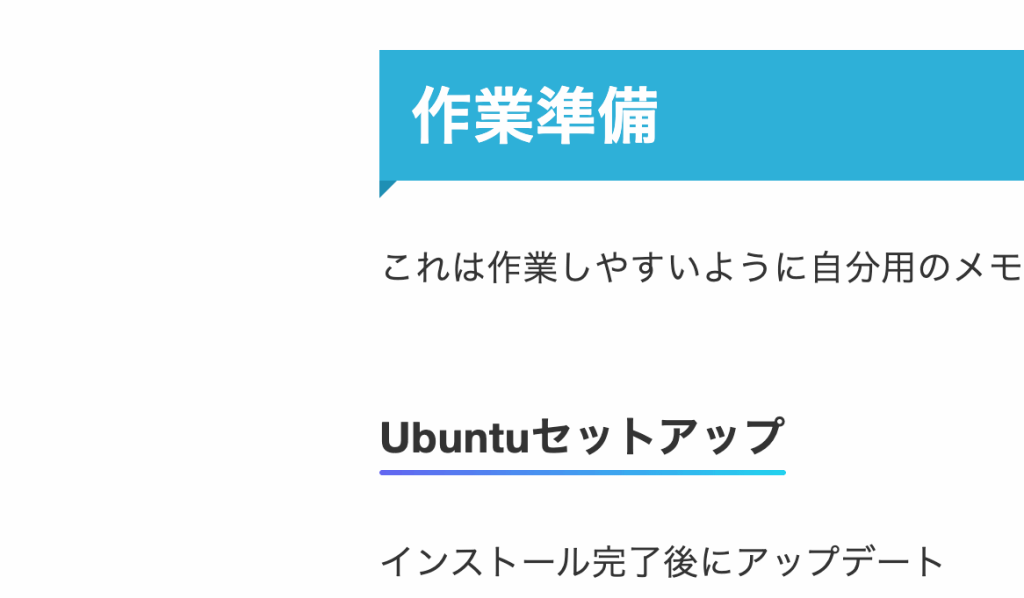
これはh2〜h5までのサイズを指定した例です。
/* h2〜h5 */
/* ========= h2 ========= */
.entry-content h2,
article h2,
.post h2 {
  position: relative !important;
  background: #2fb0d8 !important;
  color: #fff !important;
  padding: 12px 18px !important;
  margin: 32px 0 20px !important;
  font-weight: 700 !important;
  display: block !important;
  width: 100% !important;
  box-sizing: border-box !important;
  line-height: 1.45 !important;
  font-size: 1.8rem !important; /* サイズ */
}

/* 左下の折れ */
.entry-content h2::before,
article h2::before,
.post h2::before {
  content: "" !important;
  position: absolute !important;
  left: 0 !important;
  bottom: -10px !important;
  border-width: 10px 10px 0 0 !important;
  border-style: solid !important;
  border-color: #1e8fb3 transparent transparent transparent !important;
}

/* 📱 h2 スマホ */
@media (max-width: 600px) {
  .entry-content h2,
  article h2,
  .post h2 {
    font-size: 1.5rem !important; /* サイズ */
    padding: 10px 14px !important;
    margin: 26px 0 16px !important;
  }

  .entry-content h2::before,
  article h2::before,
  .post h2::before {
    bottom: -8px !important;
    border-width: 8px 8px 0 0 !important;
  }
}

/* ========= h3 ========= */
.entry-content h3,
article h3,
.post h3 {
  background: #eaf6fb !important;
  border-left: 5px solid #2fb0d8 !important;
  padding: 10px 16px !important;
  margin: 24px 0 16px !important;
  font-weight: 700 !important;
  color: #222 !important;
  width: 100% !important;
  box-sizing: border-box !important;
  line-height: 1.5 !important;
  font-size: 1.5rem !important;  /* サイズ */
}

/* 📱 h3 スマホ */
@media (max-width: 600px) {
  .entry-content h3,
  article h3,
  .post h3 {
    font-size: 1.4rem !important; /* サイズ */
    padding: 8px 12px !important;
    margin: 20px 0 12px !important;
    border-left-width: 4px !important;
  }
}

/* ========= h4 ========= */
.entry-content h4,
article h4,
.post h4 {
  position: relative;
  display: inline-block;
  padding-bottom: 4px;
  font-weight: 600;
  line-height: 1.5;
  font-size: 1.5rem; /* サイズ */
}

.entry-content h4::after,
article h4::after,
.post h4::after {
  content: "";
  position: absolute;
  left: 0;
  bottom: 0;
  width: 100%;
  height: 3px;
  background: linear-gradient(90deg, #6366f1, #22d3ee);
  border-radius: 2px;
}

/* 📱 h4 スマホ */
@media (max-width: 600px) {
  .entry-content h4,
  article h4,
  .post h4 {
    font-size: 1.3rem; /* サイズ */
  }
}

/* ========= h5 ========= */
.entry-content h5,
article h5,
.post h5 {
  display: inline-block;
  background: #eaf6fb;
  padding: 5px 12px;
  border-radius: 8px;
  font-weight: 600;
  line-height: 1.5;
  font-size: 1.3rem; /* サイズ */
}

/* 📱 h5 スマホ */
@media (max-width: 600px) {
  .entry-content h5,
  article h5,
  .post h5 {
    font-size: 1.2rem; /* サイズ */
    padding: 4px 10px;
  }
}
さらに修正して、先日のコードブロックにつけるコピーボタンのCSSも一緒にしたもの。
/* =============================================
   1. 全体設定・背景設定
   ============================================= */
body {
    font-size: 18px;
    background-color: #f0f2f5;
    font-family: "Noto Sans JP", "Hiragino Sans", "Helvetica Neue", Arial, sans-serif;
}

h1, h2, h3, h4, h5, h6 {
    font-family: inherit;
}

.l-main,
.l-sidebar {
    background-color: #fff;
    padding: 30px;
    border-radius: 8px;
}

@media (max-width: 768px) {
    .l-main, .l-sidebar {
        padding: 20px;
    }
}


/* =============================================
   2. コードブロック(pre / code)
   ============================================= */
pre {
    position: relative;
    background: #f1f5f9;
    color: #000;
    border-radius: 8px;
    overflow-x: auto;
    font-size: 0.9rem;
    line-height: 1.5;

    /* 横幅調整(右寄せのような配置) */
    width: 80% !important;
    margin-left: 0 !important;
    margin-right: auto !important;
    margin-top: 1.5em !important;
    margin-bottom: 1.5em !important;

    padding: 1em 3.5em 1em 1em; /* 上 右 下 左 */
}

pre code {
    font-family: ui-monospace, SFMono-Regular, Menlo, Consolas, monospace;
    color: #000;
    padding-right: 4em !important; /* Copyボタンのスペース */
    display: block;
    box-sizing: border-box;
}

/* Copyボタン(初期状態では非表示) */
.copy-btn {
    display: none; /* 全要素で非表示にして安全対策 */
    position: absolute;
    top: 8px;
    right: 8px;
    background: #e2e8f0;
    color: #000;
    border: 1px solid #cbd5e1;
    border-radius: 6px;
    padding: 4px 8px;
    font-size: 12px;
    cursor: pointer;
    opacity: 0.9;
}
.copy-btn:hover {
    opacity: 1;
}

/* 表示対象:コードブロックだけに Copy ボタンを表示 */
.wp-block-code pre .copy-btn,
.wp-block-preformatted pre .copy-btn,
pre[class*="language-"] .copy-btn,
pre > code + .copy-btn {
    display: block !important;
}


/* =============================================
   3. 見出しデザイン(h2〜h5)
   ============================================= */
/* H2 */
main h2.wp-block-heading {
    background-color: #eaf6fd;
    border-right: 23px solid #9fd9f6;
    color: #000;
    display: block;
    font-size: 20px;
    padding: 0.5em 0.8em;
    position: relative;
    box-shadow: 5px 5px 10px rgba(0,0,0,0.1);
}
main h2.wp-block-heading:before {
    content: "";
    position: absolute;
    right: -10px;
    bottom: 2px;
    width: 100%;
    height: 50%;
    background-color: #e8e8e8;
    filter: blur(3px);
    transform: rotate(2deg);
    z-index: -1;
}

/* H3 */
main h3.wp-block-heading {
    display: block;
    font-size: 18px;
    padding: 0.5rem;
    position: relative;
}
main h3.wp-block-heading:after {
    content: '';
    position: absolute;
    left: 0;
    bottom: 0;
    height: 7px;
    width: 100%;
    background: repeating-linear-gradient(-45deg, transparent 0 2px, #9fd9f6 2px 4px);
}

/* H4 */
main h4.wp-block-heading {
    display: block;
    font-size: 16px;
    padding: 0.5rem;
    border-left: 10px double #9fd9f6;
}


/* H5見出し(文字の下に薄いオレンジ帯 + 角丸) */
main h5.wp-block-heading {
    position: relative;
    display: inline-block;
    padding: 3px 8px;          /* テキストの余白 */
    font-size: 16px;
    font-weight: 600;
    color: #333;               /* 文字色 */
    background: #ffe4c2;       /* 薄いオレンジ背景 */
    border-radius: 6px;        /* 角丸 */
}
/* =============================================
   4. 記事リスト(3列レイアウト)
   ============================================= */
.p-postList,
.p-entryList {
    display: flex !important;
    flex-wrap: wrap !important;
    gap: 20px !important;
}

.p-entryList__item,
.p-postList__item,
.c-postItem {
    width: calc((100% - (20px * 2)) / 3) !important;
    flex: none !important;
    margin: 0 !important;
    padding: 15px !important;
    background-color: #fff !important;
    border: 1px solid #e2e8f0 !important;
    border-radius: 8px !important;
    box-sizing: border-box !important;
}

@media (max-width: 768px) {
    .p-entryList__item,
    .p-postList__item,
    .c-postItem {
        width: 100% !important;
    }
}


/* =============================================
   5. メニュー階層(sticky対応)
   ============================================= */
.l-header .sub-menu,
.l-header__inner .sub-menu {
    background: #fff !important;
}

.l-header .sub-menu a,
.l-header__inner .sub-menu a {
    color: #333 !important;
}