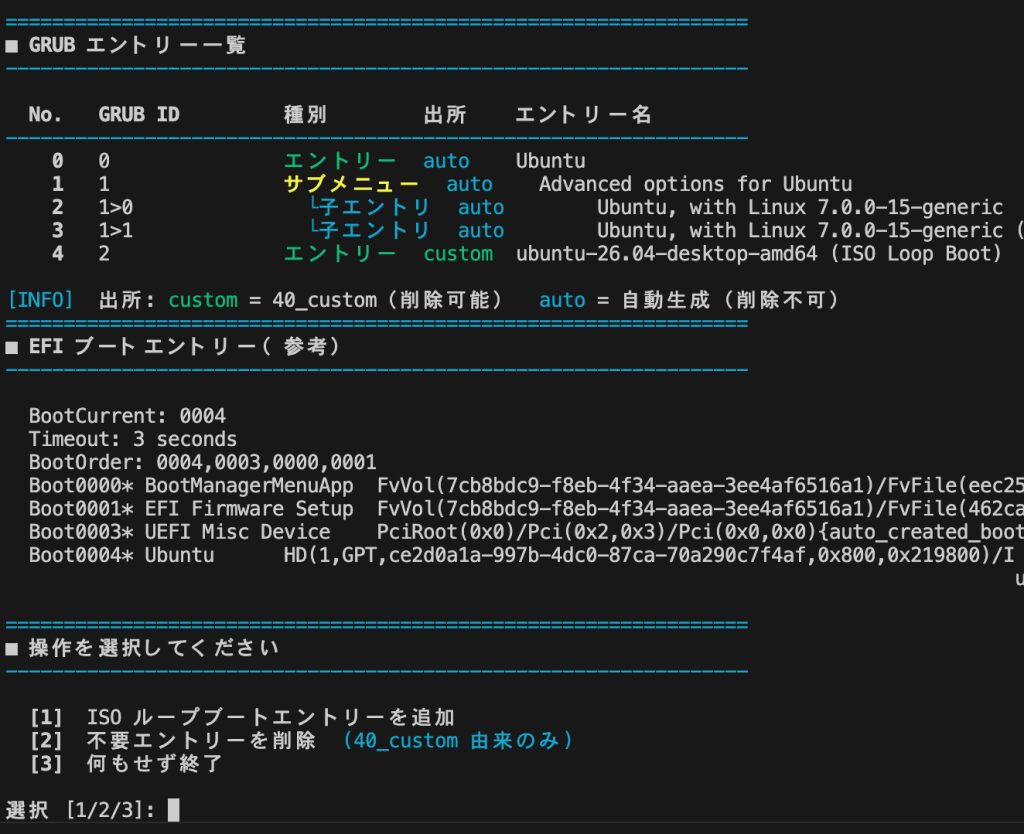
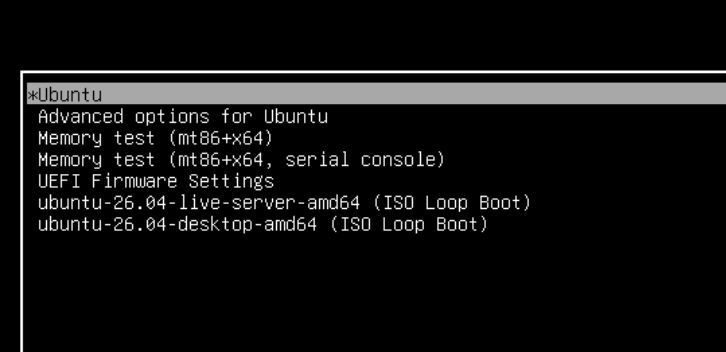
後半パーティションにUbuntuのISOイメージを保存しておき、そこからブート出来るようにしておくと便利です。その際の、GRUBメニューの現在の状況を確認したり、エントリー追加や削除を簡単に出来るようにスクリプトを作成してみました。
目次
ISOと同じパーティションに保存
スクリプトの実行はどこでも構いませんが、ISOイメージのあるパーティションに保存しておけば、クリーンインストールした際にもすぐに実行出来て便利だと思います。
nano grub-manage.sh
sudo bash grub-manage.sh
(UEFI&BIOS対応バージョンを一番最後に追加したので、そちらのほうが良いかも)
#!/usr/bin/env bash
# ============================================================
#  grub-manage.sh  —  GRUB エントリー管理スクリプト (Ubuntu)
#
#  機能:
#    1. ISO ループブートエントリーの追加
#    2. 不要エントリーの削除 (40_custom 由来のみ)
#    3. 何もせず終了
#
#  注意:
#    バックアップは /root/grub-backups/ に保存する。
#    /etc/grub.d/ に置くと update-grub が実行してエントリーが復活する。
# ============================================================

set -euo pipefail

CUSTOM_FILE="${CUSTOM_FILE:-/etc/grub.d/40_custom}"
BACKUP_DIR="/root/grub-backups"

RED='\033[0;31m'
GREEN='\033[0;32m'
YELLOW='\033[1;33m'
CYAN='\033[0;36m'
BOLD='\033[1m'
RESET='\033[0m'

info()    { echo -e "${CYAN}[INFO]${RESET}  $*"; }
success() { echo -e "${GREEN}[OK]${RESET}    $*"; }
warn()    { echo -e "${YELLOW}[WARN]${RESET}  $*"; }
error()   { echo -e "${RED}[ERROR]${RESET} $*" >&2; }
die()     { error "$*"; exit 1; }
hr()      { echo -e "${CYAN}$(printf '=%.0s' {1..64})${RESET}"; }
hr_thin() { echo -e "${CYAN}$(printf -- '-%.0s' {1..64})${RESET}"; }

confirm() {
    local ans
    while true; do
        echo -en "${YELLOW}[確認]${RESET} $1 [y/N]: "
        read -r ans
        case "$ans" in
            [yY]*) return 0 ;;
            [nN]*|"") return 1 ;;
            *) echo "  y または n を入力してください。" ;;
        esac
    done
}

check_root() {
    [[ $EUID -eq 0 ]] || die "sudo で実行してください。\n  例: sudo bash $0"
}

backup_file() {
    local src="$1" base
    base=$(basename "$src")
    mkdir -p "$BACKUP_DIR"
    local dst="${BACKUP_DIR}/${base}.bak.$(date +%Y%m%d_%H%M%S)"
    cp "$src" "$dst"
    echo "$dst"
}

# ============================================================
#  grub.cfg のパスを返す
# ============================================================
find_grub_cfg() {
    local f
    for f in /boot/grub/grub.cfg /boot/grub2/grub.cfg /boot/efi/EFI/ubuntu/grub.cfg; do
        [[ -f "$f" ]] && echo "$f" && return
    done
    echo ""
}

# ============================================================
#  menuentry/submenu の表示名を1行から抽出
# ============================================================
_SQ="'"
_DQ='"'
extract_entry_name() {
    local line="$1"
    local pat="(menuentry|submenu)[[:space:]]+[${_SQ}${_DQ}]([^${_SQ}${_DQ}]*)[${_SQ}${_DQ}]"
    if [[ "$line" =~ $pat ]]; then
        echo "${BASH_REMATCH[2]}"
    else
        echo ""
    fi
}

# ============================================================
#  grub.cfg をパースしてエントリー情報を配列に格納
#
#  ENTRY_NAMES[]    表示名
#  ENTRY_CLASSES[]  toplevel | submenu_header | sub_entry
#  ENTRY_GRUB_IDS[] grub ID (0, 1, 1>0 など)
#  ENTRY_SOURCES[]  custom | auto
# ============================================================
ENTRY_NAMES=()
ENTRY_CLASSES=()
ENTRY_GRUB_IDS=()
ENTRY_SOURCES=()

parse_grub_cfg() {
    local cfg_file="$1"

    # grub.cfg の ### BEGIN /etc/grub.d/40_custom ### セクション内の
    # エントリー名を収集する。
    # バックアップファイル (40_custom.bak.*) 由来のセクションは
    # ファイル名が一致しないため自動的に除外される。
    declare -gA CUSTOM_ENTRY_MAP=()
    local in_cs=0
    while IFS= read -r line; do
        if [[ "$line" =~ ^###\ BEGIN\ (.+)\ ###$ ]]; then
            [[ "${BASH_REMATCH[1]}" == "$CUSTOM_FILE" ]] && in_cs=1 || in_cs=0
            continue
        fi
        [[ "$line" =~ ^###\ END\ (.+)\ ###$ ]] && { in_cs=0; continue; }
        if [[ $in_cs -eq 1 ]]; then
            local cn; cn=$(extract_entry_name "$line")
            [[ -n "$cn" ]] && CUSTOM_ENTRY_MAP["$cn"]=1
        fi
    done < "$cfg_file"

    ENTRY_NAMES=()
    ENTRY_CLASSES=()
    ENTRY_GRUB_IDS=()
    ENTRY_SOURCES=()

    local top_index=-1 in_submenu=0 sub_index=-1 sub_top_index=-1

    while IFS= read -r line; do

        if [[ $in_submenu -eq 0 ]] && [[ "$line" =~ ^submenu[[:space:]] ]]; then
            ((top_index++)) || true
            sub_top_index=$top_index; in_submenu=1; sub_index=-1
            local sname; sname=$(extract_entry_name "$line")
            local src="auto"; [[ -n "${CUSTOM_ENTRY_MAP[$sname]+_}" ]] && src="custom"
            ENTRY_NAMES+=("$sname"); ENTRY_CLASSES+=("submenu_header")
            ENTRY_GRUB_IDS+=("$top_index"); ENTRY_SOURCES+=("$src")
            continue
        fi

        if [[ $in_submenu -eq 1 ]] && [[ "$line" =~ ^'}'[[:space:]]*$ ]]; then
            in_submenu=0; sub_top_index=-1; continue
        fi

        if [[ $in_submenu -eq 1 ]] && [[ "$line" =~ ^[[:space:]]+menuentry[[:space:]] ]]; then
            ((sub_index++)) || true
            local ename; ename=$(extract_entry_name "$line")
            local src="auto"; [[ -n "${CUSTOM_ENTRY_MAP[$ename]+_}" ]] && src="custom"
            ENTRY_NAMES+=("$ename"); ENTRY_CLASSES+=("sub_entry")
            ENTRY_GRUB_IDS+=("${sub_top_index}>${sub_index}"); ENTRY_SOURCES+=("$src")
            continue
        fi

        if [[ $in_submenu -eq 0 ]] && [[ "$line" =~ ^menuentry[[:space:]] ]]; then
            ((top_index++)) || true
            local ename; ename=$(extract_entry_name "$line")
            local src="auto"; [[ -n "${CUSTOM_ENTRY_MAP[$ename]+_}" ]] && src="custom"
            ENTRY_NAMES+=("$ename"); ENTRY_CLASSES+=("toplevel")
            ENTRY_GRUB_IDS+=("$top_index"); ENTRY_SOURCES+=("$src")
            continue
        fi

    done < "$cfg_file"
}

# ============================================================
#  エントリー一覧を表示
# ============================================================
print_entries() {
    if [[ ${#ENTRY_NAMES[@]} -eq 0 ]]; then
        warn "menuentry が見つかりませんでした。"
        return
    fi

    printf "\n  ${BOLD}%-4s  %-14s  %-12s  %-8s  %s${RESET}\n" \
        "No." "GRUB ID" "種別" "出所" "エントリー名"
    hr_thin

    for i in "${!ENTRY_NAMES[@]}"; do
        local class="${ENTRY_CLASSES[$i]}" src="${ENTRY_SOURCES[$i]}"
        local grub_id="${ENTRY_GRUB_IDS[$i]}" name="${ENTRY_NAMES[$i]}"

        local type_label
        case "$class" in
            toplevel)       type_label="${GREEN}エントリー${RESET}" ;;
            submenu_header) type_label="${YELLOW}サブメニュー${RESET}" ;;
            sub_entry)      type_label="${CYAN}  └子エントリ${RESET}" ;;
        esac

        local src_label
        [[ "$src" == "custom" ]] \
            && src_label="${GREEN}custom${RESET}" \
            || src_label="${CYAN}auto${RESET}  "

        local display_name="$name"
        [[ "$class" == "sub_entry" ]] && display_name="    ${name}"

        printf "  ${BOLD}%3d${RESET}   %-14s  %-22b  %-16b  %s\n" \
            "$i" "$grub_id" "$type_label" "$src_label" "$display_name"
    done

    echo ""
    info "出所: ${GREEN}custom${RESET} = 40_custom(削除可能)  ${CYAN}auto${RESET} = 自動生成(削除不可)"
}

# ============================================================
#  現在の GRUB 設定を表示
# ============================================================
print_current_settings() {
    hr
    echo -e "${BOLD}■ 現在の GRUB 設定${RESET}"
    hr_thin

    local default_grub="/etc/default/grub"
    if [[ -f "$default_grub" ]]; then
        local dv tv
        dv=$(grep '^GRUB_DEFAULT=' "$default_grub" | cut -d= -f2 | tr -d '"' || echo "未設定")
        tv=$(grep '^GRUB_TIMEOUT='  "$default_grub" | cut -d= -f2 | tr -d '"' || echo "未設定")
        echo -e "  GRUB_DEFAULT  : ${BOLD}${dv}${RESET}"
        echo -e "  GRUB_TIMEOUT  : ${BOLD}${tv}${RESET} 秒"
    fi

    local env_file
    for env_file in /boot/grub/grubenv /boot/grub2/grubenv; do
        [[ -f "$env_file" ]] || continue
        local saved next rf
        saved=$(grub-editenv "$env_file" list 2>/dev/null | grep '^saved_entry=' | cut -d= -f2 || true)
        next=$(grub-editenv  "$env_file" list 2>/dev/null | grep '^next_entry='   | cut -d= -f2 || true)
        rf=$(grub-editenv    "$env_file" list 2>/dev/null | grep '^recordfail='   | cut -d= -f2 || true)
        echo -e "  saved_entry   : ${BOLD}${saved:-(なし)}${RESET}"
        echo -e "  next_entry    : ${BOLD}${next:-(なし)}${RESET}"
        if [[ "${rf}" == "1" ]]; then
            echo -e "  recordfail    : ${RED}${BOLD}1(残存)${RESET}"
            warn "recordfail=1 が残っています。次回起動時に影響する場合があります。"
        else
            echo -e "  recordfail    : ${GREEN}なし${RESET}"
        fi
        break
    done
    echo ""
}

# ============================================================
#  1: ISO ループブートエントリーの追加
# ============================================================
action_add_iso() {
    hr
    echo -e "${BOLD}■ ISO ループブートエントリーの追加${RESET}"
    hr_thin
    echo ""

    # パーティション選択
    info "パーティション一覧:"
    echo ""

    mapfile -t part_list < <(
        lsblk -lno NAME,SIZE,FSTYPE,LABEL,MOUNTPOINTS \
        | grep -v '^loop' \
        | awk 'NF && $1 ~ /[0-9]$/ { print $0 }'
    )
    [[ ${#part_list[@]} -eq 0 ]] && die "パーティションが見つかりませんでした。"

    printf "  ${BOLD}%-4s  %s${RESET}\n" "No." "NAME  SIZE  FSTYPE  LABEL  MOUNTPOINTS"
    hr_thin
    for i in "${!part_list[@]}"; do
        printf "  ${CYAN}[%2d]${RESET}  %s\n" "$((i+1))" "${part_list[$i]}"
    done
    echo ""

    local part_dev part_uuid
    while true; do
        echo -en "${BOLD}番号を入力してください${RESET} [1-${#part_list[@]}]: "
        read -r sel
        if ! [[ "$sel" =~ ^[0-9]+$ ]] || (( sel < 1 || sel > ${#part_list[@]} )); then
            error "1〜${#part_list[@]} の番号を入力してください。"; continue
        fi
        local pname; pname=$(echo "${part_list[$((sel-1))]}" | awk '{print $1}')
        part_dev="/dev/${pname}"
        [[ -b "$part_dev" ]] || { error "${part_dev} はブロックデバイスではありません。"; continue; }
        local fstype; fstype=$(lsblk -no FSTYPE "$part_dev" 2>/dev/null || true)
        if [[ "$fstype" != "ext4" ]]; then
            warn "${part_dev} は ${fstype:-不明} です(ext4 を想定)。"
            confirm "このまま続けますか?" || continue
        fi
        echo ""
        lsblk -o NAME,SIZE,FSTYPE,UUID,MOUNTPOINTS "$part_dev" 2>/dev/null || true
        echo ""
        confirm "${part_dev} を使用しますか?" && break
    done

    part_uuid=$(blkid -s UUID -o value "$part_dev")
    [[ -n "$part_uuid" ]] || die "UUID を取得できませんでした: ${part_dev}"
    success "パーティション: ${part_dev}  UUID: ${part_uuid}"
    echo ""

    # ISO ファイルの検出と選択
    local mount_point="/mnt/_isoboot_tmp_$$"
    mkdir -p "$mount_point"
    mount "$part_dev" "$mount_point"
    info "${part_dev} を ${mount_point} にマウントしました"
    echo ""

    mapfile -t iso_candidates < <(find "$mount_point" -maxdepth 2 -name "*.iso" 2>/dev/null)
    if [[ ${#iso_candidates[@]} -eq 0 ]]; then
        umount "$mount_point"; rmdir "$mount_point"
        die "ISO ファイルが見つかりませんでした。"
    fi

    info "見つかった ISO ファイル:"
    for i in "${!iso_candidates[@]}"; do
        local sz; sz=$(du -sh "${iso_candidates[$i]}" 2>/dev/null | cut -f1)
        printf "  ${CYAN}[%d]${RESET}  %s  (%s)\n" "$((i+1))" "${iso_candidates[$i]##"$mount_point"}" "$sz"
    done
    printf "  ${CYAN}[%d]${RESET}  何もせず終了\n" "$((${#iso_candidates[@]}+1))"
    echo ""

    local iso_entries=()
    local sel_input sel_nums=()
    while true; do
        echo -en "${BOLD}追加する番号を入力${RESET}(スペース区切り複数可): "
        read -r sel_input
        local cancel_num=$(( ${#iso_candidates[@]} + 1 ))
        local do_cancel=0
        for n in $sel_input; do
            [[ "$n" == "$cancel_num" ]] && do_cancel=1 && break
        done
        if [[ $do_cancel -eq 1 ]] || [[ -z "$sel_input" ]]; then
            umount "$mount_point"; rmdir "$mount_point"
            info "キャンセルしました。"; return
        fi
        local valid=1
        sel_nums=()
        for n in $sel_input; do
            if ! [[ "$n" =~ ^[0-9]+$ ]] || (( n < 1 || n > ${#iso_candidates[@]} )); then
                error "1〜${#iso_candidates[@]} の番号を入力してください。"
                valid=0; break
            fi
            sel_nums+=("$n")
        done
        [[ $valid -eq 1 ]] && break
    done

    for n in "${sel_nums[@]}"; do
        local iso_full="${iso_candidates[$((n-1))]}"
        local iso_rel="${iso_full##"$mount_point"}"
        local iso_name; iso_name=$(basename "$iso_full")
        echo ""
        local paths; paths=$(_detect_boot_paths "$iso_full")
        local vmlinuz="${paths%%:*}"
        local rest="${paths#*:}"; local initrd="${rest%%:*}"; local boot_type="${rest##*:}"
        if [[ "$vmlinuz" == "UNKNOWN" ]]; then
            warn "カーネルパスを自動検出できませんでした。手動入力してください。"
            echo -en "  vmlinuz のパス (例: /casper/vmlinuz): "; read -r vmlinuz
            echo -en "  initrd  のパス (例: /casper/initrd): ";  read -r initrd
            boot_type="custom"
        else
            success "カーネル : ${vmlinuz}"
            success "initrd   : ${initrd}"
            success "起動方式 : ${boot_type}"
        fi
        iso_entries+=("${iso_rel}:${vmlinuz}:${initrd}:${boot_type}")
    done

    umount "$mount_point"; rmdir "$mount_point"
    success "アンマウント完了"

    [[ ${#iso_entries[@]} -eq 0 ]] && { warn "追加するエントリがありません。"; return; }

    echo ""
    local bak; bak=$(backup_file "$CUSTOM_FILE")
    success "バックアップ: ${bak}"
    echo ""

    for entry in "${iso_entries[@]}"; do
        local iso_rel vmlinuz initrd boot_type
        IFS=':' read -r iso_rel vmlinuz initrd boot_type <<< "$entry"
        local menu_label; menu_label=$(basename "$iso_rel" .iso)

        local params
        case "$boot_type" in
            casper) params="boot=casper iso-scan/filename=\$isofile quiet splash ---" ;;
            live)   params="boot=live iso-scan/filename=\$isofile quiet splash" ;;
            *)      params="iso-scan/filename=\$isofile quiet splash" ;;
        esac

        local grub_entry
        grub_entry=$(cat <<EOF

menuentry "${menu_label} (ISO Loop Boot)" {
    insmod part_gpt
    insmod ext2
    insmod loopback
    insmod iso9660
    search --no-floppy --fs-uuid --set=isodev ${part_uuid}
    set isofile="${iso_rel}"
    loopback loop (\$isodev)\$isofile
    linux  (loop)${vmlinuz} ${params}
    initrd (loop)${initrd}
}
EOF
)
        echo -e "${CYAN}追加予定エントリ:${RESET}"
        echo "$grub_entry"
        echo ""
        if confirm "このエントリを追加しますか?"; then
            echo "$grub_entry" >> "$CUSTOM_FILE"
            success "追加しました: ${menu_label}"
        else
            warn "スキップ: ${menu_label}"
        fi
    done

    _run_update_grub
}

# ISO をループマウントして vmlinuz/initrd パスを自動検出
_detect_boot_paths() {
    local iso_path="$1"
    local tmp="/mnt/_iso_inspect_$$"
    mkdir -p "$tmp"
    if ! mount -o loop,ro "$iso_path" "$tmp" 2>/dev/null; then
        echo "UNKNOWN:UNKNOWN:custom"; return
    fi
    local vmlinuz="" initrd="" boot_type=""
    if   [[ -f "$tmp/casper/vmlinuz" ]];     then vmlinuz="/casper/vmlinuz";     initrd="/casper/initrd";    boot_type="casper"
    elif [[ -f "$tmp/casper/vmlinuz.efi" ]]; then vmlinuz="/casper/vmlinuz.efi"; initrd="/casper/initrd.lz"; boot_type="casper"
    elif [[ -f "$tmp/live/vmlinuz" ]];        then vmlinuz="/live/vmlinuz";       initrd="/live/initrd.img";  boot_type="live"
    elif [[ -f "$tmp/live/vmlinuz.efi" ]];    then vmlinuz="/live/vmlinuz.efi";   initrd="/live/initrd.img";  boot_type="live"
    else
        local found; found=$(find "$tmp" -name "vmlinuz*" | head -1 || true)
        if [[ -n "$found" ]]; then
            vmlinuz="${found##"$tmp"}"
            local dir; dir=$(dirname "$found")
            local ird; ird=$(find "$dir" -name "initrd*" | head -1 || true)
            initrd="${ird##"$tmp"}"
            boot_type="custom"
        else
            vmlinuz="UNKNOWN"; initrd="UNKNOWN"; boot_type="custom"
        fi
    fi
    umount "$tmp"; rmdir "$tmp"
    echo "${vmlinuz}:${initrd}:${boot_type}"
}

# ============================================================
#  2: 不要エントリーの削除
# ============================================================
action_delete() {
    hr
    echo -e "${BOLD}■ 不要エントリーの削除${RESET}"
    hr_thin
    echo ""

    local deletable_indices=()
    for i in "${!ENTRY_SOURCES[@]}"; do
        [[ "${ENTRY_SOURCES[$i]}" == "custom" ]] \
        && [[ "${ENTRY_CLASSES[$i]}" != "submenu_header" ]] \
        && deletable_indices+=("$i")
    done

    if [[ ${#deletable_indices[@]} -eq 0 ]]; then
        warn "削除可能なエントリー(40_custom 由来)が見つかりませんでした。"
        return
    fi

    echo -e "  ${BOLD}削除可能なエントリー一覧:${RESET}"
    echo ""
    printf "  ${BOLD}%-4s  %-14s  %s${RESET}\n" "No." "GRUB ID" "エントリー名"
    hr_thin
    for i in "${deletable_indices[@]}"; do
        printf "  ${BOLD}%3d${RESET}   %-14s  %s\n" \
            "$i" "${ENTRY_GRUB_IDS[$i]}" "${ENTRY_NAMES[$i]}"
    done
    echo ""

    local sel_input to_delete=() valid
    while true; do
        echo -en "${BOLD}削除する番号を入力${RESET}(スペース区切り複数可、Enter でキャンセル): "
        read -r sel_input
        [[ -z "$sel_input" ]] && { info "キャンセルしました。"; return; }

        valid=1; to_delete=()
        for num in $sel_input; do
            if ! [[ "$num" =~ ^[0-9]+$ ]]; then
                error "無効な入力: ${num}"; valid=0; break
            fi
            local found=0
            for di in "${deletable_indices[@]}"; do
                [[ "$di" -eq "$num" ]] && found=1 && break
            done
            if [[ $found -eq 0 ]]; then
                error "番号 ${num} は削除可能なエントリーではありません。"; valid=0; break
            fi
            to_delete+=("$num")
        done
        [[ $valid -eq 1 ]] && break
    done

    echo ""
    echo -e "  ${BOLD}${RED}以下のエントリーを削除します:${RESET}"
    for num in "${to_delete[@]}"; do
        echo -e "    ${RED}・${ENTRY_NAMES[$num]}${RESET}"
    done
    echo ""
    confirm "本当に削除しますか?" || { info "キャンセルしました。"; return; }

    local bak; bak=$(backup_file "$CUSTOM_FILE")
    success "バックアップ: ${bak}"

    # /etc/grub.d/ 内の残存バックアップを検出・削除提案
    local stale_baks=()
    while IFS= read -r -d '' f; do
        stale_baks+=("$f")
    done < <(find /etc/grub.d/ -maxdepth 1 -name '40_custom.bak.*' -print0 2>/dev/null)
    if [[ ${#stale_baks[@]} -gt 0 ]]; then
        warn "/etc/grub.d/ に古いバックアップが残っています(エントリー復活の原因):"
        for f in "${stale_baks[@]}"; do warn "  ${f}"; done
        echo ""
        if confirm "古いバックアップを /etc/grub.d/ から削除しますか?"; then
            for f in "${stale_baks[@]}"; do rm -f "$f" && success "削除: $f"; done
        fi
        echo ""
    fi

    # 同名エントリーが複数ある場合に備え、出現順(N番目)で削除する。
    # 降順処理することで後ろから削除してもカウントがずれない。
    declare -A name_delete_occurrences=()
    for num in "${to_delete[@]}"; do
        local tname="${ENTRY_NAMES[$num]}"
        local occ=0
        for i in "${!ENTRY_NAMES[@]}"; do
            [[ "${ENTRY_SOURCES[$i]}" != "custom" ]] && continue
            [[ "${ENTRY_CLASSES[$i]}" == "submenu_header" ]] && continue
            [[ "${ENTRY_NAMES[$i]}" == "$tname" ]] && ((occ++)) || true
            [[ "$i" -eq "$num" ]] && break
        done
        name_delete_occurrences["$tname"]+="${occ} "
    done

    local tmp; tmp=$(mktemp)
    cp "$CUSTOM_FILE" "$tmp"

    for tname in "${!name_delete_occurrences[@]}"; do
        local sorted_occs
        sorted_occs=$(echo "${name_delete_occurrences[$tname]}" | tr ' ' '\n' | grep -v '^$' | sort -rn)
        for occ in $sorted_occs; do
            awk -v name="$tname" -v target_occ="$occ" '
            BEGIN { skip=0; depth=0; match_count=0 }
            {
                if (!skip && /menuentry/ && index($0, name) > 0) {
                    match_count++
                    if (match_count == target_occ) { skip=1; depth=0 }
                }
                if (skip) {
                    n = split($0, chars, "")
                    for (i=1; i<=n; i++) {
                        if (chars[i] == "{") depth++
                        else if (chars[i] == "}") {
                            depth--
                            if (depth <= 0) { skip=0; break }
                        }
                    }
                    next
                }
                print
            }' "$tmp" > "${tmp}.new"
            mv "${tmp}.new" "$tmp"
            success "削除: ${tname}(${occ}番目)"
        done
    done

    cat "$tmp" > "$CUSTOM_FILE"
    rm -f "$tmp"

    _run_update_grub
}

# ============================================================
#  update-grub を実行してエントリー一覧を再表示
# ============================================================
_run_update_grub() {
    echo ""
    info "GRUB を更新中..."
    if update-grub 2>&1; then
        success "update-grub 完了"
        local grub_cfg; grub_cfg=$(find_grub_cfg)
        if [[ -n "$grub_cfg" ]]; then
            echo ""
            info "エントリー一覧を更新しました:"
            parse_grub_cfg "$grub_cfg"
            print_entries
        fi
    else
        warn "update-grub でエラーが発生しました。手動で確認してください: sudo update-grub"
    fi
}

# ============================================================
#  操作メニュー
# ============================================================
show_action_menu() {
    hr
    echo -e "${BOLD}■ 操作を選択してください${RESET}"
    hr_thin
    echo ""
    echo -e "  ${BOLD}[1]${RESET}  ISO ループブートエントリーを追加"
    echo -e "  ${BOLD}[2]${RESET}  不要エントリーを削除  ${CYAN}(40_custom 由来のみ)${RESET}"
    echo -e "  ${BOLD}[3]${RESET}  何もせず終了"
    echo ""

    local choice
    while true; do
        echo -en "${BOLD}選択${RESET} [1/2/3]: "
        read -r choice
        case "$choice" in
            1) action_add_iso; break ;;
            2) action_delete; break ;;
            3) echo ""; info "変更なしで終了します。"; exit 0 ;;
            *) error "1、2、または 3 を入力してください。" ;;
        esac
    done
}

# ============================================================
#  メイン
# ============================================================
main() {
    clear
    hr
    echo -e "${BOLD}  manage-grub.sh — GRUB エントリー管理ツール${RESET}"
    hr
    echo -e "  実行日時: $(date '+%Y-%m-%d %H:%M:%S')"
    echo ""

    check_root

    local grub_cfg; grub_cfg=$(find_grub_cfg)
    [[ -n "$grub_cfg" ]] || die "grub.cfg が見つかりませんでした。"
    info "設定ファイル: ${BOLD}${grub_cfg}${RESET}"

    parse_grub_cfg "$grub_cfg"
    print_current_settings

    hr
    echo -e "${BOLD}■ GRUB エントリー一覧${RESET}"
    hr_thin
    print_entries

    if command -v efibootmgr &>/dev/null; then
        hr
        echo -e "${BOLD}■ EFI ブートエントリー(参考)${RESET}"
        hr_thin
        echo ""
        efibootmgr 2>/dev/null | while IFS= read -r line; do
            [[ "$line" =~ ^\* ]] \
                && echo -e "  ${GREEN}${line}${RESET}  ${CYAN}← アクティブ${RESET}" \
                || echo -e "  ${line}"
        done
        echo ""
    fi

    show_action_menu

    echo ""
    hr
    success "完了しました。"
    hr
    echo ""
}

main "$@"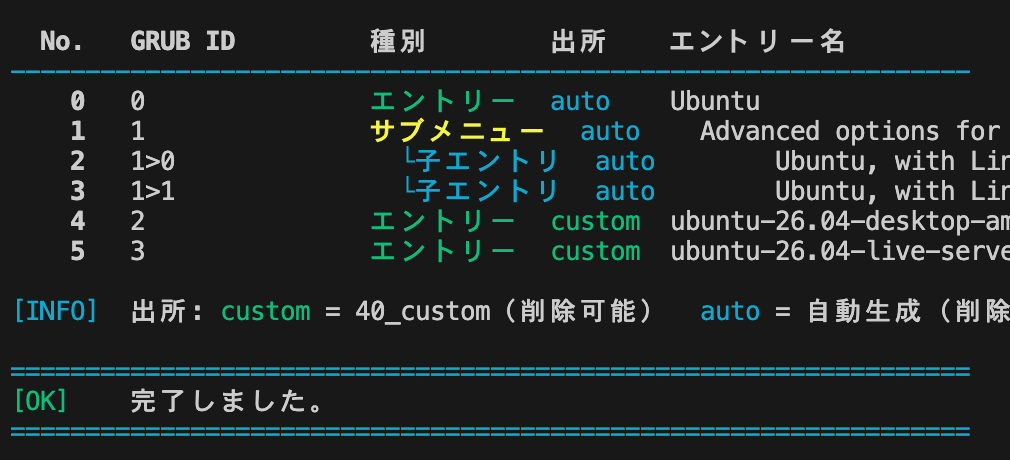
GRUBメニューを表示するには
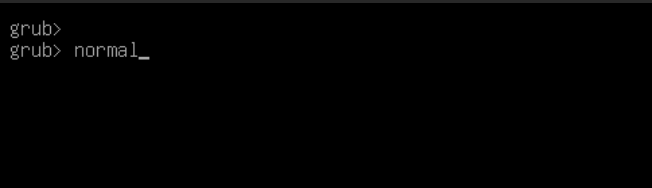
ちなみに、GRUBメニューを表示するには、UEFI環境ならEscキーを、BIOS環境ならShiftキーをタイミングよく押します。押し過ぎて、grub>のプロンプトになった場合はnormalと入力することでメニューが表示されるはずです。
既存の残存バックアップが残っている場合
GRUBメニューに変な項目が残っている場合は下記で解決するかも。
sudo rm /etc/grub.d/40_custom.bak.*
sudo update-grub
ISOイメージのパーティションを/isoに永続マウントするには
こちらのスクリプトを使用します。
UEFIだけではなくBIOS対応に
#!/usr/bin/env bash
# ============================================================
#  grub-manage.sh  —  GRUB エントリー管理スクリプト (Ubuntu)
#
#  機能:
#    1. ISO ループブートエントリーの追加
#    2. 不要エントリーの削除 (40_custom 由来のみ)
#    3. 何もせず終了
#
#  注意:
#    バックアップは /root/grub-backups/ に保存する。
#    /etc/grub.d/ に置くと update-grub が実行してエントリーが復活する。
# ============================================================

set -euo pipefail

CUSTOM_FILE="${CUSTOM_FILE:-/etc/grub.d/40_custom}"
BACKUP_DIR="/root/grub-backups"

RED='\033[0;31m'
GREEN='\033[0;32m'
YELLOW='\033[1;33m'
CYAN='\033[0;36m'
BOLD='\033[1m'
RESET='\033[0m'

info()    { echo -e "${CYAN}[INFO]${RESET}  $*"; }
success() { echo -e "${GREEN}[OK]${RESET}    $*"; }
warn()    { echo -e "${YELLOW}[WARN]${RESET}  $*"; }
error()   { echo -e "${RED}[ERROR]${RESET} $*" >&2; }
die()     { error "$*"; exit 1; }
hr()      { echo -e "${CYAN}$(printf '=%.0s' {1..64})${RESET}"; }
hr_thin() { echo -e "${CYAN}$(printf -- '-%.0s' {1..64})${RESET}"; }

confirm() {
    local ans
    while true; do
        echo -en "${YELLOW}[確認]${RESET} $1 [y/N]: "
        read -r ans
        case "$ans" in
            [yY]*) return 0 ;;
            [nN]*|"") return 1 ;;
            *) echo "  y または n を入力してください。" ;;
        esac
    done
}

check_root() {
    [[ $EUID -eq 0 ]] || die "sudo で実行してください。\n  例: sudo bash $0"
}

backup_file() {
    local src="$1" base
    base=$(basename "$src")
    mkdir -p "$BACKUP_DIR"
    local dst="${BACKUP_DIR}/${base}.bak.$(date +%Y%m%d_%H%M%S)"
    cp "$src" "$dst"
    echo "$dst"
}

# ============================================================
#  ファームウェアモードを検出 (uefi / bios)
# ============================================================
detect_firmware() {
    if [[ -d /sys/firmware/efi ]]; then
        echo "uefi"
    else
        echo "bios"
    fi
}

# ============================================================
#  パーティションテーブル種別を検出 (gpt / msdos / unknown)
# ============================================================
detect_partition_table() {
    local dev="$1"
    # 例: /dev/sda1 → /dev/sda
    local disk
    disk=$(lsblk -no PKNAME "$dev" 2>/dev/null | head -1)
    [[ -z "$disk" ]] && echo "unknown" && return
    local pttype
    pttype=$(blkid -p -o value -s PTTYPE "/dev/${disk}" 2>/dev/null || true)
    case "$pttype" in
        gpt)   echo "gpt" ;;
        dos)   echo "msdos" ;;
        *)     echo "unknown" ;;
    esac
}

# ============================================================
#  ファイルシステム種別から GRUB insmod 名を返す
#  戻り値: "insmod_fs:insmod_part" の形式
# ============================================================
fstype_to_grub_insmod() {
    local fstype="$1"
    local part_type="$2"   # gpt / msdos / unknown

    local ins_fs
    case "$fstype" in
        ext2|ext3|ext4) ins_fs="ext2" ;;
        btrfs)          ins_fs="btrfs" ;;
        xfs)            ins_fs="xfs" ;;
        vfat|fat16|fat32|fat) ins_fs="fat" ;;
        ntfs|ntfs-3g)   ins_fs="ntfs" ;;
        exfat)          ins_fs="exfat" ;;
        *)              ins_fs="ext2" ;;   # fallback
    esac

    local ins_part
    case "$part_type" in
        gpt)    ins_part="part_gpt" ;;
        msdos)  ins_part="part_msdos" ;;
        *)
            # 判定できない場合は両方 insmod する(grub は重複 insmod を無視する)
            ins_part="part_gpt part_msdos"
            ;;
    esac

    echo "${ins_fs}:${ins_part}"
}

# ============================================================
#  grub.cfg のパスを返す
# ============================================================
find_grub_cfg() {
    local f
    for f in /boot/grub/grub.cfg /boot/grub2/grub.cfg /boot/efi/EFI/ubuntu/grub.cfg; do
        [[ -f "$f" ]] && echo "$f" && return
    done
    echo ""
}

# ============================================================
#  menuentry/submenu の表示名を1行から抽出
# ============================================================
_SQ="'"
_DQ='"'
extract_entry_name() {
    local line="$1"
    local pat="(menuentry|submenu)[[:space:]]+[${_SQ}${_DQ}]([^${_SQ}${_DQ}]*)[${_SQ}${_DQ}]"
    if [[ "$line" =~ $pat ]]; then
        echo "${BASH_REMATCH[2]}"
    else
        echo ""
    fi
}

# ============================================================
#  grub.cfg をパースしてエントリー情報を配列に格納
#
#  ENTRY_NAMES[]    表示名
#  ENTRY_CLASSES[]  toplevel | submenu_header | sub_entry
#  ENTRY_GRUB_IDS[] grub ID (0, 1, 1>0 など)
#  ENTRY_SOURCES[]  custom | auto
# ============================================================
ENTRY_NAMES=()
ENTRY_CLASSES=()
ENTRY_GRUB_IDS=()
ENTRY_SOURCES=()

parse_grub_cfg() {
    local cfg_file="$1"

    declare -gA CUSTOM_ENTRY_MAP=()
    local in_cs=0
    while IFS= read -r line; do
        if [[ "$line" =~ ^###\ BEGIN\ (.+)\ ###$ ]]; then
            [[ "${BASH_REMATCH[1]}" == "$CUSTOM_FILE" ]] && in_cs=1 || in_cs=0
            continue
        fi
        [[ "$line" =~ ^###\ END\ (.+)\ ###$ ]] && { in_cs=0; continue; }
        if [[ $in_cs -eq 1 ]]; then
            local cn; cn=$(extract_entry_name "$line")
            [[ -n "$cn" ]] && CUSTOM_ENTRY_MAP["$cn"]=1
        fi
    done < "$cfg_file"

    ENTRY_NAMES=()
    ENTRY_CLASSES=()
    ENTRY_GRUB_IDS=()
    ENTRY_SOURCES=()

    local top_index=-1 in_submenu=0 sub_index=-1 sub_top_index=-1

    while IFS= read -r line; do

        if [[ $in_submenu -eq 0 ]] && [[ "$line" =~ ^submenu[[:space:]] ]]; then
            ((top_index++)) || true
            sub_top_index=$top_index; in_submenu=1; sub_index=-1
            local sname; sname=$(extract_entry_name "$line")
            local src="auto"; [[ -n "${CUSTOM_ENTRY_MAP[$sname]+_}" ]] && src="custom"
            ENTRY_NAMES+=("$sname"); ENTRY_CLASSES+=("submenu_header")
            ENTRY_GRUB_IDS+=("$top_index"); ENTRY_SOURCES+=("$src")
            continue
        fi

        if [[ $in_submenu -eq 1 ]] && [[ "$line" =~ ^'}'[[:space:]]*$ ]]; then
            in_submenu=0; sub_top_index=-1; continue
        fi

        if [[ $in_submenu -eq 1 ]] && [[ "$line" =~ ^[[:space:]]+menuentry[[:space:]] ]]; then
            ((sub_index++)) || true
            local ename; ename=$(extract_entry_name "$line")
            local src="auto"; [[ -n "${CUSTOM_ENTRY_MAP[$ename]+_}" ]] && src="custom"
            ENTRY_NAMES+=("$ename"); ENTRY_CLASSES+=("sub_entry")
            ENTRY_GRUB_IDS+=("${sub_top_index}>${sub_index}"); ENTRY_SOURCES+=("$src")
            continue
        fi

        if [[ $in_submenu -eq 0 ]] && [[ "$line" =~ ^menuentry[[:space:]] ]]; then
            ((top_index++)) || true
            local ename; ename=$(extract_entry_name "$line")
            local src="auto"; [[ -n "${CUSTOM_ENTRY_MAP[$ename]+_}" ]] && src="custom"
            ENTRY_NAMES+=("$ename"); ENTRY_CLASSES+=("toplevel")
            ENTRY_GRUB_IDS+=("$top_index"); ENTRY_SOURCES+=("$src")
            continue
        fi

    done < "$cfg_file"
}

# ============================================================
#  エントリー一覧を表示
# ============================================================
print_entries() {
    if [[ ${#ENTRY_NAMES[@]} -eq 0 ]]; then
        warn "menuentry が見つかりませんでした。"
        return
    fi

    printf "\n  ${BOLD}%-4s  %-14s  %-12s  %-8s  %s${RESET}\n" \
        "No." "GRUB ID" "種別" "出所" "エントリー名"
    hr_thin

    for i in "${!ENTRY_NAMES[@]}"; do
        local class="${ENTRY_CLASSES[$i]}" src="${ENTRY_SOURCES[$i]}"
        local grub_id="${ENTRY_GRUB_IDS[$i]}" name="${ENTRY_NAMES[$i]}"

        local type_label
        case "$class" in
            toplevel)       type_label="${GREEN}エントリー${RESET}" ;;
            submenu_header) type_label="${YELLOW}サブメニュー${RESET}" ;;
            sub_entry)      type_label="${CYAN}  └子エントリ${RESET}" ;;
        esac

        local src_label
        [[ "$src" == "custom" ]] \
            && src_label="${GREEN}custom${RESET}" \
            || src_label="${CYAN}auto${RESET}  "

        local display_name="$name"
        [[ "$class" == "sub_entry" ]] && display_name="    ${name}"

        printf "  ${BOLD}%3d${RESET}   %-14s  %-22b  %-16b  %s\n" \
            "$i" "$grub_id" "$type_label" "$src_label" "$display_name"
    done

    echo ""
    info "出所: ${GREEN}custom${RESET} = 40_custom(削除可能)  ${CYAN}auto${RESET} = 自動生成(削除不可)"
}

# ============================================================
#  現在の GRUB 設定を表示
# ============================================================
print_current_settings() {
    hr
    echo -e "${BOLD}■ 現在の GRUB 設定${RESET}"
    hr_thin

    # ファームウェアモード表示
    local fw; fw=$(detect_firmware)
    if [[ "$fw" == "uefi" ]]; then
        echo -e "  ファームウェア: ${GREEN}${BOLD}UEFI${RESET}"
    else
        echo -e "  ファームウェア: ${YELLOW}${BOLD}BIOS (Legacy)${RESET}"
    fi

    local default_grub="/etc/default/grub"
    if [[ -f "$default_grub" ]]; then
        local dv tv
        dv=$(grep '^GRUB_DEFAULT=' "$default_grub" | cut -d= -f2 | tr -d '"' || echo "未設定")
        tv=$(grep '^GRUB_TIMEOUT='  "$default_grub" | cut -d= -f2 | tr -d '"' || echo "未設定")
        echo -e "  GRUB_DEFAULT  : ${BOLD}${dv}${RESET}"
        echo -e "  GRUB_TIMEOUT  : ${BOLD}${tv}${RESET} 秒"
    fi

    local env_file
    for env_file in /boot/grub/grubenv /boot/grub2/grubenv; do
        [[ -f "$env_file" ]] || continue
        local saved next rf
        saved=$(grub-editenv "$env_file" list 2>/dev/null | grep '^saved_entry=' | cut -d= -f2 || true)
        next=$(grub-editenv  "$env_file" list 2>/dev/null | grep '^next_entry='   | cut -d= -f2 || true)
        rf=$(grub-editenv    "$env_file" list 2>/dev/null | grep '^recordfail='   | cut -d= -f2 || true)
        echo -e "  saved_entry   : ${BOLD}${saved:-(なし)}${RESET}"
        echo -e "  next_entry    : ${BOLD}${next:-(なし)}${RESET}"
        if [[ "${rf}" == "1" ]]; then
            echo -e "  recordfail    : ${RED}${BOLD}1(残存)${RESET}"
            warn "recordfail=1 が残っています。次回起動時に影響する場合があります。"
        else
            echo -e "  recordfail    : ${GREEN}なし${RESET}"
        fi
        break
    done
    echo ""
}

# ============================================================
#  1: ISO ループブートエントリーの追加
# ============================================================
action_add_iso() {
    hr
    echo -e "${BOLD}■ ISO ループブートエントリーの追加${RESET}"
    hr_thin
    echo ""

    # パーティション選択
    info "パーティション一覧:"
    echo ""

    mapfile -t part_list < <(
        lsblk -lno NAME,SIZE,FSTYPE,LABEL,MOUNTPOINTS \
        | grep -v '^loop' \
        | awk 'NF && $1 ~ /[0-9]$/ { print $0 }'
    )
    [[ ${#part_list[@]} -eq 0 ]] && die "パーティションが見つかりませんでした。"

    printf "  ${BOLD}%-4s  %s${RESET}\n" "No." "NAME  SIZE  FSTYPE  LABEL  MOUNTPOINTS"
    hr_thin
    for i in "${!part_list[@]}"; do
        printf "  ${CYAN}[%2d]${RESET}  %s\n" "$((i+1))" "${part_list[$i]}"
    done
    echo ""

    local part_dev part_uuid part_fstype part_pttype
    while true; do
        echo -en "${BOLD}番号を入力してください${RESET} [1-${#part_list[@]}]: "
        read -r sel
        if ! [[ "$sel" =~ ^[0-9]+$ ]] || (( sel < 1 || sel > ${#part_list[@]} )); then
            error "1〜${#part_list[@]} の番号を入力してください。"; continue
        fi
        local pname; pname=$(echo "${part_list[$((sel-1))]}" | awk '{print $1}')
        part_dev="/dev/${pname}"
        [[ -b "$part_dev" ]] || { error "${part_dev} はブロックデバイスではありません。"; continue; }

        part_fstype=$(lsblk -no FSTYPE "$part_dev" 2>/dev/null | head -1 || true)
        part_pttype=$(detect_partition_table "$part_dev")

        # サポート外 FS の警告
        case "$part_fstype" in
            ext2|ext3|ext4|btrfs|xfs|vfat|fat16|fat32|fat|ntfs|ntfs-3g|exfat) ;;
            *)
                warn "${part_dev} のファイルシステム(${part_fstype:-不明})は動作確認済みではありません。"
                confirm "このまま続けますか?" || continue
                ;;
        esac

        echo ""
        lsblk -o NAME,SIZE,FSTYPE,UUID,MOUNTPOINTS "$part_dev" 2>/dev/null || true
        echo -e "  パーティションテーブル: ${BOLD}${part_pttype}${RESET}"
        echo ""
        confirm "${part_dev} を使用しますか?" && break
    done

    part_uuid=$(blkid -s UUID -o value "$part_dev")
    [[ -n "$part_uuid" ]] || die "UUID を取得できませんでした: ${part_dev}"
    success "パーティション : ${part_dev}"
    success "UUID          : ${part_uuid}"
    success "FS 種別       : ${part_fstype:-不明}"
    success "パーティション表: ${part_pttype}"
    echo ""

    # insmod 文字列を決定
    local insmod_str; insmod_str=$(fstype_to_grub_insmod "$part_fstype" "$part_pttype")
    local ins_fs="${insmod_str%%:*}"
    local ins_part="${insmod_str#*:}"   # "part_gpt" / "part_msdos" / "part_gpt part_msdos"

    # ISO ファイルの検出と選択
    local mount_point="/mnt/_isoboot_tmp_$$"
    mkdir -p "$mount_point"
    mount "$part_dev" "$mount_point"
    info "${part_dev} を ${mount_point} にマウントしました"
    echo ""

    mapfile -t iso_candidates < <(find "$mount_point" -maxdepth 2 -name "*.iso" 2>/dev/null)
    if [[ ${#iso_candidates[@]} -eq 0 ]]; then
        umount "$mount_point"; rmdir "$mount_point"
        die "ISO ファイルが見つかりませんでした。"
    fi

    info "見つかった ISO ファイル:"
    for i in "${!iso_candidates[@]}"; do
        local sz; sz=$(du -sh "${iso_candidates[$i]}" 2>/dev/null | cut -f1)
        printf "  ${CYAN}[%d]${RESET}  %s  (%s)\n" "$((i+1))" "${iso_candidates[$i]##"$mount_point"}" "$sz"
    done
    printf "  ${CYAN}[%d]${RESET}  何もせず終了\n" "$((${#iso_candidates[@]}+1))"
    echo ""

    local iso_entries=()
    local sel_input sel_nums=()
    while true; do
        echo -en "${BOLD}追加する番号を入力${RESET}(スペース区切り複数可): "
        read -r sel_input
        local cancel_num=$(( ${#iso_candidates[@]} + 1 ))
        local do_cancel=0
        for n in $sel_input; do
            [[ "$n" == "$cancel_num" ]] && do_cancel=1 && break
        done
        if [[ $do_cancel -eq 1 ]] || [[ -z "$sel_input" ]]; then
            umount "$mount_point"; rmdir "$mount_point"
            info "キャンセルしました。"; return
        fi
        local valid=1
        sel_nums=()
        for n in $sel_input; do
            if ! [[ "$n" =~ ^[0-9]+$ ]] || (( n < 1 || n > ${#iso_candidates[@]} )); then
                error "1〜${#iso_candidates[@]} の番号を入力してください。"
                valid=0; break
            fi
            sel_nums+=("$n")
        done
        [[ $valid -eq 1 ]] && break
    done

    for n in "${sel_nums[@]}"; do
        local iso_full="${iso_candidates[$((n-1))]}"
        local iso_rel="${iso_full##"$mount_point"}"
        local iso_name; iso_name=$(basename "$iso_full")
        echo ""
        local paths; paths=$(_detect_boot_paths "$iso_full")
        local vmlinuz="${paths%%:*}"
        local rest="${paths#*:}"; local initrd="${rest%%:*}"; local boot_type="${rest##*:}"
        if [[ "$vmlinuz" == "UNKNOWN" ]]; then
            warn "カーネルパスを自動検出できませんでした。手動入力してください。"
            echo -en "  vmlinuz のパス (例: /casper/vmlinuz): "; read -r vmlinuz
            echo -en "  initrd  のパス (例: /casper/initrd): ";  read -r initrd
            boot_type="custom"
        else
            success "カーネル : ${vmlinuz}"
            success "initrd   : ${initrd}"
            success "起動方式 : ${boot_type}"
        fi
        iso_entries+=("${iso_rel}:${vmlinuz}:${initrd}:${boot_type}")
    done

    umount "$mount_point"; rmdir "$mount_point"
    success "アンマウント完了"

    [[ ${#iso_entries[@]} -eq 0 ]] && { warn "追加するエントリがありません。"; return; }

    echo ""
    local bak; bak=$(backup_file "$CUSTOM_FILE")
    success "バックアップ: ${bak}"
    echo ""

    for entry in "${iso_entries[@]}"; do
        local iso_rel vmlinuz initrd boot_type
        IFS=':' read -r iso_rel vmlinuz initrd boot_type <<< "$entry"
        local menu_label; menu_label=$(basename "$iso_rel" .iso)

        local params
        case "$boot_type" in
            casper) params="boot=casper iso-scan/filename=\$isofile quiet splash ---" ;;
            live)   params="boot=live iso-scan/filename=\$isofile quiet splash" ;;
            *)      params="iso-scan/filename=\$isofile quiet splash" ;;
        esac

        # insmod 行を動的生成
        # ins_part は空白区切りで複数ある場合もある
        local insmod_lines=""
        for mod in $ins_part; do
            insmod_lines+="    insmod ${mod}"$'\n'
        done
        insmod_lines+="    insmod loopback"$'\n'
        insmod_lines+="    insmod iso9660"$'\n'
        insmod_lines+="    insmod ${ins_fs}"

        local grub_entry
        grub_entry=$(cat <<EOF

menuentry "${menu_label} (ISO Loop Boot)" {
${insmod_lines}
    search --no-floppy --fs-uuid --set=isodev ${part_uuid}
    set isofile="${iso_rel}"
    loopback loop (\$isodev)\$isofile
    linux  (loop)${vmlinuz} ${params}
    initrd (loop)${initrd}
}
EOF
)
        echo -e "${CYAN}追加予定エントリ:${RESET}"
        echo "$grub_entry"
        echo ""
        if confirm "このエントリを追加しますか?"; then
            echo "$grub_entry" >> "$CUSTOM_FILE"
            success "追加しました: ${menu_label}"
        else
            warn "スキップ: ${menu_label}"
        fi
    done

    _run_update_grub
}

# ISO をループマウントして vmlinuz/initrd パスを自動検出
_detect_boot_paths() {
    local iso_path="$1"
    local tmp="/mnt/_iso_inspect_$$"
    mkdir -p "$tmp"
    if ! mount -o loop,ro "$iso_path" "$tmp" 2>/dev/null; then
        echo "UNKNOWN:UNKNOWN:custom"; return
    fi
    local vmlinuz="" initrd="" boot_type=""
    if   [[ -f "$tmp/casper/vmlinuz" ]];     then vmlinuz="/casper/vmlinuz";     initrd="/casper/initrd";    boot_type="casper"
    elif [[ -f "$tmp/casper/vmlinuz.efi" ]]; then vmlinuz="/casper/vmlinuz.efi"; initrd="/casper/initrd.lz"; boot_type="casper"
    elif [[ -f "$tmp/live/vmlinuz" ]];        then vmlinuz="/live/vmlinuz";       initrd="/live/initrd.img";  boot_type="live"
    elif [[ -f "$tmp/live/vmlinuz.efi" ]];    then vmlinuz="/live/vmlinuz.efi";   initrd="/live/initrd.img";  boot_type="live"
    else
        local found; found=$(find "$tmp" -name "vmlinuz*" | head -1 || true)
        if [[ -n "$found" ]]; then
            vmlinuz="${found##"$tmp"}"
            local dir; dir=$(dirname "$found")
            local ird; ird=$(find "$dir" -name "initrd*" | head -1 || true)
            initrd="${ird##"$tmp"}"
            boot_type="custom"
        else
            vmlinuz="UNKNOWN"; initrd="UNKNOWN"; boot_type="custom"
        fi
    fi
    umount "$tmp"; rmdir "$tmp"
    echo "${vmlinuz}:${initrd}:${boot_type}"
}

# ============================================================
#  2: 不要エントリーの削除
# ============================================================
action_delete() {
    hr
    echo -e "${BOLD}■ 不要エントリーの削除${RESET}"
    hr_thin
    echo ""

    local deletable_indices=()
    for i in "${!ENTRY_SOURCES[@]}"; do
        [[ "${ENTRY_SOURCES[$i]}" == "custom" ]] \
        && [[ "${ENTRY_CLASSES[$i]}" != "submenu_header" ]] \
        && deletable_indices+=("$i")
    done

    if [[ ${#deletable_indices[@]} -eq 0 ]]; then
        warn "削除可能なエントリー(40_custom 由来)が見つかりませんでした。"
        return
    fi

    echo -e "  ${BOLD}削除可能なエントリー一覧:${RESET}"
    echo ""
    printf "  ${BOLD}%-4s  %-14s  %s${RESET}\n" "No." "GRUB ID" "エントリー名"
    hr_thin
    for i in "${deletable_indices[@]}"; do
        printf "  ${BOLD}%3d${RESET}   %-14s  %s\n" \
            "$i" "${ENTRY_GRUB_IDS[$i]}" "${ENTRY_NAMES[$i]}"
    done
    echo ""

    local sel_input to_delete=() valid
    while true; do
        echo -en "${BOLD}削除する番号を入力${RESET}(スペース区切り複数可、Enter でキャンセル): "
        read -r sel_input
        [[ -z "$sel_input" ]] && { info "キャンセルしました。"; return; }

        valid=1; to_delete=()
        for num in $sel_input; do
            if ! [[ "$num" =~ ^[0-9]+$ ]]; then
                error "無効な入力: ${num}"; valid=0; break
            fi
            local found=0
            for di in "${deletable_indices[@]}"; do
                [[ "$di" -eq "$num" ]] && found=1 && break
            done
            if [[ $found -eq 0 ]]; then
                error "番号 ${num} は削除可能なエントリーではありません。"; valid=0; break
            fi
            to_delete+=("$num")
        done
        [[ $valid -eq 1 ]] && break
    done

    echo ""
    echo -e "  ${BOLD}${RED}以下のエントリーを削除します:${RESET}"
    for num in "${to_delete[@]}"; do
        echo -e "    ${RED}・${ENTRY_NAMES[$num]}${RESET}"
    done
    echo ""
    confirm "本当に削除しますか?" || { info "キャンセルしました。"; return; }

    local bak; bak=$(backup_file "$CUSTOM_FILE")
    success "バックアップ: ${bak}"

    # /etc/grub.d/ 内の残存バックアップを検出・削除提案
    local stale_baks=()
    while IFS= read -r -d '' f; do
        stale_baks+=("$f")
    done < <(find /etc/grub.d/ -maxdepth 1 -name '40_custom.bak.*' -print0 2>/dev/null)
    if [[ ${#stale_baks[@]} -gt 0 ]]; then
        warn "/etc/grub.d/ に古いバックアップが残っています(エントリー復活の原因):"
        for f in "${stale_baks[@]}"; do warn "  ${f}"; done
        echo ""
        if confirm "古いバックアップを /etc/grub.d/ から削除しますか?"; then
            for f in "${stale_baks[@]}"; do rm -f "$f" && success "削除: $f"; done
        fi
        echo ""
    fi

    declare -A name_delete_occurrences=()
    for num in "${to_delete[@]}"; do
        local tname="${ENTRY_NAMES[$num]}"
        local occ=0
        for i in "${!ENTRY_NAMES[@]}"; do
            [[ "${ENTRY_SOURCES[$i]}" != "custom" ]] && continue
            [[ "${ENTRY_CLASSES[$i]}" == "submenu_header" ]] && continue
            [[ "${ENTRY_NAMES[$i]}" == "$tname" ]] && ((occ++)) || true
            [[ "$i" -eq "$num" ]] && break
        done
        name_delete_occurrences["$tname"]+="${occ} "
    done

    local tmp; tmp=$(mktemp)
    cp "$CUSTOM_FILE" "$tmp"

    for tname in "${!name_delete_occurrences[@]}"; do
        local sorted_occs
        sorted_occs=$(echo "${name_delete_occurrences[$tname]}" | tr ' ' '\n' | grep -v '^$' | sort -rn)
        for occ in $sorted_occs; do
            awk -v name="$tname" -v target_occ="$occ" '
            BEGIN { skip=0; depth=0; match_count=0 }
            {
                if (!skip && /menuentry/ && index($0, name) > 0) {
                    match_count++
                    if (match_count == target_occ) { skip=1; depth=0 }
                }
                if (skip) {
                    n = split($0, chars, "")
                    for (i=1; i<=n; i++) {
                        if (chars[i] == "{") depth++
                        else if (chars[i] == "}") {
                            depth--
                            if (depth <= 0) { skip=0; break }
                        }
                    }
                    next
                }
                print
            }' "$tmp" > "${tmp}.new"
            mv "${tmp}.new" "$tmp"
            success "削除: ${tname}(${occ}番目)"
        done
    done

    cat "$tmp" > "$CUSTOM_FILE"
    rm -f "$tmp"

    _run_update_grub
}

# ============================================================
#  update-grub を実行してエントリー一覧を再表示
# ============================================================
_run_update_grub() {
    echo ""
    info "GRUB を更新中..."
    if update-grub 2>&1; then
        success "update-grub 完了"
        local grub_cfg; grub_cfg=$(find_grub_cfg)
        if [[ -n "$grub_cfg" ]]; then
            echo ""
            info "エントリー一覧を更新しました:"
            parse_grub_cfg "$grub_cfg"
            print_entries
        fi
    else
        warn "update-grub でエラーが発生しました。手動で確認してください: sudo update-grub"
    fi
}

# ============================================================
#  操作メニュー
# ============================================================
show_action_menu() {
    hr
    echo -e "${BOLD}■ 操作を選択してください${RESET}"
    hr_thin
    echo ""
    echo -e "  ${BOLD}[1]${RESET}  ISO ループブートエントリーを追加"
    echo -e "  ${BOLD}[2]${RESET}  不要エントリーを削除  ${CYAN}(40_custom 由来のみ)${RESET}"
    echo -e "  ${BOLD}[3]${RESET}  何もせず終了"
    echo ""

    local choice
    while true; do
        echo -en "${BOLD}選択${RESET} [1/2/3]: "
        read -r choice
        case "$choice" in
            1) action_add_iso; break ;;
            2) action_delete; break ;;
            3) echo ""; info "変更なしで終了します。"; exit 0 ;;
            *) error "1、2、または 3 を入力してください。" ;;
        esac
    done
}

# ============================================================
#  メイン
# ============================================================
main() {
    clear
    hr
    echo -e "${BOLD}  manage-grub.sh — GRUB エントリー管理ツール${RESET}"
    hr
    echo -e "  実行日時: $(date '+%Y-%m-%d %H:%M:%S')"
    echo ""

    check_root

    local grub_cfg; grub_cfg=$(find_grub_cfg)
    [[ -n "$grub_cfg" ]] || die "grub.cfg が見つかりませんでした。"
    info "設定ファイル: ${BOLD}${grub_cfg}${RESET}"

    parse_grub_cfg "$grub_cfg"
    print_current_settings

    hr
    echo -e "${BOLD}■ GRUB エントリー一覧${RESET}"
    hr_thin
    print_entries

    # UEFI 環境のみ efibootmgr 表示
    if [[ $(detect_firmware) == "uefi" ]] && command -v efibootmgr &>/dev/null; then
        hr
        echo -e "${BOLD}■ EFI ブートエントリー(参考)${RESET}"
        hr_thin
        echo ""
        efibootmgr 2>/dev/null | while IFS= read -r line; do
            [[ "$line" =~ ^\* ]] \
                && echo -e "  ${GREEN}${line}${RESET}  ${CYAN}← アクティブ${RESET}" \
                || echo -e "  ${line}"
        done
        echo ""
    fi

    show_action_menu

    echo ""
    hr
    success "完了しました。"
    hr
    echo ""
}

main "$@"