壊れたHDDからのデータ救出に便利な「ddrescue」。基本的にはコマンドで使用するツールとなりますが、GUIがあると分かりやすいかなと作ってみました。別PCから取り出したHDDと、コピー先となるHDDを接続したりして使います。
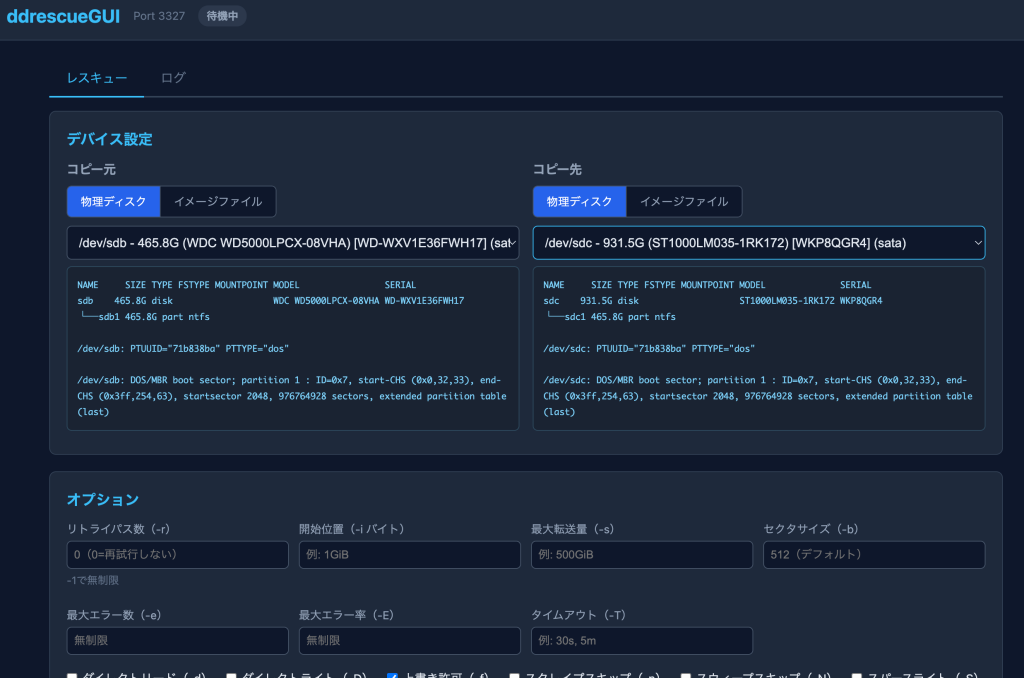
最終的には、出力画面の関係でコマンドをコピーしてターミナルで実行したほうが表示が安定するのですが…
ディスクの選択がしやすいのと、ログの管理がしやすいというメリットもあるかなと。コマンドのジェネレータとして使ってみるとよいかと。
目次
ホストに直接インストール
sudo nano install-ddrescuegui3.sh
sudo bash install-ddrescuegui3.sh
#!/bin/bash
set -e
INSTALL_DIR="/opt/ddrescuegui"
PORT=3327
SERVICE_NAME="ddrescuegui"
echo "=== ddrescueGUI Installer v3 ==="
if [ "$(id -u)" -ne 0 ]; then
echo "Error: This script must be run as root." >&2
exit 1
fi
echo "[1/5] Installing dependencies..."
apt-get update -qq
apt-get install -y -qq python3 gddrescue smartmontools fdisk
echo "[2/5] Creating directories..."
mkdir -p "$INSTALL_DIR/logs" "$INSTALL_DIR/public"
echo "[3/5] Writing server..."
cat > "$INSTALL_DIR/server.py" << 'PYEOF'
#!/usr/bin/env python3
import http.server
import json
import os
import subprocess
import time
import signal
from urllib.parse import urlparse, parse_qs
PORT = 3327
BASE_DIR = os.path.dirname(os.path.abspath(__file__))
LOG_DIR = os.path.join(BASE_DIR, "logs")
os.makedirs(LOG_DIR, exist_ok=True)
running_process = None
current_log_file = None
def get_block_devices():
devices = []
try:
r = subprocess.run(
["lsblk", "-J", "-o", "NAME,SIZE,TYPE,MODEL,SERIAL,MOUNTPOINT,TRAN,FSTYPE"],
capture_output=True, text=True, timeout=5
)
if r.returncode == 0:
data = json.loads(r.stdout)
for dev in data.get("blockdevices", []):
if dev.get("type") == "disk":
name = dev.get("name", "")
size = dev.get("size", "")
model = (dev.get("model") or "").strip()
serial = (dev.get("serial") or "").strip()
tran = (dev.get("tran") or "").strip()
mount = dev.get("mountpoint") or ""
fstype = (dev.get("fstype") or "").strip()
label = f"/dev/{name} - {size}"
if model: label += f" ({model})"
if serial: label += f" [{serial}]"
if tran: label += f" ({tran})"
if fstype: label += f" [{fstype}]"
if mount: label += f" mounted:{mount}"
devices.append({"path": f"/dev/{name}", "name": name, "size": size,
"model": model, "serial": serial, "tran": tran,
"mountpoint": mount, "fstype": fstype, "label": label})
except Exception:
pass
return devices
def get_device_info(path):
info = {}
try:
r = subprocess.run(["lsblk", "-o", "NAME,SIZE,TYPE,FSTYPE,MOUNTPOINT,MODEL,SERIAL", path],
capture_output=True, text=True, timeout=5)
if r.returncode == 0 and r.stdout.strip():
info["lsblk"] = r.stdout.strip()
except Exception:
pass
try:
r = subprocess.run(["blkid", path], capture_output=True, text=True, timeout=5)
if r.returncode == 0 and r.stdout.strip():
info["blkid"] = r.stdout.strip()
except Exception:
pass
try:
r = subprocess.run(["file", "-s", path], capture_output=True, text=True, timeout=5)
if r.returncode == 0 and r.stdout.strip():
info["file_type"] = r.stdout.strip()
except Exception:
pass
return info
def get_file_info(path, for_dest=False):
info = {}
if not os.path.exists(path):
if for_dest:
info["status"] = "新規作成"
dir_path = os.path.dirname(path)
if dir_path and os.path.isdir(dir_path):
info["target_dir"] = f"ディレクトリ: {dir_path}"
try:
st = os.statvfs(dir_path)
free = st.f_bavail * st.f_frsize
info["free_space"] = f"空き容量: {free / (1024**3):.2f} GB"
except Exception:
pass
else:
info["target_dir"] = f"ディレクトリが見つかりません: {dir_path}"
else:
info["error"] = "ファイルが見つかりません"
return info
try:
stat = os.stat(path)
info["size"] = stat.st_size
info["size_human"] = f"{stat.st_size / (1024**3):.2f} GB"
info["mtime"] = time.strftime("%Y-%m-%d %H:%M:%S", time.localtime(stat.st_mtime))
except Exception:
pass
try:
r = subprocess.run(["file", path], capture_output=True, text=True, timeout=5)
if r.returncode == 0:
info["file_type"] = r.stdout.strip()
except Exception:
pass
return info
def get_log_files():
logs = []
if os.path.isdir(LOG_DIR):
for f in sorted(os.listdir(LOG_DIR), reverse=True):
if f.endswith(".log"):
fpath = os.path.join(LOG_DIR, f)
logs.append({"name": f, "size": os.path.getsize(fpath), "mtime": os.path.getmtime(fpath)})
return logs
def read_log_tail(filepath, lines=100):
try:
with open(filepath, "r", errors="replace") as f:
all_lines = f.readlines()
return "".join(all_lines[-lines:])
except Exception:
return ""
class Handler(http.server.SimpleHTTPRequestHandler):
def __init__(self, *a, **kw):
super().__init__(*a, directory=os.path.join(BASE_DIR, "public"), **kw)
def do_GET(self):
p = urlparse(self.path)
if p.path == "/api/devices":
self._json(get_block_devices())
elif p.path == "/api/device-info":
q = parse_qs(p.query)
path = q.get("path", [""])[0]
self._json(get_device_info(path) if path else {"error": "path required"}, 400 if not path else 200)
elif p.path == "/api/file-info":
q = parse_qs(p.query)
path = q.get("path", [""])[0]
for_dest = q.get("for_dest", ["0"])[0] == "1"
self._json(get_file_info(path, for_dest) if path else {"error": "path required"}, 400 if not path else 200)
elif p.path == "/api/status":
self._json({"running": running_process is not None and running_process.poll() is None, "log_file": current_log_file})
elif p.path == "/api/logs":
self._json(get_log_files())
elif p.path == "/api/log-content":
q = parse_qs(p.query)
name = q.get("name", [""])[0]
lines = int(q.get("lines", ["100"])[0])
if name:
fpath = os.path.join(LOG_DIR, name)
self._json({"content": read_log_tail(fpath, lines)} if os.path.exists(fpath) else {"error": "not found"}, 404 if not os.path.exists(fpath) else 200)
else:
self._json({"error": "name required"}, 400)
elif p.path == "/api/log-stream":
q = parse_qs(p.query)
name = q.get("name", [""])[0]
if name: self._stream_log(os.path.join(LOG_DIR, name))
else: self._json({"error": "name required"}, 400)
else:
super().do_GET()
def do_POST(self):
p = urlparse(self.path)
cl = int(self.headers.get("Content-Length", 0))
body = self.rfile.read(cl) if cl else b""
try: data = json.loads(body) if body else {}
except: data = {}
if p.path == "/api/start": self._handle_start(data)
elif p.path == "/api/stop": self._handle_stop()
elif p.path == "/api/force-stop": self._handle_force_stop()
else: self._json({"error": "not found"}, 404)
def do_OPTIONS(self):
self.send_response(200)
self.send_header("Access-Control-Allow-Origin", "*")
self.send_header("Access-Control-Allow-Methods", "GET, POST, OPTIONS")
self.send_header("Access-Control-Allow-Headers", "Content-Type")
self.end_headers()
def _handle_start(self, data):
global running_process, current_log_file
if running_process and running_process.poll() is None:
self._json({"error": "既に実行中です"}); return
source = data.get("source", "")
dest = data.get("dest", "")
options = data.get("options", {})
resume_log = data.get("resume_log", "")
if not source: self._json({"error": "コピー元を指定してください"}); return
if not dest: self._json({"error": "コピー先を指定してください"}); return
timestamp = time.strftime("%Y%m%d_%H%M%S")
log_name = resume_log if resume_log else f"ddrescue_{os.path.basename(source).replace('/', '_')[:20]}_{timestamp}.run.log"
current_log_file = os.path.join(LOG_DIR, log_name)
mapfile_path = current_log_file[:-len(".run.log")] + ".map" if current_log_file.endswith(".run.log") else current_log_file + ".map"
cmd = ["stdbuf", "-o0", "-e0", "ddrescue"]
if options.get("direct"): cmd.append("-d")
if options.get("force"): cmd.append("-f")
if options.get("no_scrape"): cmd.append("-n")
if options.get("no_sweep"): cmd.append("-N")
if options.get("sparse"): cmd.append("-S")
if options.get("odirect"): cmd.append("-D")
if options.get("reverse"): cmd.append("-R")
if options.get("unidirectional"): cmd.append("-u")
for opt, flag in [
("retry_passes", "-r"), ("input_pos", "-i"),
("size_limit", "-s"), ("sector_size", "-b"), ("cluster_size", "-c"),
("min_read_rate", "-a"), ("max_bad_areas", "-e"),
("max_error_rate", "-E"), ("timeout", "-T"),
]:
val = options.get(opt, "")
if val and str(val).strip():
cmd.extend([flag, str(val).strip()])
cmd.extend([source, dest, mapfile_path])
try:
log_f = open(current_log_file, "a")
log_f.write(f"=== ddrescue started at {time.strftime('%Y-%m-%d %H:%M:%S')} ===\n")
log_f.write(f"Command: {' '.join(cmd)}\n\n")
log_f.flush()
running_process = subprocess.Popen(cmd, stdout=log_f, stderr=subprocess.STDOUT, preexec_fn=os.setsid)
log_f.close()
self._json({"ok": True, "log_file": log_name, "pid": running_process.pid})
except Exception as e:
self._json({"error": str(e)})
def _handle_stop(self):
global running_process
if running_process and running_process.poll() is None:
try:
os.killpg(os.getpgid(running_process.pid), signal.SIGTERM)
time.sleep(1)
if running_process.poll() is None:
os.killpg(os.getpgid(running_process.pid), signal.SIGKILL)
except Exception: pass
self._json({"ok": True})
else:
self._json({"error": "実行中のプロセスがありません"})
def _handle_force_stop(self):
global running_process
if running_process and running_process.poll() is None:
try:
os.killpg(os.getpgid(running_process.pid), signal.SIGKILL)
except Exception: pass
self._json({"ok": True})
else:
self._json({"error": "実行中のプロセスがありません"})
def _sse_send(self, text):
escaped = text.replace("\\", "\\\\").replace("\n", "\\n").replace("\r", "\\r")
self.wfile.write(f"data: {escaped}\n\n".encode("utf-8"))
self.wfile.flush()
def _stream_log(self, filepath):
self.send_response(200)
self.send_header("Content-Type", "text/event-stream; charset=utf-8")
self.send_header("Cache-Control", "no-cache")
self.send_header("X-Accel-Buffering", "no")
self.send_header("Access-Control-Allow-Origin", "*")
self.end_headers()
try:
with open(filepath, "r", errors="replace") as f:
f.seek(0, 2)
buf = ""
while True:
chunk = f.read(4096)
if chunk:
buf += chunk
while True:
idx_n = buf.find("\n")
idx_r = buf.find("\r")
candidates = [i for i in (idx_n, idx_r) if i != -1]
if not candidates:
break
idx = min(candidates)
sep = buf[idx]
piece = buf[:idx]
buf = buf[idx + 1:]
self._sse_send(piece + ("\n" if sep == "\n" else "\r"))
elif running_process and running_process.poll() is None:
time.sleep(0.3)
else:
if buf:
self._sse_send(buf)
break
except (BrokenPipeError, ConnectionResetError): pass
def _json(self, data, code=200):
self.send_response(code)
self.send_header("Content-Type", "application/json; charset=utf-8")
self.send_header("Access-Control-Allow-Origin", "*")
self.end_headers()
self.wfile.write(json.dumps(data, ensure_ascii=False).encode("utf-8"))
def log_message(self, fmt, *a): pass
if __name__ == "__main__":
server = http.server.HTTPServer(("0.0.0.0", PORT), Handler)
print(f"ddrescueGUI running on port {PORT}")
try: server.serve_forever()
except KeyboardInterrupt: pass
finally:
if running_process and running_process.poll() is None:
os.killpg(os.getpgid(running_process.pid), signal.SIGTERM)
server.server_close()
PYEOF
echo "[4/5] Writing Web UI..."
cat > "$INSTALL_DIR/public/index.html" << 'HTMLEOF'
<!DOCTYPE html>
<html lang="ja">
<head>
<meta charset="UTF-8">
<meta name="viewport" content="width=device-width, initial-scale=1.0">
<title>ddrescueGUI</title>
<style>
*{margin:0;padding:0;box-sizing:border-box}
body{font-family:'Segoe UI',system-ui,sans-serif;background:#0f172a;color:#e2e8f0;min-height:100vh}
.header{background:#1e293b;padding:16px 24px;border-bottom:1px solid #334155;display:flex;align-items:center;gap:16px}
.header h1{font-size:1.4em;color:#38bdf8}
.header .port{color:#64748b;font-size:0.85em}
.main{max-width:1200px;margin:0 auto;padding:24px}
.card{background:#1e293b;border:1px solid #334155;border-radius:8px;padding:20px;margin-bottom:20px}
.card h2{font-size:1.1em;color:#38bdf8;margin-bottom:12px;display:flex;align-items:center;gap:8px}
.form-row{display:grid;grid-template-columns:1fr 1fr;gap:16px}
.form-group{margin-bottom:14px}
.form-group label{display:block;margin-bottom:6px;color:#94a3b8;font-size:0.9em}
select,input[type=text]{width:100%;padding:10px;background:#0f172a;border:1px solid #475569;border-radius:6px;color:#e2e8f0;font-size:0.95em}
select:focus,input:focus{outline:none;border-color:#38bdf8}
.btn{padding:10px 20px;border:none;border-radius:6px;cursor:pointer;font-size:0.95em;font-weight:500;transition:all 0.2s}
.btn-primary{background:#2563eb;color:#fff}.btn-primary:hover{background:#1d4ed8}
.btn-danger{background:#dc2626;color:#fff}.btn-danger:hover{background:#b91c1c}
.btn-secondary{background:#475569;color:#e2e8f0}.btn-secondary:hover{background:#64748b}
.btn-info{background:#0891b2;color:#fff}.btn-info:hover{background:#0e7490}
.btn-force{background:#7f1d1d;color:#fff}.btn-force:hover{background:#991b1b}
.btn:disabled{opacity:0.5;cursor:not-allowed}
.btn-group{display:flex;gap:10px;margin-top:16px;align-items:center}
.device-info{background:#1a2332;border:1px solid #2d4a5e;border-radius:6px;padding:12px;font-family:'Fira Code',monospace;font-size:0.8em;color:#7dd3fc;max-height:200px;overflow-y:auto;white-space:pre-wrap;margin-top:8px;line-height:1.5}
.type-toggle{display:flex;gap:0;margin-bottom:10px;border:1px solid #475569;border-radius:6px;overflow:hidden;width:fit-content}
.type-toggle button{padding:8px 16px;background:#0f172a;border:none;color:#94a3b8;cursor:pointer;font-size:0.85em;transition:all 0.2s}
.type-toggle button.active{background:#2563eb;color:#fff}
.type-toggle button:not(:last-child){border-right:1px solid #475569}
.checkbox-row{display:flex;gap:16px;flex-wrap:wrap;margin-top:8px}
.checkbox-row label{display:flex;align-items:center;gap:6px;color:#e2e8f0;font-size:0.9em;cursor:pointer}
.checkbox-row input[type=checkbox]{width:auto}
.opt-grid{display:grid;grid-template-columns:repeat(4,1fr);gap:12px}
.opt-group{margin-bottom:10px}
.opt-group label{display:block;margin-bottom:4px;color:#94a3b8;font-size:0.85em}
.opt-group input{padding:8px;font-size:0.85em}
.log-output{background:#000;border:1px solid #334155;border-radius:6px;padding:12px;font-family:'Fira Code',monospace;font-size:0.82em;color:#4ade80;max-height:400px;overflow-y:auto;white-space:pre-wrap;margin-top:10px;line-height:1.4}
.log-select{display:flex;gap:10px;align-items:center;margin-bottom:10px}
.log-select select{flex:1}
.status-badge{display:inline-block;padding:3px 10px;border-radius:12px;font-size:0.8em;font-weight:bold}
.status-running{background:rgba(34,197,94,0.2);color:#22c55e}
.status-idle{background:rgba(100,116,139,0.2);color:#94a3b8}
.tabs{display:flex;gap:0;border-bottom:2px solid #334155;margin-bottom:16px}
.tabs button{padding:10px 20px;background:none;border:none;color:#64748b;cursor:pointer;font-size:0.95em;border-bottom:2px solid transparent;margin-bottom:-2px;transition:all 0.2s}
.tabs button.active{color:#38bdf8;border-bottom-color:#38bdf8}
.tab-content{display:none}.tab-content.active{display:block}
.notify{position:fixed;top:20px;right:20px;padding:12px 20px;border-radius:6px;color:#fff;z-index:1000;animation:fadeIn 0.3s}
.notify.success{background:#16a34a}.notify.error{background:#dc2626}
@keyframes fadeIn{from{opacity:0;transform:translateY(-10px)}to{opacity:1;transform:translateY(0)}}
.info-panel{display:grid;grid-template-columns:1fr 1fr;gap:16px;margin-top:12px}
.side-section{margin-bottom:8px}
.side-section h3{font-size:0.95em;color:#94a3b8;margin-bottom:8px}
.help-text{font-size:0.8em;color:#64748b;margin-top:4px}
.cmd-box{background:#0f172a;border:1px solid #475569;border-radius:6px;padding:12px;margin-top:12px;display:none}
.cmd-box pre{margin:0;font-family:'Fira Code',monospace;font-size:0.85em;color:#4ade80;white-space:pre-wrap;word-break:break-all}
.cmd-box .cmd-header{display:flex;justify-content:space-between;align-items:center;margin-bottom:8px}
.cmd-box .cmd-header span{color:#94a3b8;font-size:0.85em}
</style>
</head>
<body>
<div class="header">
<h1>ddrescueGUI</h1>
<span class="port">Port 3327</span>
<span id="status-badge" class="status-badge status-idle">待機中</span>
</div>
<div class="main">
<div class="tabs">
<button class="active" onclick="switchTab('rescue',this)">レスキュー</button>
<button onclick="switchTab('logs',this)">ログ</button>
</div>
<div id="tab-rescue" class="tab-content active">
<div class="card">
<h2>デバイス設定</h2>
<div class="info-panel">
<div class="side-section">
<h3>コピー元</h3>
<div class="type-toggle" id="src-toggle">
<button class="active" onclick="setSideType('src','disk',this)">物理ディスク</button>
<button onclick="setSideType('src','file',this)">イメージファイル</button>
</div>
<div id="src-disk-wrap">
<select id="source" onchange="loadDeviceInfo('source')">
<option value="">-- デバイスを選択 --</option>
</select>
</div>
<div id="src-file-wrap" style="display:none">
<input type="text" id="source-path" placeholder="/path/to/image.img" oninput="loadFileInfo('source-path','source-info',false)">
<div class="help-text">既存のイメージファイルを指定してください</div>
</div>
<div class="device-info" id="source-info">デバイスを選択してください</div>
</div>
<div class="side-section">
<h3>コピー先</h3>
<div class="type-toggle" id="dst-toggle">
<button class="active" onclick="setSideType('dst','disk',this)">物理ディスク</button>
<button onclick="setSideType('dst','file',this)">イメージファイル</button>
</div>
<div id="dst-disk-wrap">
<select id="dest" onchange="loadDeviceInfo('dest')">
<option value="">-- デバイスを選択 --</option>
</select>
</div>
<div id="dst-file-wrap" style="display:none">
<input type="text" id="dest-path" placeholder="/path/to/output.img" oninput="loadFileInfo('dest-path','dest-info',true)">
<div class="help-text">新規作成の場合はファイル名のみ入力</div>
</div>
<div class="device-info" id="dest-info">デバイスを選択してください</div>
</div>
</div>
</div>
<div class="card">
<h2>オプション</h2>
<div class="opt-grid">
<div class="opt-group">
<label>リトライパス数(-r)</label>
<input type="text" id="opt-retry-passes" placeholder="0(0=再試行しない)">
<div class="help-text">-1で無制限</div>
</div>
<div class="opt-group">
<label>開始位置(-i バイト)</label>
<input type="text" id="opt-input-pos" placeholder="例: 1GiB">
</div>
<div class="opt-group">
<label>最大転送量(-s)</label>
<input type="text" id="opt-size-limit" placeholder="例: 500GiB">
</div>
<div class="opt-group">
<label>セクタサイズ(-b)</label>
<input type="text" id="opt-sector-size" placeholder="512(デフォルト)">
</div>
<div class="opt-group">
<label>最大エラー数(-e)</label>
<input type="text" id="opt-max-bad-areas" placeholder="無制限">
</div>
<div class="opt-group">
<label>最大エラー率(-E)</label>
<input type="text" id="opt-max-error-rate" placeholder="無制限">
</div>
<div class="opt-group">
<label>タイムアウト(-T)</label>
<input type="text" id="opt-timeout" placeholder="例: 30s, 5m">
</div>
</div>
<div class="checkbox-row">
<label><input type="checkbox" id="opt-direct"> ダイレクトリード(-d)</label>
<label><input type="checkbox" id="opt-odirect"> ダイレクトライト(-D)</label>
<label><input type="checkbox" id="opt-force" checked> 上書き許可(-f)</label>
<label><input type="checkbox" id="opt-no-scrape"> スクレイプスキップ(-n)</label>
<label><input type="checkbox" id="opt-no-sweep"> スウィープスキップ(-N)</label>
<label><input type="checkbox" id="opt-sparse"> スパースライト(-S)</label>
<label><input type="checkbox" id="opt-reverse"> 逆方向実行(-R)</label>
<label><input type="checkbox" id="opt-unidirectional"> 単方向実行(-u)</label>
</div>
</div>
<div class="card">
<h2>実行</h2>
<div class="form-group">
<label>再開用ログファイル</label>
<select id="resume-log">
<option value="">-- 新規実行 --</option>
</select>
</div>
<div class="btn-group">
<button class="btn btn-info" id="btn-show-cmd" onclick="toggleCmdBox()">実行コマンドを表示</button>
<button class="btn btn-primary" id="btn-start" onclick="startRescue()">開始</button>
<button class="btn btn-danger" id="btn-stop" onclick="stopRescue()" disabled>中断</button>
<button class="btn btn-force" id="btn-force-stop" onclick="forceStopRescue()" disabled>強制停止</button>
</div>
<div class="cmd-box" id="cmd-box">
<div class="cmd-header">
<span>実行コマンド(ターミナルで直接実行可能)</span>
<button class="btn btn-secondary" onclick="copyCmd()" style="padding:6px 14px;font-size:0.85em">コピー</button>
</div>
<pre id="cmd-text"></pre>
</div>
</div>
<div class="card">
<h2>出力</h2>
<div class="log-output" id="log-output">待機中...</div>
</div>
</div>
<div id="tab-logs" class="tab-content">
<div class="card">
<h2>ログファイル一覧</h2>
<div class="log-select">
<select id="log-select" onchange="loadLogContent()">
<option value="">-- ログを選択 --</option>
</select>
<button class="btn btn-secondary" onclick="refreshLogs()">更新</button>
</div>
<div class="log-output" id="log-view" style="max-height:600px">ログを選択してください</div>
</div>
</div>
</div>
<script>
let statusPoll = null;
let logStream = null;
let srcType = 'disk';
let dstType = 'disk';
function notify(msg, type) {
const el = document.createElement('div');
el.className = 'notify ' + type;
el.textContent = msg;
document.body.appendChild(el);
setTimeout(() => el.remove(), 3000);
}
function switchTab(name, btn) {
document.querySelectorAll('.tab-content').forEach(t => t.classList.remove('active'));
document.querySelectorAll('.tabs button').forEach(b => b.classList.remove('active'));
document.getElementById('tab-' + name).classList.add('active');
if (btn) btn.classList.add('active');
}
function setSideType(side, type, btn) {
const toggle = btn.parentElement;
toggle.querySelectorAll('button').forEach(b => b.classList.remove('active'));
btn.classList.add('active');
if (side === 'src') {
srcType = type;
document.getElementById('src-disk-wrap').style.display = type === 'disk' ? '' : 'none';
document.getElementById('src-file-wrap').style.display = type === 'file' ? '' : 'none';
document.getElementById('source-info').textContent = type === 'disk' ? 'デバイスを選択してください' : 'パスを入力してください';
} else {
dstType = type;
document.getElementById('dst-disk-wrap').style.display = type === 'disk' ? '' : 'none';
document.getElementById('dst-file-wrap').style.display = type === 'file' ? '' : 'none';
document.getElementById('dest-info').textContent = type === 'disk' ? 'デバイスを選択してください' : 'パスを入力してください';
}
}
async function loadDevices() {
try {
const res = await fetch('/api/devices');
const devs = await res.json();
['source', 'dest'].forEach(id => {
const sel = document.getElementById(id);
sel.innerHTML = '<option value="">-- デバイスを選択 --</option>';
devs.forEach(d => { sel.innerHTML += '<option value="'+d.path+'">'+d.label+'</option>'; });
});
} catch(e) {}
}
async function loadDeviceInfo(which) {
const sel = document.getElementById(which);
const infoEl = document.getElementById(which + '-info');
if (!sel.value) { infoEl.textContent = 'デバイスを選択してください'; return; }
infoEl.textContent = '読み込み中...';
try {
const res = await fetch('/api/device-info?path=' + encodeURIComponent(sel.value));
const info = await res.json();
let text = '';
if (info.lsblk) text += info.lsblk + '\n';
if (info.blkid) text += '\n' + info.blkid + '\n';
if (info.file_type) text += '\n' + info.file_type;
infoEl.textContent = text || '情報なし';
} catch(e) { infoEl.textContent = '取得エラー'; }
}
async function loadFileInfo(inputId, infoId, forDest) {
const path = document.getElementById(inputId).value.trim();
const infoEl = document.getElementById(infoId);
if (!path) { infoEl.textContent = 'パスを入力してください'; return; }
infoEl.textContent = '読み込み中...';
try {
const url = '/api/file-info?path=' + encodeURIComponent(path) + (forDest ? '&for_dest=1' : '');
const res = await fetch(url);
const info = await res.json();
if (info.error) { infoEl.textContent = info.error; return; }
let text = '';
if (info.status) text += '状態: ' + info.status + '\n';
if (info.size_human) text += 'サイズ: ' + info.size_human + '\n';
if (info.mtime) text += '更新日時: ' + info.mtime + '\n';
if (info.file_type) text += info.file_type + '\n';
if (info.target_dir) text += info.target_dir + '\n';
if (info.free_space) text += info.free_space + '\n';
infoEl.textContent = text || '情報なし';
} catch(e) { infoEl.textContent = '取得エラー'; }
}
function getSource() {
if (srcType === 'disk') return document.getElementById('source').value;
return document.getElementById('source-path').value.trim();
}
function getDest() {
if (dstType === 'disk') return document.getElementById('dest').value;
return document.getElementById('dest-path').value.trim();
}
function buildCmd() {
const source = getSource();
const dest = getDest();
const parts = ['sudo', 'ddrescue'];
if (document.getElementById('opt-direct').checked) parts.push('-d');
if (document.getElementById('opt-force').checked) parts.push('-f');
if (document.getElementById('opt-no-scrape').checked) parts.push('-n');
if (document.getElementById('opt-no-sweep').checked) parts.push('-N');
if (document.getElementById('opt-sparse').checked) parts.push('-S');
if (document.getElementById('opt-odirect').checked) parts.push('-D');
if (document.getElementById('opt-reverse').checked) parts.push('-R');
if (document.getElementById('opt-unidirectional').checked) parts.push('-u');
const numOpts = [
['opt-retry-passes', '-r'], ['opt-input-pos', '-i'],
['opt-size-limit', '-s'], ['opt-sector-size', '-b'],
['opt-max-bad-areas', '-e'], ['opt-max-error-rate', '-E'],
['opt-timeout', '-T'],
];
numOpts.forEach(([id, flag]) => {
const v = document.getElementById(id).value.trim();
if (v) parts.push(flag, v);
});
if (source) parts.push(shQuote(source));
if (dest) parts.push(shQuote(dest));
const srcName = source ? source.replace(/\//g, '_').replace(/^_+/, '').substring(0, 20) : 'disk';
const ts = new Date().toISOString().replace(/[-:T]/g, '').substring(0, 14);
const mapFile = '/opt/ddrescuegui/logs/ddrescue_' + srcName + '_' + ts + '.map';
parts.push(shQuote(mapFile));
return parts.join(' ');
}
function shQuote(s) {
if (!s) return "''";
if (/^[a-zA-Z0-9_\-\.\/]+$/.test(s)) return s;
return "'" + s.replace(/'/g, "'\\''") + "'";
}
function toggleCmdBox() {
const box = document.getElementById('cmd-box');
if (box.style.display === 'none' || !box.style.display) {
const cmd = buildCmd();
document.getElementById('cmd-text').textContent = cmd;
box.style.display = 'block';
document.getElementById('btn-show-cmd').textContent = '実行コマンドを隠す';
} else {
box.style.display = 'none';
document.getElementById('btn-show-cmd').textContent = '実行コマンドを表示';
}
}
function copyCmd() {
const text = document.getElementById('cmd-text').textContent;
navigator.clipboard.writeText(text).then(() => {
notify('コピーしました', 'success');
}).catch(() => {
const ta = document.createElement('textarea');
ta.value = text;
document.body.appendChild(ta);
ta.select();
document.execCommand('copy');
document.body.removeChild(ta);
notify('コピーしました', 'success');
});
}
async function startRescue() {
const source = getSource();
const dest = getDest();
if (!source) { notify('コピー元を指定してください', 'error'); return; }
if (!dest) { notify('コピー先を指定してください', 'error'); return; }
const resumeLog = document.getElementById('resume-log').value;
const options = {
direct: document.getElementById('opt-direct').checked,
odirect: document.getElementById('opt-odirect').checked,
force: document.getElementById('opt-force').checked,
no_scrape: document.getElementById('opt-no-scrape').checked,
no_sweep: document.getElementById('opt-no-sweep').checked,
sparse: document.getElementById('opt-sparse').checked,
reverse: document.getElementById('opt-reverse').checked,
unidirectional: document.getElementById('opt-unidirectional').checked,
retry_passes: document.getElementById('opt-retry-passes').value,
input_pos: document.getElementById('opt-input-pos').value,
size_limit: document.getElementById('opt-size-limit').value,
sector_size: document.getElementById('opt-sector-size').value,
max_bad_areas: document.getElementById('opt-max-bad-areas').value,
max_error_rate: document.getElementById('opt-max-error-rate').value,
timeout: document.getElementById('opt-timeout').value,
};
try {
const res = await fetch('/api/start', {
method: 'POST',
headers: {'Content-Type': 'application/json'},
body: JSON.stringify({source, dest, source_type: srcType, dest_type: dstType, options, resume_log: resumeLog}),
});
const data = await res.json();
if (data.error) { notify('エラー: ' + data.error, 'error'); return; }
notify('ddrescueを開始しました', 'success');
document.getElementById('btn-start').disabled = true;
document.getElementById('btn-stop').disabled = false;
document.getElementById('btn-force-stop').disabled = false;
updateStatus(true);
startLogStream(data.log_file);
} catch(e) { notify('通信エラー: ' + e.message, 'error'); }
}
async function stopRescue() {
if (!confirm('ddrescueを中断しますか?\nログファイルは保存されます。')) return;
try {
await fetch('/api/stop', {method: 'POST'});
notify('中断しました', 'success');
updateStatus(false);
} catch(e) { notify('通信エラー: ' + e.message, 'error'); }
}
async function forceStopRescue() {
if (!confirm('強制停止しますか?\nプロセスは即座にSIGKILLで終了されます。')) return;
try {
await fetch('/api/force-stop', {method: 'POST'});
notify('強制停止しました', 'success');
updateStatus(false);
} catch(e) { notify('通信エラー: ' + e.message, 'error'); }
}
function updateStatus(running) {
const badge = document.getElementById('status-badge');
if (running) {
badge.textContent = '実行中'; badge.className = 'status-badge status-running';
document.getElementById('btn-start').disabled = true;
document.getElementById('btn-stop').disabled = false;
document.getElementById('btn-force-stop').disabled = false;
} else {
badge.textContent = '待機中'; badge.className = 'status-badge status-idle';
document.getElementById('btn-start').disabled = false;
document.getElementById('btn-stop').disabled = true;
document.getElementById('btn-force-stop').disabled = true;
}
}
let currentStreamLog = '';
let liveCompleted = '';
let liveCurrent = '';
let cursorCol = 0;
function startLogStream(logName) {
if (logStream) logStream.close();
currentStreamLog = logName;
liveCompleted = '';
liveCurrent = '';
cursorCol = 0;
const output = document.getElementById('log-output');
output.textContent = '';
logStream = new EventSource('/api/log-stream?name=' + encodeURIComponent(logName));
logStream.onmessage = function(e) {
var raw = e.data.replace(/\\\\/g, '\u0000').replace(/\\n/g, '\n').replace(/\\r/g, '\r').replace(/\u0000/g, '\\');
var text = raw.replace(/\x1b\[[0-9;]*[A-Za-z]/g, '');
for (var i = 0; i < text.length; i++) {
var ch = text[i];
if (ch === '\r') {
cursorCol = 0;
} else if (ch === '\n') {
liveCompleted += liveCurrent + '\n';
liveCurrent = '';
cursorCol = 0;
} else {
if (cursorCol < liveCurrent.length) {
liveCurrent = liveCurrent.substring(0, cursorCol) + ch + liveCurrent.substring(cursorCol + 1);
} else {
liveCurrent += ch;
}
cursorCol++;
}
}
output.textContent = liveCompleted + liveCurrent;
output.scrollTop = output.scrollHeight;
};
logStream.onerror = function() { logStream.close(); logStream = null; checkStatus(); };
}
async function checkStatus() {
try {
const res = await fetch('/api/status');
const data = await res.json();
updateStatus(data.running);
if (!data.running && currentStreamLog) {
const output = document.getElementById('log-output');
const logRes = await fetch('/api/log-content?name=' + encodeURIComponent(currentStreamLog));
const logData = await logRes.json();
if (logData.content) { output.textContent = logData.content; output.scrollTop = output.scrollHeight; }
}
} catch(e) {}
}
async function refreshLogs() {
try {
const res = await fetch('/api/logs');
const logs = await res.json();
const sel = document.getElementById('log-select');
const resumeSel = document.getElementById('resume-log');
const current = sel.value;
sel.innerHTML = '<option value="">-- ログを選択 --</option>';
resumeSel.innerHTML = '<option value="">-- 新規実行 --</option>';
logs.forEach(l => {
const sizeKB = (l.size / 1024).toFixed(1);
const date = new Date(l.mtime * 1000).toLocaleString('ja-JP');
const label = l.name + ' (' + sizeKB + 'KB) ' + date;
sel.innerHTML += '<option value="'+l.name+'">'+label+'</option>';
resumeSel.innerHTML += '<option value="'+l.name+'">'+label+'</option>';
});
if (current) sel.value = current;
} catch(e) {}
}
async function loadLogContent() {
const name = document.getElementById('log-select').value;
const view = document.getElementById('log-view');
if (!name) { view.textContent = 'ログを選択してください'; return; }
try {
const res = await fetch('/api/log-content?name=' + encodeURIComponent(name) + '&lines=500');
const data = await res.json();
view.textContent = data.content || '';
view.scrollTop = view.scrollHeight;
} catch(e) { view.textContent = '読み込みエラー'; }
}
async function init() {
await loadDevices();
await refreshLogs();
await checkStatus();
statusPoll = setInterval(checkStatus, 5000);
}
init();
</script>
</body>
</html>
HTMLEOF
echo "[5/5] Creating systemd service..."
cat > /etc/systemd/system/${SERVICE_NAME}.service << SVCEOF
[Unit]
Description=ddrescueGUI - Web-based ddrescue interface
After=network.target
[Service]
Type=simple
WorkingDirectory=${INSTALL_DIR}
ExecStart=/usr/bin/python3 ${INSTALL_DIR}/server.py
Restart=always
RestartSec=5
[Install]
WantedBy=multi-user.target
SVCEOF
systemctl daemon-reload
systemctl enable ${SERVICE_NAME}
systemctl restart ${SERVICE_NAME}
echo ""
echo "=== Done! ==="
echo "ddrescueGUI is running at http://localhost:${PORT}"
echo ""
echo "Commands:"
echo " systemctl status ${SERVICE_NAME}"
echo " systemctl restart ${SERVICE_NAME}"
echo " journalctl -u ${SERVICE_NAME} -f"
起動・確認
# サービス状態確認
sudo systemctl status ddrescuegui

# 再起動
sudo systemctl restart ddrescuegui

# ログ確認
sudo journalctl -u ddrescuegui -f
ブラウザで http://localhost:3327 にアクセス
画面構成
デバイス設定
- コピー元: 復旧元のディスクまたはイメージファイル
- コピー先: 復旧先のディスクまたはイメージファイル
- 物理ディスク / イメージファイル を選択可能
オプション
| オプション | フラグ | 説明 |
|---|---|---|
| リトライパス数 | -r | リトライ回数(0=再試行しない, -1=無制限) |
| 開始位置 | -i | 開始バイト位置(例: 1GiB) |
| 最大転送量 | -s | 最大転送量(例: 500GiB) |
| セクタサイズ | -b | セクタサイズ(デフォルト: 512) |
| 最大エラー数 | -e | 最大エラー数(空=無制限) |
| 最大エラー率 | -E | 最大エラー率(空=無制限) |
| タイムアウト | -T | タイムアウト(例: 30s, 5m) |
チェックボックスオプション
| オプション | フラグ | 説明 |
|---|---|---|
| ダイレクトリード | -d | デバイスを直接読み込み(キャッシュ bypass) |
| ダイレクトライト | -D | デバイスに直接書き込み |
| 上書き許可 | -f | 出力ファイルが存在する場合に上書き |
| スクレイプスキップ | -n | スクレイプフェーズをスキップ |
| スウィープスキップ | -N | スウィープフェーズをスキップ |
| スパースライト | -S | スパースライトモード |
| 逆方向実行 | -R | 逆方向から復旧開始 |
| 単方向実行 | -u | 単方向のみで実行 |
実行ボタン
- 実行コマンドを表示: ターミナルで直接実行できるコマンドを表示
- コピー: 表示されたコマンドをクリップボードにコピー
- 開始: Web UIからddrescueを実行
- 中断: SIGTERMでプロセスを終了(1秒後にSIGKILL)
- 強制停止: 即座にSIGKILLでプロセスを強制終了
ターミナルでの直接実行(推奨)
Web UIの「実行コマンドを表示」ボタンでコマンドを生成し、ターミナルで実行するのが最も安定しています。
# 例: /dev/sdaから復旧
sudo ddrescue -f /dev/sda /dev/sdb /opt/ddrescuegui/logs/ddrescue_sda_20260618_120000.map
ddrescueの典型的な使い方
# フェーズ1: データの転送(スキップされたセクタを記録)
sudo ddrescue -f -d /dev/sda /dev/sdb /path/to/mapfile.map

# フェーズ2: リトライ(エラーセクタを再試行)
sudo ddrescue -d -r3 /dev/sda /dev/sdb /path/to/mapfile.map

# イメージファイルへの復旧
sudo ddrescue -f /dev/sda /path/to/recovery.img /path/to/mapfile.map
ログ
- ログファイル:
/opt/ddrescuegui/logs/ - ファイル名:
ddrescue_{source}_{timestamp}.run.log - マップファイル:
ddrescue_{source}_{timestamp}.map
注意事項
- ddrescueの実行にはroot権限が必要です
- データ復旧中の電源断は避けてください
- マップファイルは再開時に使用されます
- 途中で中断しても、マップファイルがあれば再開可能です
アンインストール方法
以下のコマンドを順番に実行してください。
# サービス停止・無効化・削除
systemctl stop ddrescuegui
systemctl disable ddrescuegui
rm /etc/systemd/system/ddrescuegui.service
systemctl daemon-reload

# ファイル削除
rm -rf /opt/ddrescueguiログを残したい場合は、rm -rf /opt/ddrescuegui の前に以下でバックアップできます。
cp -r /opt/ddrescuegui/logs ~/ddrescuegui-logs-backup