
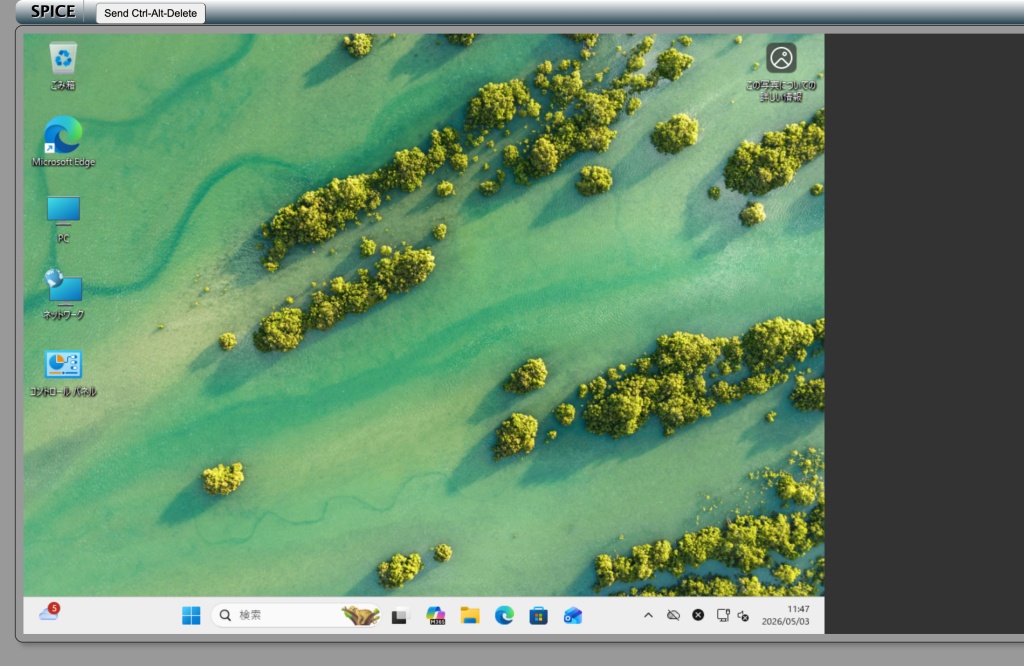
VMを操作するためのSPICEクライアントをWebから実行出来ると便利かなと、spice-html5を導入してみました。ただ、動作速度的にはCockpitのVNCビューアのほうがスムーズなので実用性は低いですが。メモとして残しておきます。
LXDコンテナに導入
#!/bin/bash
# =============================================================================
# spice-html5 セットアップスクリプト
# 対象: Ubuntu 26.04 LXD コンテナ
# 用途: ブラウザ経由で SPICE プロトコル接続を提供する Web クライアント
# =============================================================================

set -euo pipefail

# -----------------------------------------------------------------------------
# 設定変数(必要に応じて変更)
# -----------------------------------------------------------------------------
INSTALL_DIR="/var/www/spice-html5"    # インストール先ディレクトリ
WEB_PORT=8443                         # Web サーバーのポート番号(8080はdocker使用中)
SPICE_HOST="localhost"                # SPICE サーバーのホスト(自動検出)
SPICE_PORT=5900                       # SPICE サーバーのポート
WEBSOCKIFY_PORT=6080                  # WebSocket プロキシポート
USE_NGINX=true                        # nginx を使用するか(false なら Python HTTP サーバー)
LOG_FILE="/var/log/spice-html5-setup.log"

# カラー出力
RED='\033[0;31m'; GREEN='\033[0;32m'; YELLOW='\033[1;33m'; BLUE='\033[0;34m'; NC='\033[0m'
info()    { echo -e "${BLUE}[INFO]${NC}  $*" | tee -a "$LOG_FILE"; }
success() { echo -e "${GREEN}[OK]${NC}    $*" | tee -a "$LOG_FILE"; }
warn()    { echo -e "${YELLOW}[WARN]${NC}  $*" | tee -a "$LOG_FILE"; }
error()   { echo -e "${RED}[ERROR]${NC} $*" | tee -a "$LOG_FILE"; exit 1; }

# -----------------------------------------------------------------------------
# 前提チェック
# -----------------------------------------------------------------------------
check_requirements() {
    info "前提条件を確認中..."

    # root 権限確認
    [[ $EUID -eq 0 ]] || error "このスクリプトは root 権限で実行してください。\n  sudo $0"

    # Ubuntu 確認
    if [[ -f /etc/os-release ]]; then
        . /etc/os-release
        info "OS: $PRETTY_NAME"
    fi

    # インターネット接続確認(警告のみ、停止しない)
    if ! curl -sf --max-time 10 https://archive.ubuntu.com > /dev/null 2>&1; then
        warn "外部への接続を確認できませんでした。apt が利用可能であれば続行します。"
    fi

    touch "$LOG_FILE"
    success "前提チェック完了"
}

# -----------------------------------------------------------------------------
# ホスト IP 自動検出
# SPICE サーバーはホスト側の 127.0.0.1:5900 で動作しているため、
# コンテナのデフォルトゲートウェイ(LXDブリッジIP)を使用する
# -----------------------------------------------------------------------------
detect_spice_host() {
    if [[ "$SPICE_HOST" == "localhost" ]]; then
        local detected_ip
        detected_ip=$(ip route show default 2>/dev/null | awk '/default/ {print $3; exit}')
        if [[ -n "$detected_ip" ]]; then
            SPICE_HOST="$detected_ip"
            success "SPICE ホストIPを自動検出: ${SPICE_HOST}"
        else
            warn "ホストIPの自動検出に失敗しました。SPICE_HOST を手動で設定してください。"
        fi
    else
        info "SPICE ホスト: ${SPICE_HOST} (手動設定)"
    fi
}

# -----------------------------------------------------------------------------
# Tailscale IP 検出
# コンテナ内に tailscale0 があれば nginx でそのIPもリッスンさせる
# -----------------------------------------------------------------------------
detect_tailscale_ip() {
    TAILSCALE_IP=""
    if ip link show tailscale0 &>/dev/null 2>&1; then
        TAILSCALE_IP=$(ip addr show tailscale0 2>/dev/null | awk '/inet / {print $2}' | cut -d/ -f1)
        if [[ -n "$TAILSCALE_IP" ]]; then
            success "Tailscale IP を検出: ${TAILSCALE_IP}"
        fi
    else
        info "tailscale0 インターフェースなし。Tailscale リッスンはスキップ。"
    fi
}

# -----------------------------------------------------------------------------
# パッケージインストール
# -----------------------------------------------------------------------------
install_packages() {
    info "必要なパッケージをインストール中..."

    apt-get update -qq

    local packages=(
        python3
        curl
        websockify          # SPICE TCP → WebSocket 変換
    )

    if $USE_NGINX; then
        packages+=(nginx)
    fi

    DEBIAN_FRONTEND=noninteractive apt-get install -y --no-install-recommends "${packages[@]}" \
        2>&1 | tee -a "$LOG_FILE" || true
    grep -E '(Setting up|already installed)' "$LOG_FILE" | tail -20 || true

    success "パッケージインストール完了"
}

# -----------------------------------------------------------------------------
# spice-html5 のインストール
# -----------------------------------------------------------------------------
install_spice_html5() {
    info "spice-html5 をインストール中..."

    mkdir -p "$INSTALL_DIR"

    # apt でインストール(Ubuntu 22.04+ で利用可能)
    if apt-cache show spice-html5 &>/dev/null 2>&1; then
        info "apt から spice-html5 をインストール..."
        DEBIAN_FRONTEND=noninteractive apt-get install -y spice-html5 2>&1 | tee -a "$LOG_FILE"

        # aptのインストール先を特定
        local apt_path
        apt_path=$(dpkg -L spice-html5 2>/dev/null \
            | grep -E "(spice\.html|index\.html)$" \
            | head -1 \
            | xargs -r dirname)

        # フォールバック: /usr/share/spice-html5 を直接確認
        if [[ -z "$apt_path" && -d "/usr/share/spice-html5" ]]; then
            apt_path="/usr/share/spice-html5"
        fi

        if [[ -n "$apt_path" && "$apt_path" != "$INSTALL_DIR" ]]; then
            cp -r "$apt_path"/. "$INSTALL_DIR"/
            info "ファイルをコピー: $apt_path → $INSTALL_DIR"
        elif [[ -z "$apt_path" ]]; then
            warn "apt インストール先が見つかりません。ファイルを手動で確認してください。"
        fi
    else
        # GitHub からクローン(apt で取れない場合)
        info "GitHub から spice-html5 をクローン中..."
        local tmp_dir
        tmp_dir=$(mktemp -d)
        git clone --depth=1 https://github.com/freedesktop/spice-html5.git "$tmp_dir/spice-html5" \
            2>&1 | tee -a "$LOG_FILE"
        cp -r "$tmp_dir/spice-html5"/. "$INSTALL_DIR"/
        rm -rf "$tmp_dir"
    fi

    # パーミッション設定
    chown -R www-data:www-data "$INSTALL_DIR" 2>/dev/null \
        || chown -R nobody:nogroup "$INSTALL_DIR"
    chmod -R 755 "$INSTALL_DIR"

    # インストール結果確認
    if [[ -f "$INSTALL_DIR/spice.html" ]]; then
        success "spice-html5 インストール完了: $INSTALL_DIR"
    else
        warn "spice.html が見つかりません。ls $INSTALL_DIR で確認してください。"
        ls "$INSTALL_DIR" | tee -a "$LOG_FILE"
    fi
}

# -----------------------------------------------------------------------------
# spice.html のパラメーター設定
# WebSocket 接続先をあらかじめ埋め込む
# -----------------------------------------------------------------------------
configure_spice_html5() {
    info "spice-html5 の接続設定を構成中..."

    local index_file="$INSTALL_DIR/spice.html"
    [[ -f "$index_file" ]] || index_file="$INSTALL_DIR/index.html"
    [[ -f "$index_file" ]] || {
        warn "spice.html / index.html が見つかりません。スキップします。"
        return
    }

    sed -i \
        -e "s|host.*=.*'localhost'|host = '${SPICE_HOST}'|g" \
        -e "s|port.*=.*6080|port = ${WEBSOCKIFY_PORT}|g" \
        "$index_file" 2>/dev/null || true

    success "spice-html5 設定完了 ($index_file)"
}

# -----------------------------------------------------------------------------
# nginx 設定
# - 0.0.0.0 で全インターフェースリッスン(LAN・LXDブリッジ共通)
# - Tailscale IP が検出された場合は明示的にも追加(念のため)
# - WebSocket プロキシ(/websockify)を設定
# -----------------------------------------------------------------------------
configure_nginx() {
    info "nginx を設定中..."

    local conf_file="/etc/nginx/sites-available/spice-html5"

    # Tailscale IP が検出された場合は追加の listen ディレクティブを生成
    local tailscale_listen=""
    if [[ -n "${TAILSCALE_IP:-}" ]]; then
        tailscale_listen="    listen ${TAILSCALE_IP}:${WEB_PORT};  # Tailscale"
    fi

    cat > "$conf_file" <<EOF
# spice-html5 nginx 設定
server {
    listen 0.0.0.0:${WEB_PORT};          # 全インターフェース(LAN / LXDブリッジ)
${tailscale_listen}
    server_name _;

    root ${INSTALL_DIR};
    index spice.html index.html;

    # spice-html5 静的ファイル
    location / {
        try_files \$uri \$uri/ =404;
        add_header Cache-Control "no-cache";
        add_header Access-Control-Allow-Origin "*";
    }

    # WebSocket プロキシ(websockify 経由で SPICE TCP に接続)
    location /websockify {
        proxy_pass http://127.0.0.1:${WEBSOCKIFY_PORT};
        proxy_http_version 1.1;
        proxy_set_header Upgrade \$http_upgrade;
        proxy_set_header Connection "upgrade";
        proxy_set_header Host \$host;
        proxy_read_timeout 3600s;
        proxy_send_timeout 3600s;
    }

    # アクセスログ
    access_log /var/log/nginx/spice-html5-access.log;
    error_log  /var/log/nginx/spice-html5-error.log;
}
EOF

    rm -f /etc/nginx/sites-enabled/default
    ln -sf "$conf_file" /etc/nginx/sites-enabled/spice-html5

    nginx -t 2>&1 | tee -a "$LOG_FILE" || error "nginx 設定にエラーがあります"
    systemctl enable nginx
    systemctl restart nginx

    success "nginx 設定完了 (ポート: ${WEB_PORT})"
}

# -----------------------------------------------------------------------------
# websockify systemd サービス設定
# -----------------------------------------------------------------------------
configure_websockify_service() {
    info "websockify systemd サービスを設定中..."

    local websockify_bin
    websockify_bin=$(command -v websockify || echo "/usr/bin/websockify")

    cat > /etc/systemd/system/websockify.service <<EOF
[Unit]
Description=WebSocket to TCP proxy for SPICE (websockify)
After=network.target

[Service]
Type=simple
ExecStart=${websockify_bin} --web ${INSTALL_DIR} ${WEBSOCKIFY_PORT} ${SPICE_HOST}:${SPICE_PORT}
Restart=on-failure
RestartSec=5s
User=nobody
StandardOutput=journal
StandardError=journal

[Install]
WantedBy=multi-user.target
EOF

    systemctl daemon-reload
    systemctl enable websockify

    success "websockify サービス設定完了"
    info "  WebSocket ポート : ${WEBSOCKIFY_PORT}"
    info "  SPICE 接続先     : ${SPICE_HOST}:${SPICE_PORT}"
}

# -----------------------------------------------------------------------------
# ファイアウォール設定(ufw が有効な場合)
# -----------------------------------------------------------------------------
configure_firewall() {
    if command -v ufw &>/dev/null && ufw status 2>/dev/null | grep -q "Status: active"; then
        info "ufw ファイアウォールルールを追加中..."
        ufw allow "${WEB_PORT}/tcp"        comment "spice-html5 web"
        ufw allow "${WEBSOCKIFY_PORT}/tcp" comment "spice-html5 websockify"
        success "ファイアウォール設定完了"
    else
        info "ufw は無効またはインストールされていません。スキップします。"
    fi
}

# -----------------------------------------------------------------------------
# サービスの起動と確認
# -----------------------------------------------------------------------------
start_and_verify() {
    info "サービスを起動・確認中..."

    systemctl start websockify \
        || warn "websockify の起動に失敗(SPICE サーバー未起動の場合は正常)"

    if $USE_NGINX; then
        systemctl restart nginx
        sleep 1
        systemctl is-active --quiet nginx \
            && success "nginx: 稼働中" \
            || warn "nginx: 起動失敗 — journalctl -u nginx で確認してください"
    fi

    systemctl is-active --quiet websockify \
        && success "websockify: 稼働中" \
        || warn "websockify: 停止中(SPICE サーバー起動後に 'systemctl start websockify' を実行)"
}

# -----------------------------------------------------------------------------
# セットアップ完了メッセージ
# -----------------------------------------------------------------------------
print_summary() {
    local lxd_ip
    lxd_ip=$(ip addr show eth0 2>/dev/null | awk '/inet / {print $2}' | cut -d/ -f1)

    echo ""
    echo -e "${GREEN}━━━━━━━━━━━━━━━━━━━━━━━━━━━━━━━━━━━━━━━━━━━━━━━━━━━━━━━━━${NC}"
    echo -e "${GREEN}  spice-html5 セットアップ完了${NC}"
    echo -e "${GREEN}━━━━━━━━━━━━━━━━━━━━━━━━━━━━━━━━━━━━━━━━━━━━━━━━━━━━━━━━━${NC}"
    echo ""
    echo -e "  ${BLUE}Web アクセス先${NC}"
    echo -e "    ローカル (LXD)  : http://${lxd_ip}:${WEB_PORT}/spice.html"
    if [[ -n "${TAILSCALE_IP:-}" ]]; then
        echo -e "    Tailnet         : http://${TAILSCALE_IP}:${WEB_PORT}/spice.html"
    fi
    echo ""
    echo -e "  ${BLUE}接続パラメーター${NC}"
    echo -e "    WebSocket ポート : ${WEBSOCKIFY_PORT}"
    echo -e "    SPICE サーバー   : ${SPICE_HOST}:${SPICE_PORT}"
    if [[ -n "${TAILSCALE_IP:-}" ]]; then
        echo -e "    Tailscale IP     : ${TAILSCALE_IP}"
    fi
    echo ""
    echo -e "  ${BLUE}サービス管理${NC}"
    echo -e "    systemctl status websockify"
    echo -e "    systemctl status nginx"
    echo -e "    journalctl -u websockify -f"
    echo ""
    echo -e "  ${YELLOW}注意: SPICE サーバー(VM側)を起動してから接続してください${NC}"
    echo -e "  ログ: $LOG_FILE"
    echo ""
}

# -----------------------------------------------------------------------------
# メイン処理
# -----------------------------------------------------------------------------
main() {
    echo -e "${BLUE}"
    echo "╔══════════════════════════════════════════════╗"
    echo "║   spice-html5 セットアップ (Ubuntu 26.04)    ║"
    echo "╚══════════════════════════════════════════════╝"
    echo -e "${NC}"

    check_requirements
    detect_spice_host       # ホストIP自動検出(デフォルトゲートウェイ)
    detect_tailscale_ip     # Tailscale IP 検出
    install_packages
    install_spice_html5
    configure_spice_html5
    configure_websockify_service

    if $USE_NGINX; then
        configure_nginx
    fi

    configure_firewall
    start_and_verify
    print_summary
}

main "$@"
http://IP
IP
管理用のWebサイトを作成
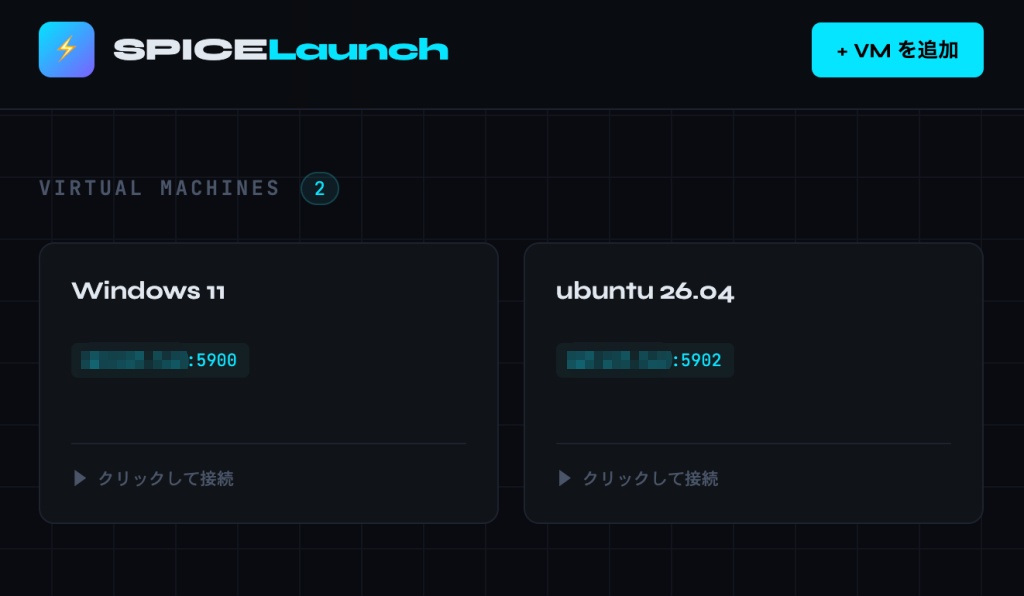
接続先を管理するポータルがあると便利かなと作成してみました。現状、デフォルトポートを変更すると接続出来ないようでしたが、実用性も低いので修正していません……
ブラウザ → http://IPアドレス:8443/
              ├─ launcher.html   … VM一覧・管理UI
              ├─ /api/vms        … Flask REST API(追加/編集/削除)
              └─ /websockify     … SPICE接続
setup-launcher.sh
api.py
launcher.html
bash setup-launcher.sh
setup-launcher.sh
#!/bin/bash
# =============================================================================
# SPICE Launcher セットアップスクリプト
# VM一覧管理UIとREST APIをLXDコンテナに追加する
# 前提: setup-spice-html5.sh が実行済みであること
# =============================================================================

set -euo pipefail

INSTALL_DIR="/var/www/spice-html5"
API_DIR="/opt/spice-launcher"
DATA_DIR="/var/lib/spice-launcher"
API_PORT=5001
WEB_PORT=8443
LOG_FILE="/var/log/spice-launcher-setup.log"

RED='\033[0;31m'; GREEN='\033[0;32m'; YELLOW='\033[1;33m'; BLUE='\033[0;34m'; NC='\033[0m'
info()    { echo -e "${BLUE}[INFO]${NC}  $*" | tee -a "$LOG_FILE"; }
success() { echo -e "${GREEN}[OK]${NC}    $*" | tee -a "$LOG_FILE"; }
warn()    { echo -e "${YELLOW}[WARN]${NC}  $*" | tee -a "$LOG_FILE"; }
error()   { echo -e "${RED}[ERROR]${NC} $*" | tee -a "$LOG_FILE"; exit 1; }

[[ $EUID -eq 0 ]] || error "root権限で実行してください"

touch "$LOG_FILE"

# -----------------------------------------------------------------------------
# Python パッケージインストール
# -----------------------------------------------------------------------------
info "Python パッケージをインストール中..."
DEBIAN_FRONTEND=noninteractive apt-get install -y --no-install-recommends \
    python3 python3-pip python3-venv 2>&1 | tee -a "$LOG_FILE" || true

# venv を作成
mkdir -p "$API_DIR"
python3 -m venv "$API_DIR/venv"
"$API_DIR/venv/bin/pip" install --quiet flask flask-cors 2>&1 | tee -a "$LOG_FILE"
success "Python 環境構築完了: $API_DIR/venv"

# -----------------------------------------------------------------------------
# API スクリプトを配置
# -----------------------------------------------------------------------------
info "API スクリプトを配置中..."
mkdir -p "$DATA_DIR"

# このスクリプトと同じディレクトリの api.py をコピー
SCRIPT_DIR="$(cd "$(dirname "${BASH_SOURCE[0]}")" && pwd)"
if [[ -f "$SCRIPT_DIR/api.py" ]]; then
    cp "$SCRIPT_DIR/api.py" "$API_DIR/api.py"
else
    # インラインで生成
    cat > "$API_DIR/api.py" <<'PYEOF'
#!/usr/bin/env python3
import json, os, uuid
from datetime import datetime
from flask import Flask, jsonify, request, abort
from flask_cors import CORS

app = Flask(__name__)
CORS(app)
DATA_FILE = os.environ.get("SPICE_DATA_FILE", "/var/lib/spice-launcher/vms.json")

def load_vms():
    os.makedirs(os.path.dirname(DATA_FILE), exist_ok=True)
    if not os.path.exists(DATA_FILE): return []
    with open(DATA_FILE) as f: return json.load(f)

def save_vms(vms):
    os.makedirs(os.path.dirname(DATA_FILE), exist_ok=True)
    with open(DATA_FILE, "w") as f: json.dump(vms, f, indent=2, ensure_ascii=False)

@app.route("/api/vms", methods=["GET"])
def get_vms(): return jsonify(load_vms())

@app.route("/api/vms", methods=["POST"])
def create_vm():
    data = request.get_json()
    if not data or not data.get("name") or not data.get("host"):
        abort(400, "name と host は必須です")
    vm = {"id": str(uuid.uuid4()), "name": data["name"], "host": data["host"],
          "port": int(data.get("port", 5900)), "description": data.get("description", ""),
          "created_at": datetime.utcnow().isoformat()}
    vms = load_vms(); vms.append(vm); save_vms(vms)
    return jsonify(vm), 201

@app.route("/api/vms/<vm_id>", methods=["PUT"])
def update_vm(vm_id):
    data = request.get_json(); vms = load_vms()
    for i, vm in enumerate(vms):
        if vm["id"] == vm_id:
            vms[i] = {"id": vm_id, "name": data.get("name", vm["name"]),
                      "host": data.get("host", vm["host"]),
                      "port": int(data.get("port", vm["port"])),
                      "description": data.get("description", vm.get("description", "")),
                      "created_at": vm.get("created_at", "")}
            save_vms(vms); return jsonify(vms[i])
    abort(404)

@app.route("/api/vms/<vm_id>", methods=["DELETE"])
def delete_vm(vm_id):
    vms = load_vms(); new_vms = [v for v in vms if v["id"] != vm_id]
    if len(new_vms) == len(vms): abort(404)
    save_vms(new_vms); return "", 204

if __name__ == "__main__":
    app.run(host="127.0.0.1", port=5001, debug=False)
PYEOF
fi

chown -R www-data:www-data "$DATA_DIR" 2>/dev/null || true
success "API スクリプト配置完了: $API_DIR/api.py"

# -----------------------------------------------------------------------------
# ランチャー HTML を配置
# -----------------------------------------------------------------------------
info "ランチャー HTML を配置中..."
if [[ -f "$SCRIPT_DIR/launcher.html" ]]; then
    cp "$SCRIPT_DIR/launcher.html" "$INSTALL_DIR/launcher.html"
    success "launcher.html をコピーしました"
else
    warn "launcher.html が見つかりません。手動で配置してください。"
fi

# nginx のデフォルトインデックスをランチャーに変更
if [[ -f "/etc/nginx/sites-available/spice-html5" ]]; then
    sed -i 's/index spice_auto.html spice.html index.html/index launcher.html spice_auto.html spice.html index.html/' \
        /etc/nginx/sites-available/spice-html5 2>/dev/null || true
    sed -i 's/index spice.html index.html/index launcher.html spice.html index.html/' \
        /etc/nginx/sites-available/spice-html5 2>/dev/null || true
fi

# -----------------------------------------------------------------------------
# nginx に API プロキシを追加
# -----------------------------------------------------------------------------
info "nginx に API プロキシを追加中..."

# /api/ ブロックがまだなければ追加
if ! grep -q "location /api/" /etc/nginx/sites-available/spice-html5; then
    sed -i '/location \/websockify/i\
    # SPICE Launcher REST API\
    location /api/ {\
        proxy_pass http://127.0.0.1:'"$API_PORT"'/api/;\
        proxy_set_header Host $host;\
        add_header Cache-Control "no-cache";\
    }\
' /etc/nginx/sites-available/spice-html5
fi

nginx -t 2>&1 | tee -a "$LOG_FILE" || error "nginx 設定にエラーがあります"
systemctl reload nginx
success "nginx API プロキシ追加完了"

# -----------------------------------------------------------------------------
# systemd サービス(Flask API)
# -----------------------------------------------------------------------------
info "Flask API サービスを設定中..."

cat > /etc/systemd/system/spice-launcher-api.service <<EOF
[Unit]
Description=SPICE Launcher REST API
After=network.target

[Service]
Type=simple
ExecStart=${API_DIR}/venv/bin/python ${API_DIR}/api.py
Environment=SPICE_DATA_FILE=${DATA_DIR}/vms.json
WorkingDirectory=${API_DIR}
Restart=on-failure
RestartSec=3s
User=www-data
StandardOutput=journal
StandardError=journal

[Install]
WantedBy=multi-user.target
EOF

systemctl daemon-reload
systemctl enable spice-launcher-api
systemctl restart spice-launcher-api
sleep 1
systemctl is-active --quiet spice-launcher-api \
    && success "Flask API 起動完了 (127.0.0.1:${API_PORT})" \
    || warn "Flask API の起動に失敗 — journalctl -u spice-launcher-api で確認"

# -----------------------------------------------------------------------------
# 完了メッセージ
# -----------------------------------------------------------------------------
TAILSCALE_IP=$(ip addr show tailscale0 2>/dev/null | awk '/inet / {print $2}' | cut -d/ -f1 || true)
LXD_IP=$(ip addr show eth0 2>/dev/null | awk '/inet / {print $2}' | cut -d/ -f1 || true)

echo ""
echo -e "${GREEN}━━━━━━━━━━━━━━━━━━━━━━━━━━━━━━━━━━━━━━━━━━━━━━━━━━━━━━━━━${NC}"
echo -e "${GREEN}  SPICE Launcher セットアップ完了${NC}"
echo -e "${GREEN}━━━━━━━━━━━━━━━━━━━━━━━━━━━━━━━━━━━━━━━━━━━━━━━━━━━━━━━━━${NC}"
echo ""
echo -e "  ${BLUE}アクセス先${NC}"
[[ -n "$LXD_IP" ]]       && echo -e "    ローカル  : http://${LXD_IP}:${WEB_PORT}/"
[[ -n "$TAILSCALE_IP" ]] && echo -e "    Tailnet   : http://${TAILSCALE_IP}:${WEB_PORT}/"
echo ""
echo -e "  ${BLUE}サービス管理${NC}"
echo -e "    systemctl status spice-launcher-api"
echo -e "    journalctl -u spice-launcher-api -f"
echo ""
echo -e "  ${BLUE}VM データファイル${NC}"
echo -e "    ${DATA_DIR}/vms.json"
echo ""
api.py
#!/usr/bin/env python3
"""
SPICE Launcher API
VM一覧をJSONファイルで管理するシンプルなREST API
"""

import json
import os
import uuid
from datetime import datetime
from flask import Flask, jsonify, request, abort
from flask_cors import CORS

app = Flask(__name__)
CORS(app)

DATA_FILE = os.environ.get("SPICE_DATA_FILE", "/var/lib/spice-launcher/vms.json")


def load_vms():
    os.makedirs(os.path.dirname(DATA_FILE), exist_ok=True)
    if not os.path.exists(DATA_FILE):
        return []
    with open(DATA_FILE, "r") as f:
        return json.load(f)


def save_vms(vms):
    os.makedirs(os.path.dirname(DATA_FILE), exist_ok=True)
    with open(DATA_FILE, "w") as f:
        json.dump(vms, f, indent=2, ensure_ascii=False)


@app.route("/api/vms", methods=["GET"])
def get_vms():
    return jsonify(load_vms())


@app.route("/api/vms", methods=["POST"])
def create_vm():
    data = request.get_json()
    if not data or not data.get("name") or not data.get("host"):
        abort(400, "name と host は必須です")
    vms = load_vms()
    vm = {
        "id": str(uuid.uuid4()),
        "name": data["name"],
        "host": data["host"],
        "port": int(data.get("port", 5900)),
        "description": data.get("description", ""),
        "created_at": datetime.utcnow().isoformat(),
    }
    vms.append(vm)
    save_vms(vms)
    return jsonify(vm), 201


@app.route("/api/vms/<vm_id>", methods=["PUT"])
def update_vm(vm_id):
    data = request.get_json()
    vms = load_vms()
    for i, vm in enumerate(vms):
        if vm["id"] == vm_id:
            vms[i] = {
                "id": vm_id,
                "name": data.get("name", vm["name"]),
                "host": data.get("host", vm["host"]),
                "port": int(data.get("port", vm["port"])),
                "description": data.get("description", vm.get("description", "")),
                "created_at": vm.get("created_at", ""),
            }
            save_vms(vms)
            return jsonify(vms[i])
    abort(404)


@app.route("/api/vms/<vm_id>", methods=["DELETE"])
def delete_vm(vm_id):
    vms = load_vms()
    new_vms = [v for v in vms if v["id"] != vm_id]
    if len(new_vms) == len(vms):
        abort(404)
    save_vms(new_vms)
    return "", 204


if __name__ == "__main__":
    app.run(host="127.0.0.1", port=5001, debug=False)
launcher.html
<!DOCTYPE html>
<html lang="ja">
<head>
<meta charset="UTF-8">
<meta name="viewport" content="width=device-width, initial-scale=1.0">
<title>SPICE Launcher</title>
<link rel="preconnect" href="https://fonts.googleapis.com">
<link href="https://fonts.googleapis.com/css2?family=JetBrains+Mono:wght@400;600&family=Syne:wght@400;700;800&display=swap" rel="stylesheet">
<style>
:root {
--bg: #0a0c10;
--surface: #111318;
--border: #1e2330;
--accent: #00e5ff;
--accent2: #7b61ff;
--danger: #ff4566;
--text: #e2e8f0;
--muted: #4a5568;
--online: #00e676;
--radius: 6px;
}
*, *::before, *::after { box-sizing: border-box; margin: 0; padding: 0; }
body {
background: var(--bg);
color: var(--text);
font-family: 'Syne', sans-serif;
min-height: 100vh;
padding: 0;
overflow-x: hidden;
}
/* ── グリッド背景 ── */
body::before {
content: '';
position: fixed;
inset: 0;
background-image:
linear-gradient(var(--border) 1px, transparent 1px),
linear-gradient(90deg, var(--border) 1px, transparent 1px);
background-size: 40px 40px;
opacity: 0.4;
pointer-events: none;
z-index: 0;
}
/* ── ヘッダー ── */
header {
position: relative;
z-index: 1;
display: flex;
align-items: center;
justify-content: space-between;
padding: 20px 32px;
border-bottom: 1px solid var(--border);
background: rgba(10,12,16,0.85);
backdrop-filter: blur(12px);
}
.logo {
display: flex;
align-items: center;
gap: 12px;
}
.logo-icon {
width: 36px; height: 36px;
background: linear-gradient(135deg, var(--accent), var(--accent2));
border-radius: 8px;
display: flex; align-items: center; justify-content: center;
font-size: 18px;
}
.logo-text {
font-size: 20px;
font-weight: 800;
letter-spacing: -0.5px;
color: var(--text);
}
.logo-text span { color: var(--accent); }
.header-actions { display: flex; gap: 10px; align-items: center; }
/* ── ボタン ── */
.btn {
display: inline-flex; align-items: center; gap: 6px;
padding: 8px 16px;
border-radius: var(--radius);
font-family: 'Syne', sans-serif;
font-size: 13px;
font-weight: 600;
cursor: pointer;
border: none;
transition: all 0.15s ease;
letter-spacing: 0.3px;
}
.btn-primary {
background: var(--accent);
color: #000;
}
.btn-primary:hover { background: #33ecff; transform: translateY(-1px); }
.btn-ghost {
background: transparent;
color: var(--muted);
border: 1px solid var(--border);
}
.btn-ghost:hover { border-color: var(--accent); color: var(--accent); }
.btn-danger {
background: transparent;
color: var(--danger);
border: 1px solid transparent;
padding: 6px 10px;
font-size: 12px;
}
.btn-danger:hover { border-color: var(--danger); background: rgba(255,69,102,0.08); }
.btn-edit {
background: transparent;
color: var(--muted);
border: 1px solid transparent;
padding: 6px 10px;
font-size: 12px;
}
.btn-edit:hover { border-color: var(--accent2); color: var(--accent2); }
/* ── メインコンテンツ ── */
main {
position: relative; z-index: 1;
max-width: 1000px;
margin: 0 auto;
padding: 40px 32px;
}
/* ── セクションヘッダー ── */
.section-header {
display: flex; align-items: baseline; gap: 12px;
margin-bottom: 24px;
}
.section-title {
font-size: 13px;
font-weight: 600;
color: var(--muted);
letter-spacing: 2px;
text-transform: uppercase;
font-family: 'JetBrains Mono', monospace;
}
.section-count {
font-family: 'JetBrains Mono', monospace;
font-size: 12px;
color: var(--accent);
background: rgba(0,229,255,0.08);
padding: 2px 8px;
border-radius: 20px;
border: 1px solid rgba(0,229,255,0.2);
}
/* ── VMカード グリッド ── */
.vm-grid {
display: grid;
grid-template-columns: repeat(auto-fill, minmax(280px, 1fr));
gap: 16px;
}
.vm-card {
background: var(--surface);
border: 1px solid var(--border);
border-radius: 10px;
padding: 20px;
cursor: pointer;
transition: all 0.2s ease;
position: relative;
overflow: hidden;
animation: fadeIn 0.3s ease forwards;
opacity: 0;
}
.vm-card::before {
content: '';
position: absolute;
top: 0; left: 0; right: 0;
height: 2px;
background: linear-gradient(90deg, var(--accent), var(--accent2));
opacity: 0;
transition: opacity 0.2s;
}
.vm-card:hover {
border-color: rgba(0,229,255,0.3);
transform: translateY(-2px);
box-shadow: 0 8px 32px rgba(0,229,255,0.08);
}
.vm-card:hover::before { opacity: 1; }
@keyframes fadeIn {
from { opacity: 0; transform: translateY(8px); }
to { opacity: 1; transform: translateY(0); }
}
.vm-card-header {
display: flex; align-items: flex-start; justify-content: space-between;
margin-bottom: 12px;
}
.vm-name {
font-size: 16px;
font-weight: 700;
color: var(--text);
line-height: 1.3;
}
.vm-actions {
display: flex; gap: 2px;
opacity: 0;
transition: opacity 0.15s;
}
.vm-card:hover .vm-actions { opacity: 1; }
.vm-endpoint {
font-family: 'JetBrains Mono', monospace;
font-size: 11px;
color: var(--accent);
background: rgba(0,229,255,0.06);
padding: 4px 8px;
border-radius: 4px;
margin-bottom: 10px;
display: inline-block;
}
.vm-desc {
font-size: 12px;
color: var(--muted);
line-height: 1.5;
min-height: 18px;
}
.vm-connect-hint {
margin-top: 14px;
padding-top: 14px;
border-top: 1px solid var(--border);
font-size: 11px;
color: var(--muted);
display: flex; align-items: center; gap: 6px;
font-family: 'JetBrains Mono', monospace;
transition: color 0.15s;
}
.vm-card:hover .vm-connect-hint { color: var(--accent); }
/* ── 空状態 ── */
.empty-state {
grid-column: 1 / -1;
text-align: center;
padding: 80px 20px;
color: var(--muted);
}
.empty-icon { font-size: 48px; margin-bottom: 16px; opacity: 0.4; }
.empty-title { font-size: 16px; font-weight: 700; margin-bottom: 8px; color: var(--text); opacity: 0.5; }
.empty-sub { font-size: 13px; }
/* ── モーダル ── */
.modal-overlay {
position: fixed; inset: 0;
background: rgba(0,0,0,0.7);
backdrop-filter: blur(4px);
z-index: 100;
display: flex; align-items: center; justify-content: center;
opacity: 0; pointer-events: none;
transition: opacity 0.2s;
}
.modal-overlay.open { opacity: 1; pointer-events: all; }
.modal {
background: var(--surface);
border: 1px solid var(--border);
border-radius: 12px;
padding: 28px;
width: 100%;
max-width: 440px;
transform: translateY(12px);
transition: transform 0.2s;
}
.modal-overlay.open .modal { transform: translateY(0); }
.modal-title {
font-size: 18px;
font-weight: 800;
margin-bottom: 24px;
color: var(--text);
}
.modal-title span { color: var(--accent); }
/* ── フォーム ── */
.form-group { margin-bottom: 16px; }
label {
display: block;
font-size: 11px;
font-weight: 600;
color: var(--muted);
text-transform: uppercase;
letter-spacing: 1px;
margin-bottom: 6px;
font-family: 'JetBrains Mono', monospace;
}
input, textarea {
width: 100%;
background: var(--bg);
border: 1px solid var(--border);
border-radius: var(--radius);
padding: 10px 12px;
color: var(--text);
font-family: 'JetBrains Mono', monospace;
font-size: 13px;
transition: border-color 0.15s;
outline: none;
}
input:focus, textarea:focus {
border-color: var(--accent);
box-shadow: 0 0 0 2px rgba(0,229,255,0.08);
}
textarea { resize: vertical; min-height: 72px; }
.form-row { display: grid; grid-template-columns: 1fr 100px; gap: 12px; }
.modal-footer {
display: flex; justify-content: flex-end; gap: 8px;
margin-top: 24px;
padding-top: 20px;
border-top: 1px solid var(--border);
}
/* ── トースト ── */
.toast {
position: fixed;
bottom: 24px; right: 24px;
background: var(--surface);
border: 1px solid var(--border);
border-radius: 8px;
padding: 12px 16px;
font-size: 13px;
z-index: 200;
transform: translateY(8px);
opacity: 0;
transition: all 0.2s;
pointer-events: none;
font-family: 'JetBrains Mono', monospace;
}
.toast.show { opacity: 1; transform: translateY(0); }
.toast.success { border-color: var(--online); color: var(--online); }
.toast.error { border-color: var(--danger); color: var(--danger); }
/* ── ローディング ── */
.loading {
display: flex; align-items: center; justify-content: center;
gap: 8px; color: var(--muted); font-size: 13px;
padding: 60px;
font-family: 'JetBrains Mono', monospace;
grid-column: 1 / -1;
}
.spinner {
width: 16px; height: 16px;
border: 2px solid var(--border);
border-top-color: var(--accent);
border-radius: 50%;
animation: spin 0.6s linear infinite;
}
@keyframes spin { to { transform: rotate(360deg); } }
</style>
</head>
<body>
<header>
<div class="logo">
<div class="logo-icon">⚡</div>
<div class="logo-text">SPICE<span>Launch</span></div>
</div>
<div class="header-actions">
<button class="btn btn-primary" onclick="openModal()">
+ VM を追加
</button>
</div>
</header>
<main>
<div class="section-header">
<span class="section-title">Virtual Machines</span>
<span class="section-count" id="vmCount">0</span>
</div>
<div class="vm-grid" id="vmGrid">
<div class="loading"><div class="spinner"></div> 読み込み中...</div>
</div>
</main>
<!-- 追加/編集モーダル -->
<div class="modal-overlay" id="modalOverlay" onclick="closeModalOnBg(event)">
<div class="modal">
<div class="modal-title" id="modalTitle">VM を<span>追加</span></div>
<div class="form-group">
<label>VM 名 *</label>
<input type="text" id="fieldName" placeholder="例: Ubuntu Desktop" />
</div>
<div class="form-group">
<label>ホスト / IP *</label>
<div class="form-row">
<input type="text" id="fieldHost" placeholder="例: 192.168.1.10" />
<input type="number" id="fieldPort" placeholder="5900" min="1" max="65535" />
</div>
</div>
<div class="form-group">
<label>メモ</label>
<textarea id="fieldDesc" placeholder="用途など(任意)"></textarea>
</div>
<div class="modal-footer">
<button class="btn btn-ghost" onclick="closeModal()">キャンセル</button>
<button class="btn btn-primary" onclick="saveVM()">保存</button>
</div>
</div>
</div>
<div class="toast" id="toast"></div>
<script>
const API = '/api/vms';
let editingId = null;
// ── VM一覧取得・描画 ──
async function loadVMs() {
try {
const res = await fetch(API);
const vms = await res.json();
renderVMs(vms);
} catch {
document.getElementById('vmGrid').innerHTML =
`<div class="loading" style="color:var(--danger)">⚠ APIに接続できません</div>`;
}
}
function renderVMs(vms) {
const grid = document.getElementById('vmGrid');
document.getElementById('vmCount').textContent = vms.length;
if (vms.length === 0) {
grid.innerHTML = `
<div class="empty-state">
<div class="empty-icon">🖥</div>
<div class="empty-title">VMがまだありません</div>
<div class="empty-sub">「VM を追加」ボタンから登録してください</div>
</div>`;
return;
}
grid.innerHTML = vms.map((vm, i) => `
<div class="vm-card" style="animation-delay:${i * 60}ms" onclick="connectVM('${vm.host}', ${vm.port})">
<div class="vm-card-header">
<div class="vm-name">${esc(vm.name)}</div>
<div class="vm-actions" onclick="event.stopPropagation()">
<button class="btn btn-edit" onclick="openModal('${vm.id}')">編集</button>
<button class="btn btn-danger" onclick="deleteVM('${vm.id}', '${esc(vm.name)}')">削除</button>
</div>
</div>
<div class="vm-endpoint">${esc(vm.host)}:${vm.port}</div>
<div class="vm-desc">${esc(vm.description || '')}</div>
<div class="vm-connect-hint">
<span>▶</span> クリックして接続
</div>
</div>
`).join('');
}
// ── SPICE接続(spice_auto.htmlへパラメーター付きで開く)──
function connectVM(host, port) {
const wsHost = location.hostname;
const wsPort = 6080;
const url = `/spice_auto.html?host=${wsHost}&port=${wsPort}&spice_host=${host}&spice_port=${port}`;
window.open(url, '_blank');
}
// ── 削除 ──
async function deleteVM(id, name) {
if (!confirm(`「${name}」を削除しますか?`)) return;
await fetch(`${API}/${id}`, { method: 'DELETE' });
showToast(`${name} を削除しました`, 'success');
loadVMs();
}
// ── モーダル ──
async function openModal(id = null) {
editingId = id;
const title = document.getElementById('modalTitle');
if (id) {
title.innerHTML = 'VM を<span>編集</span>';
const res = await fetch(API);
const vms = await res.json();
const vm = vms.find(v => v.id === id);
if (vm) {
document.getElementById('fieldName').value = vm.name;
document.getElementById('fieldHost').value = vm.host;
document.getElementById('fieldPort').value = vm.port;
document.getElementById('fieldDesc').value = vm.description || '';
}
} else {
title.innerHTML = 'VM を<span>追加</span>';
document.getElementById('fieldName').value = '';
document.getElementById('fieldHost').value = '';
document.getElementById('fieldPort').value = '5900';
document.getElementById('fieldDesc').value = '';
}
document.getElementById('modalOverlay').classList.add('open');
setTimeout(() => document.getElementById('fieldName').focus(), 100);
}
function closeModal() {
document.getElementById('modalOverlay').classList.remove('open');
editingId = null;
}
function closeModalOnBg(e) {
if (e.target === document.getElementById('modalOverlay')) closeModal();
}
// ── 保存 ──
async function saveVM() {
const name = document.getElementById('fieldName').value.trim();
const host = document.getElementById('fieldHost').value.trim();
const port = parseInt(document.getElementById('fieldPort').value) || 5900;
const description = document.getElementById('fieldDesc').value.trim();
if (!name || !host) {
showToast('VM名とホストは必須です', 'error');
return;
}
const body = JSON.stringify({ name, host, port, description });
const headers = { 'Content-Type': 'application/json' };
if (editingId) {
await fetch(`${API}/${editingId}`, { method: 'PUT', headers, body });
showToast(`${name} を更新しました`, 'success');
} else {
await fetch(API, { method: 'POST', headers, body });
showToast(`${name} を追加しました`, 'success');
}
closeModal();
loadVMs();
}
// ── トースト ──
function showToast(msg, type = 'success') {
const t = document.getElementById('toast');
t.textContent = msg;
t.className = `toast ${type} show`;
setTimeout(() => t.classList.remove('show'), 3000);
}
// ── ユーティリティ ──
function esc(s) {
return String(s)
.replace(/&/g,'&').replace(/</g,'<')
.replace(/>/g,'>').replace(/"/g,'"');
}
// Enterキーで保存
document.addEventListener('keydown', e => {
if (e.key === 'Escape') closeModal();
});
loadVMs();
</script>
</body>
</html>